EasyManua.ls Logo

Fluke VIBXPERT 3 - Page 107

Fluke VIBXPERT 3
125 pages
Print Icon
To Next Page IconTo Next Page
To Previous Page IconTo Previous Page
Loading...
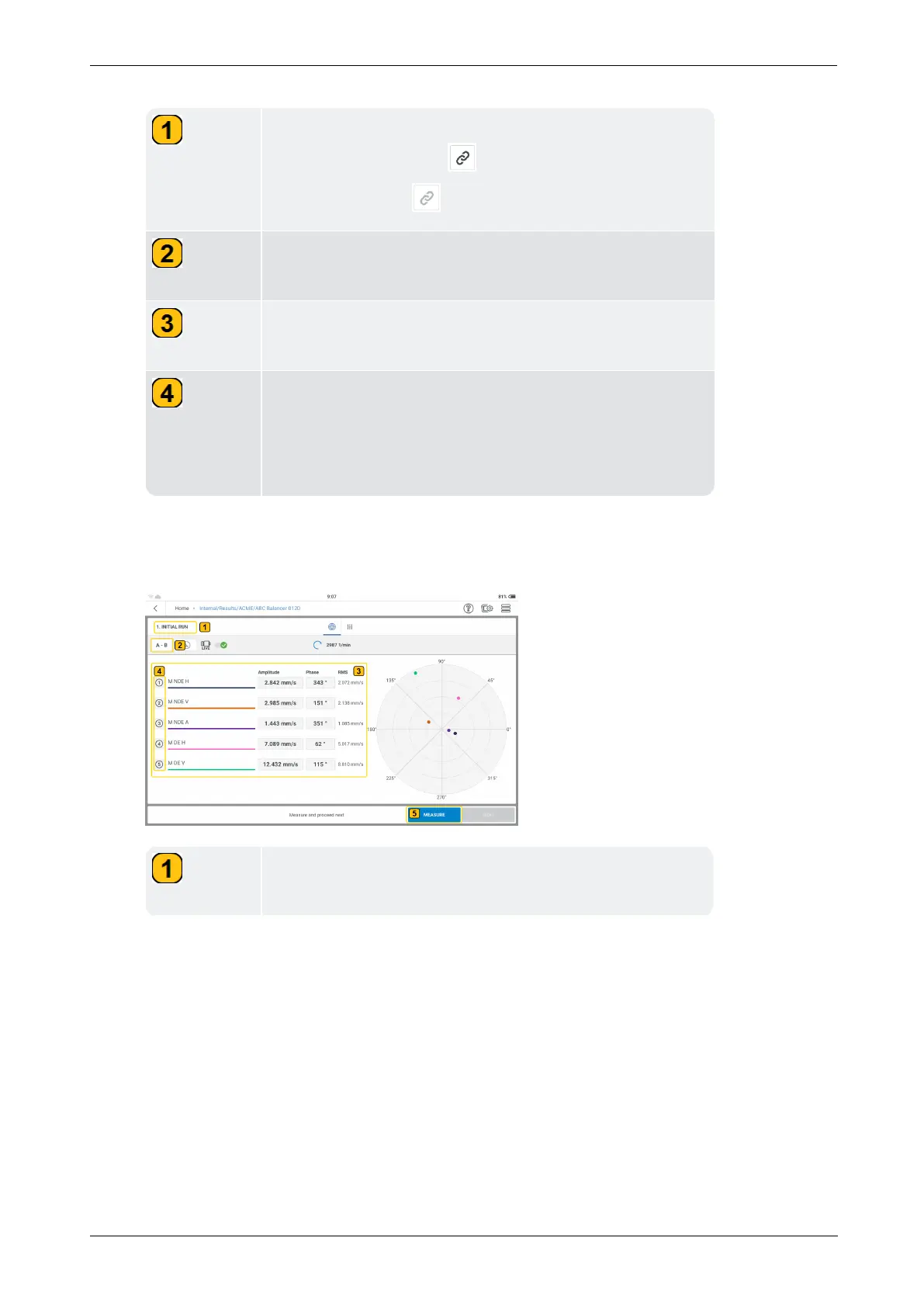
The selected measure locations are shown with a darker
measure location icon ( ). Locations not selected have
a grayed out icon ( ).
Shows the device measure channels that will be used for
the balancing procedure.
Shows live sensor data. In this example, the sensors
have been already connected to the device.
Shows the measured machine speed. In this example,
the laser trigger sensor has been mounted on the
machine and connected to the device, but the machine is
switched off.

l
Mount the sensors as necessary then connect them to the applicable VIBXPERT 3 inputs.
l
Switch the machine on. Wait until the machine has reached the balancing RPM and oper-
ating temperature if necessary.
Shows current balancing step; in this case it is the first
step which is initial run.
106 Version:1.0
On-board help

Table of Contents