EasyManua.ls Logo

Fluke VIBXPERT 3 - Page 57

Fluke VIBXPERT 3
125 pages
Print Icon
To Next Page IconTo Next Page
To Previous Page IconTo Previous Page
Loading...
l
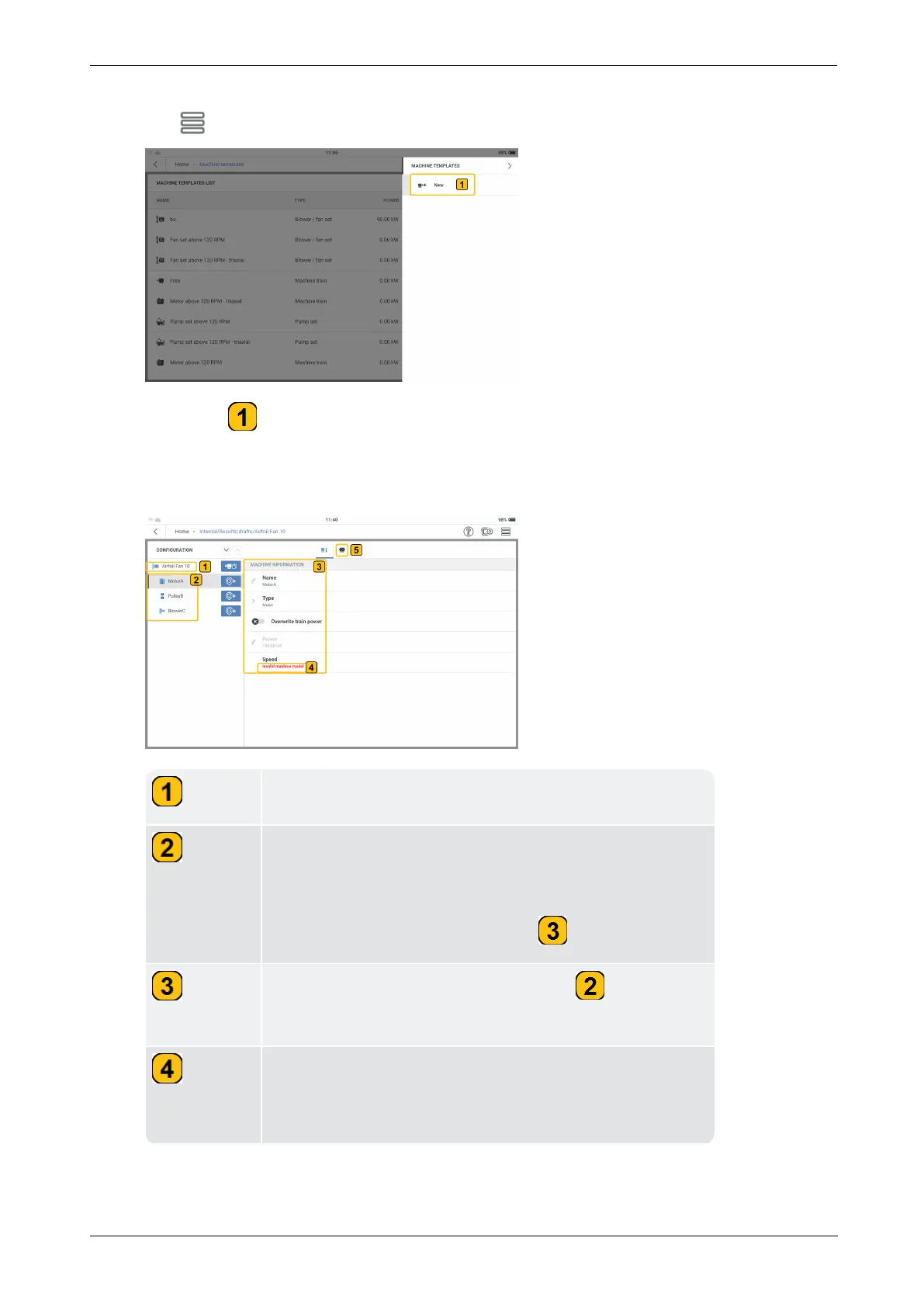
Tap the hamburger menu to show the context menu items.
l
Tap New ( ) to create the necessary belt driven machine train template.
l
Use the alphanumeric keyboard and edit the name of the template.
l
Configure the belt driven machine train template as necessary.
Shows machine train name.
Shows the type of machines in the machine train. In this
example the three machines in the train are motor, belt
drive and blower. The motor is the highlighted machine
and the motor details are shown in .
Shows details of machine highlighted in . These
details can be edited here.
Shows the hint that machine model requirements have
not been complied with. Thus, the machine model must
be corrected.

56 Version:1.0
On-board help

Table of Contents

Related product manuals