- 31 -
CONTROLS AND INDICATORS
3
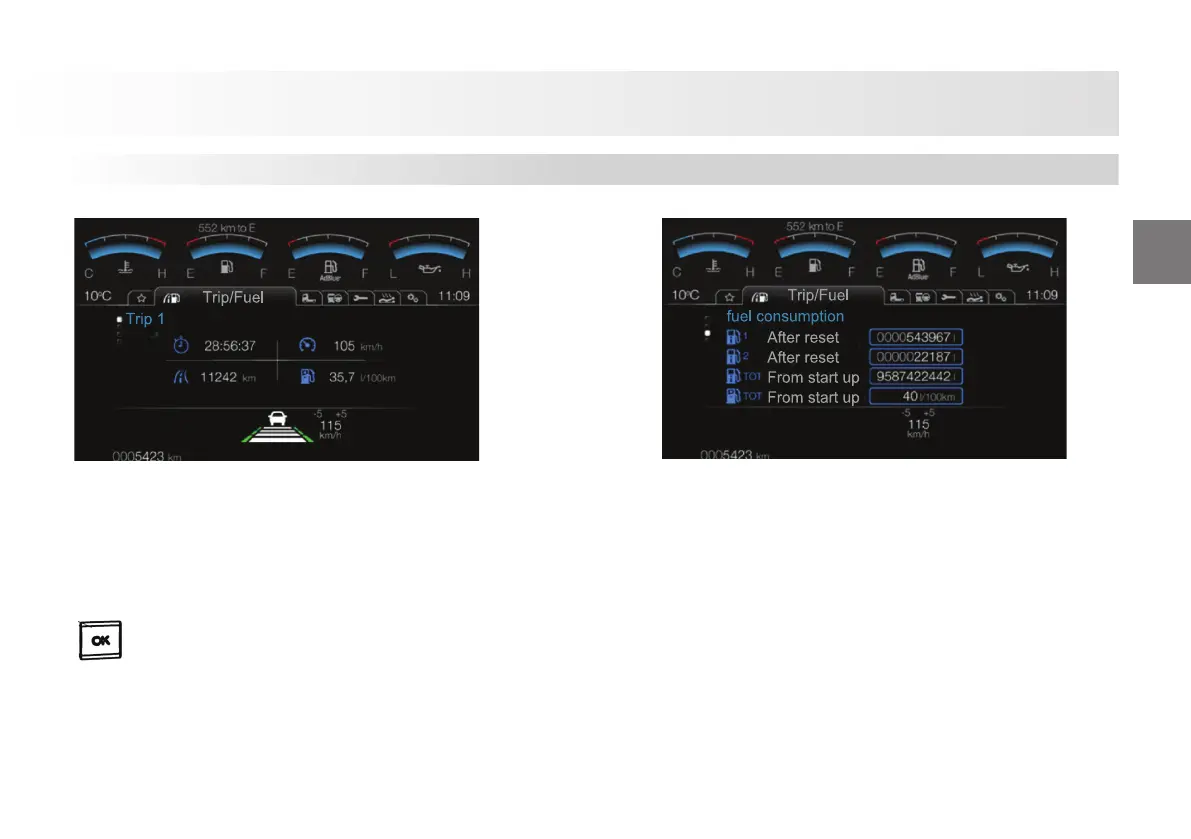
1 - Time: Indicates the time period passed in the relevant trip.
2 - Mileage: Indicates the mileage covered in the relevant
trip.
3-Average Speed: Indicates the average speed of the vehicle
in the relevant trip.
4-Average Fuel: Indicates the average fuel consumption of the
vehicle for the relevant trip.
To reset the trip mileage, time and average fuel
consumption information, press and hold the
button on the screen in this menu.
1-Fuel Consumption -1: Indicates the fuel consumed information
for the trip in Trip 1 menu.
2-Fuel Consumption -2: Indicates the fuel consumed
information for the trip in Trip 2 menu.
3-Fuel Consumption -Total: Indicates the average fuel
consumed information for the period starting with the fi rst
operation of the vehicle.
4-Average Fuel Consumption: Indicates the average fuel
consumed information for the period starting with the fi rst
operation of the vehicle.
Trip Computer










 To Next Page