Chapter 1 DaqPRO 23
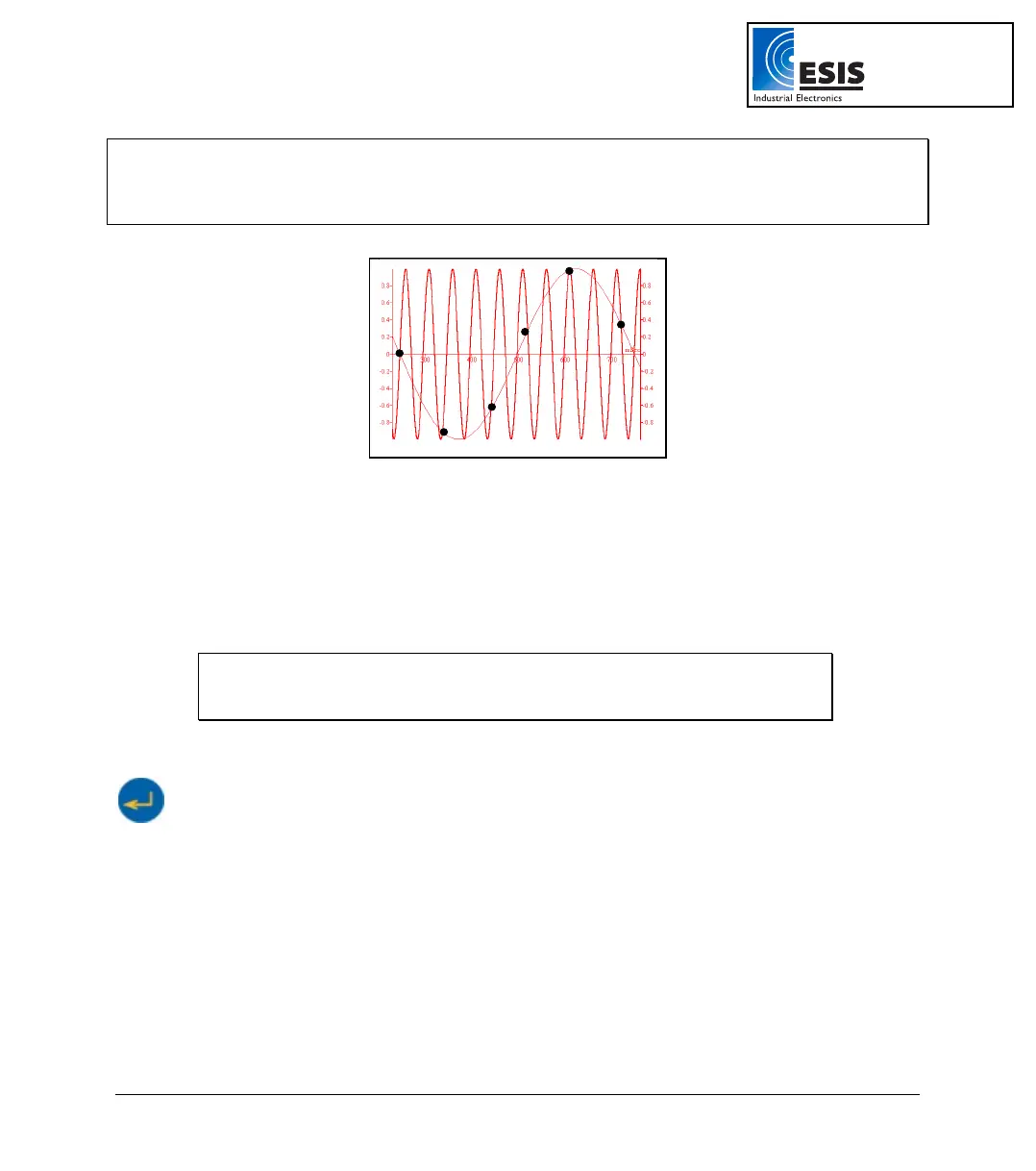
Note: Sampling at a rate slower than the expected rate can cause frequency aliasing. In such a case,
the graph will show a frequency much lower than expected. In Figure 6 below, the higher frequency sine
wave was sampled at 1/3 of its frequency. Connecting the sampled points yielded a graph with a lower,
incorrect frequency.
Figure 6: Frequency Aliasing
Manual sampling
Use this mode for:
• Recordings or measurements that are not related to time.
• Situations in which you have to stop recording data after each sample obtained,
in order to change your location, or any other logging parameter
Note: During recording NO CHANGES can be made to the DaqPRO’s
configuration).
To start a recording using manual data logging, set the RATE to manual and press the Enter button
once to start the data recording, then press the Enter button each time you want to collect a
sample.
2. Sampling Points
After you have chosen the sampling rate, choosing the number of points will determine the logging
period: Samples / Rate = Logging time. You can also choose the duration of a run first, and then
calculate the number of samples: Samples = Logging time × Rate.
www.esis.com.au
Ph 02 9481 7420
Fax 02 9481 7267
esis.enq@esis.com.au



 To Next Page