23
Names of controls and parts
II
Names of controls and parts
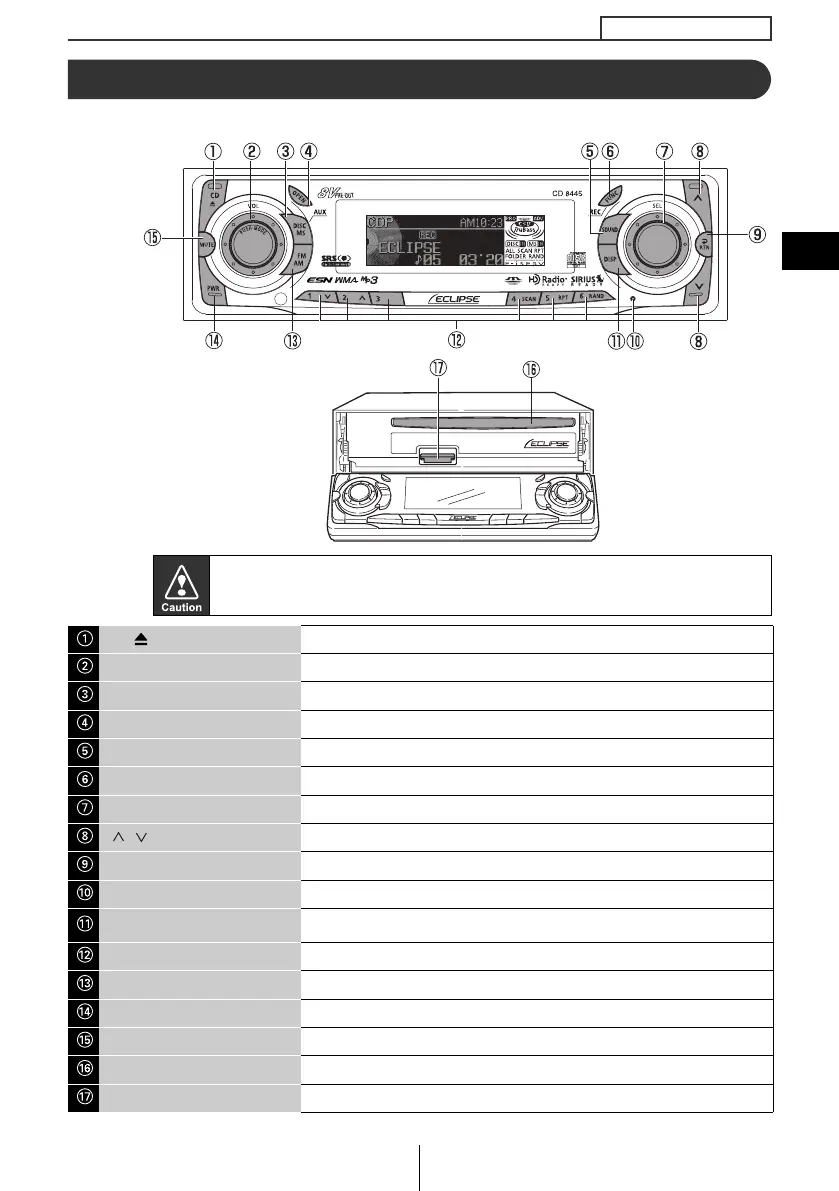
Front view
*: Double function button ➞ "MUTE" & "AREA SHOT" functions
Never place an object or rest your hands or the like on the front panel.
[CD ] button Opens/closes front panel and ejects CD.
[AUDIO CONTROL] button Adjusts volume and performs other functions.
[DISC MS] button
Switches disc modes, Memory Stick mode and switches to AUX mode.
[OPEN] button Opens/closes front panel.
[SOUND] button Turns the sound adjustment mode ON/OFF.
[FUNC] button Turns function mode ON/OFF.
[SEL] button Selects radio stations and CD tracks.
[/] button
Automatically finds radio reception or to fast forward/rewind.
[RTN] button Returns to previous screen.
[RESET] button
Reset deck functions to default settings.
[DISP] button
Turns the display adjustment mode ON/OFF and switches screen
display. Displays User Registration Key.
Buttons [1] to [6] Selects radio preset channels and performs disc mode functions.
[FM AM] button Switches to radio mode and switches radio bands.
[PWR] button Turns deck power ON/OFF.
[MUTE] button* Activates and deactivates mute.
Disc slot Inserts compact discs.
Memory Stick slot Inserts and ejects Memory Stick.
ATE
M
AGIC
G
TICK
M
EMORY
S
With the front open
CD8445.book 23 ページ 2004年12月13日 月曜日 午前11時30分



 To Next Page