62
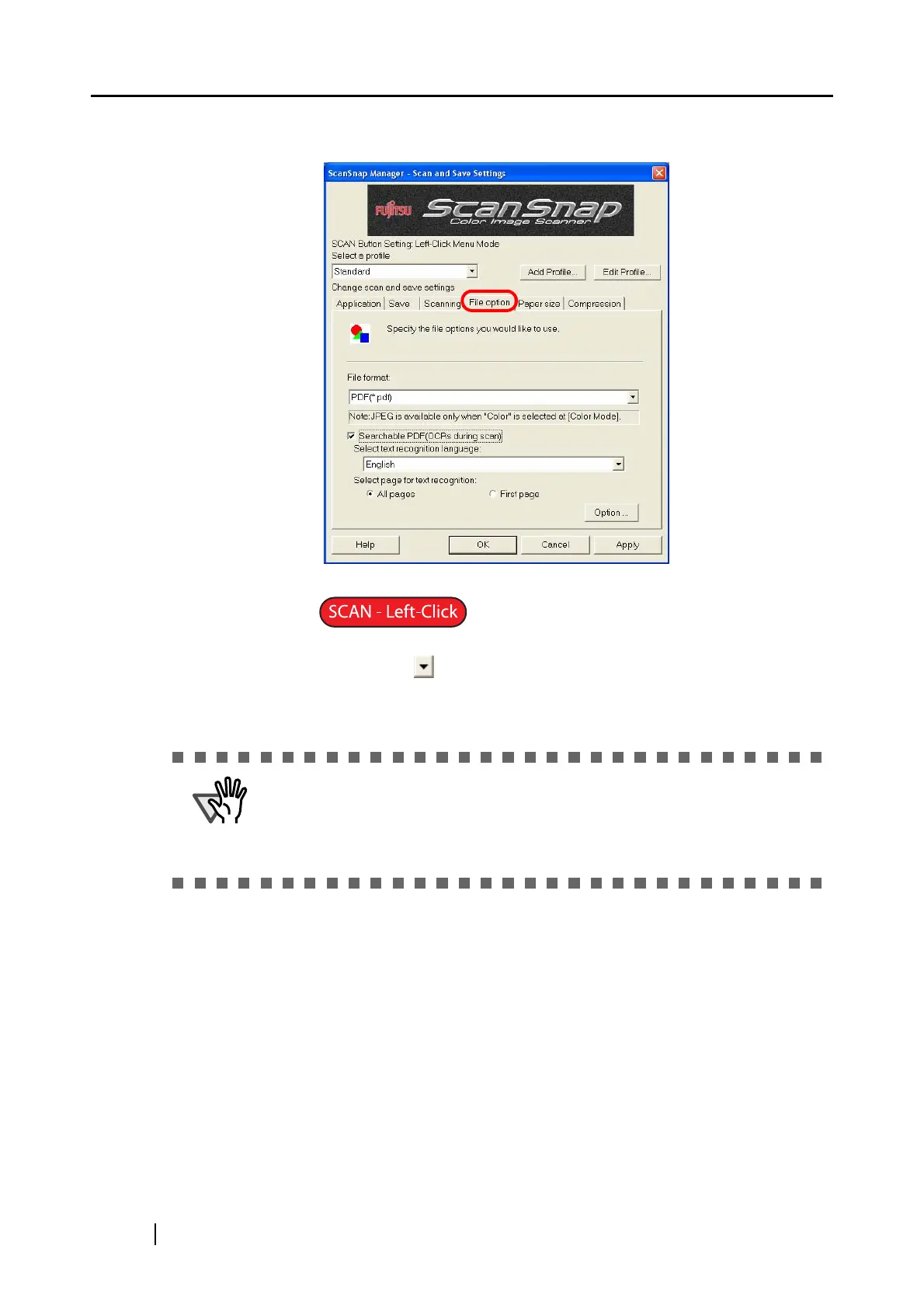
[File option] tab
■ File format
You can specify the file format to save scanned images.
Click the down-arrow and select either of the following:
• PDF (*.pdf)
• JPEG (*.jpg)
■ Searchable PDF (OCRs during scan)
You can use this function only when PDF is selected in the [File format] drop-down
list. By marking this checkbox, you can create a searchable PDF file.
■ Select text recognition language:
You can select a language for recognizing text.
■ Select page for text recognition:
• All pages
All pages are recognized as text when a PDF file is created.
• First page
Only the first page is recognized as text when a PDF file is created.
ATTENTION
The JPEG format is not available when [Auto Color Detection], [B&W], or [Color
high compression] is selected in the [Color mode] drop-down list on the
[Scanning] tab.
When [JPEG] is selected, if you select [Auto Color Detection], [B&W], or [Color
high compression], the file format is automatically switched to [PDF].



 To Next Page
 Loading...













