EasyManua.ls Logo

Furuno 1815 - User Manual

Furuno 1815
148 pages
Print Icon
To Next Page IconTo Next Page
Loading...
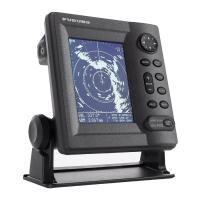
MARINE RADAR
MODEL 1815
OPERATOR'S MANUAL
www.furuno.com

Table of Contents

Questions and Answers

  • H
    Heidi TateSep 4, 2025
    What to do if Furuno 1815 Marine Radar range rings are not displayed?
    • X
      xwellsSep 4, 2025
      If the range rings are not displayed on your Furuno Marine Radar, first adjust their brilliance on the [Brill/Color] menu. If this does not solve the problem, replace the associated circuit board.
  • B
    Benjamin RobertsonSep 3, 2025
    How to fix Furuno Marine Radar when you cannot turn on the power?
    • T
      Terry RodriguezSep 3, 2025
      If you're unable to turn on your Furuno Marine Radar, check the following: • Check for a blown fuse. • Ensure the power connector is securely fastened. • Inspect the power cable connector for corrosion. • Check for any damage to the power cable. • Verify the battery provides the correct voltage output.
  • B
    bsalazarSep 2, 2025
    What to do if Furuno Marine Radar data and marks are not displayed in transmit?
    • E
      Elizabeth RobinsonSep 2, 2025
      If data and marks are not being displayed during transmission on your Furuno Marine Radar, the issue may stem from the SPU board. Replacing the SPU board should rectify this.
  • O
    owagnerSep 1, 2025
    Why Furuno 1815 antenna not rotating?
    • V
      Valerie GutierrezSep 1, 2025
      If the antenna on your Furuno Marine Radar isn't rotating, the problem likely lies within the antenna drive mechanism. Replacing the antenna drive mechanism should resolve this issue.
  • B
    Brandy AllenAug 31, 2025
    What to do if Furuno Marine Radar brilliance adjusted but no picture?
    • S
      Sue ShermanAug 31, 2025
      If you've adjusted the brilliance on your Furuno Marine Radar but there's still no picture, the issue may be with the SPU board. In this case, replace the SPU board.
  • L
    Loretta CarpenterAug 30, 2025
    How to fix Furuno 1815 Marine Radar target tracking issues caused by sea clutter?
    • G
      Gregory AndrewsAug 30, 2025
      To address incorrect target tracking on your Furuno Marine Radar due to sea clutter, adjust the sea clutter and rain clutter settings.
  • M
    Michael AlvarezAug 29, 2025
    What to do if Furuno 1815 shows marks but no echo?
    • K
      Karen FoleyAug 30, 2025
      If your Furuno Marine Radar displays marks, indications, and noise but no echo, and the transmission leak representing your ship's position is absent, the issue might be with the magnetron, modulator board, or SPU board. Check the magnetron current. If that's not the problem, replace the modulator board. If the issue continues, replace the SPU board.
  • T
    tiffany66Aug 28, 2025
    What causes poor sensitivity in Furuno Marine Radar even when correctly tuned?
    • W
      William MartinezAug 29, 2025
      If your Furuno Marine Radar has poor sensitivity despite correct tuning, the possible causes are dirt on the radiator face, a deteriorated magnetron, or a detuned MIC. Clean the radiator. Check the magnetron current with the radar transmitting on 48 nm range; if the current is below normal, the magnetron may be defective and needs replacement. Also, check the MIC detecting current; if it's below the normal value, the MIC may have become detuned.
  • D
    Dana GambleAug 28, 2025
    Why Furuno 1815 range rings are not displayed?
    • J
      Jessica LewisAug 28, 2025
      If the range rings are not showing on your Furuno Marine Radar, check that the setting of [Rings Brill] in the [Brill/Color] menu is set to other than [Off].
  • D
    David RichardsonAug 27, 2025
    What to do if Furuno 1815 range is changed but radar picture does not change?
    • W
      Whitney AdamsAug 27, 2025
      If changing the range on your Furuno Marine Radar doesn't alter the radar picture, try changing the range again. If the issue persists, turn the display unit off and on.

Summary

SAFETY INSTRUCTIONS

Radio Frequency Radiation Hazard

Hazards related to RF radiation exposure from the radar antenna.

Do not open the equipment

Warning against opening the equipment due to high voltage risks.

Handling Water and Fire Hazards

Procedures for water ingress or fire incidents to prevent electrical shock.

Do not disassemble or modify the equipment

Warning against unauthorized modification to avoid injury or damage.

INSTALLATION

How to Install the Display Unit

Instructions for mounting the display unit on a desktop or flush mount.

How to Install the Antenna Unit

Guidelines and considerations for selecting a mounting location for the antenna.

How to connect the power cable

Steps and precautions for connecting the power cable to the antenna unit.

WIRING

Wiring

Instructions for connecting the display unit to other equipment and power.

Ground

Guidelines and precautions for grounding the display unit to prevent interference.

INITIAL SETTINGS

Initial Settings

Accessing and performing initial setup procedures for the radar.

OPERATION

Controls

Description of the display unit's keys, knobs, and cursorpad.

How to Turn the Radar On;Off and Transmit

Steps for powering the radar on/off and initiating transmission.

Tuning

Procedures for manual tuning to optimize radar performance.

How to Reduce the Sea Clutter

Methods to minimize sea clutter interference for clearer target detection.

How to Reduce the Rain Clutter

Methods to minimize rain clutter interference for clearer target detection.

Interference Rejector

How to activate the interference rejector to reduce radar interference.

How to Measure the Range to a Target

Methods for measuring the distance to a detected target.

How to Measure the Bearing to a Target

Using the Electronic Bearing Line (EBL) to measure target bearing.

HOW TO INTERPRET THE RADAR DISPLAY

TT OPERATION

AIS OPERATION

GPS OPERATION

MAINTENANCE, TROUBLESHOOTING

SPECIFICATIONS OF MARINE RADAR MODEL1815

Furuno 1815 Specifications

General IconGeneral
Display Size10.4 inches
TypeMarine Radar
Power Output4 kW
Antenna TypeOpen Array
Display TypeLCD
Rotation Speed24 RPM
RangeUp to 36 nautical miles
Frequency9410 MHz ±30 MHz
Range Scales6, 12, 24, 36 NM
Beam Width25° (Vertical)
Range Resolution20 meters
Display ModesTrue Motion
Power Supply24 V DC

Related product manuals