109
Airplane
Function
Method
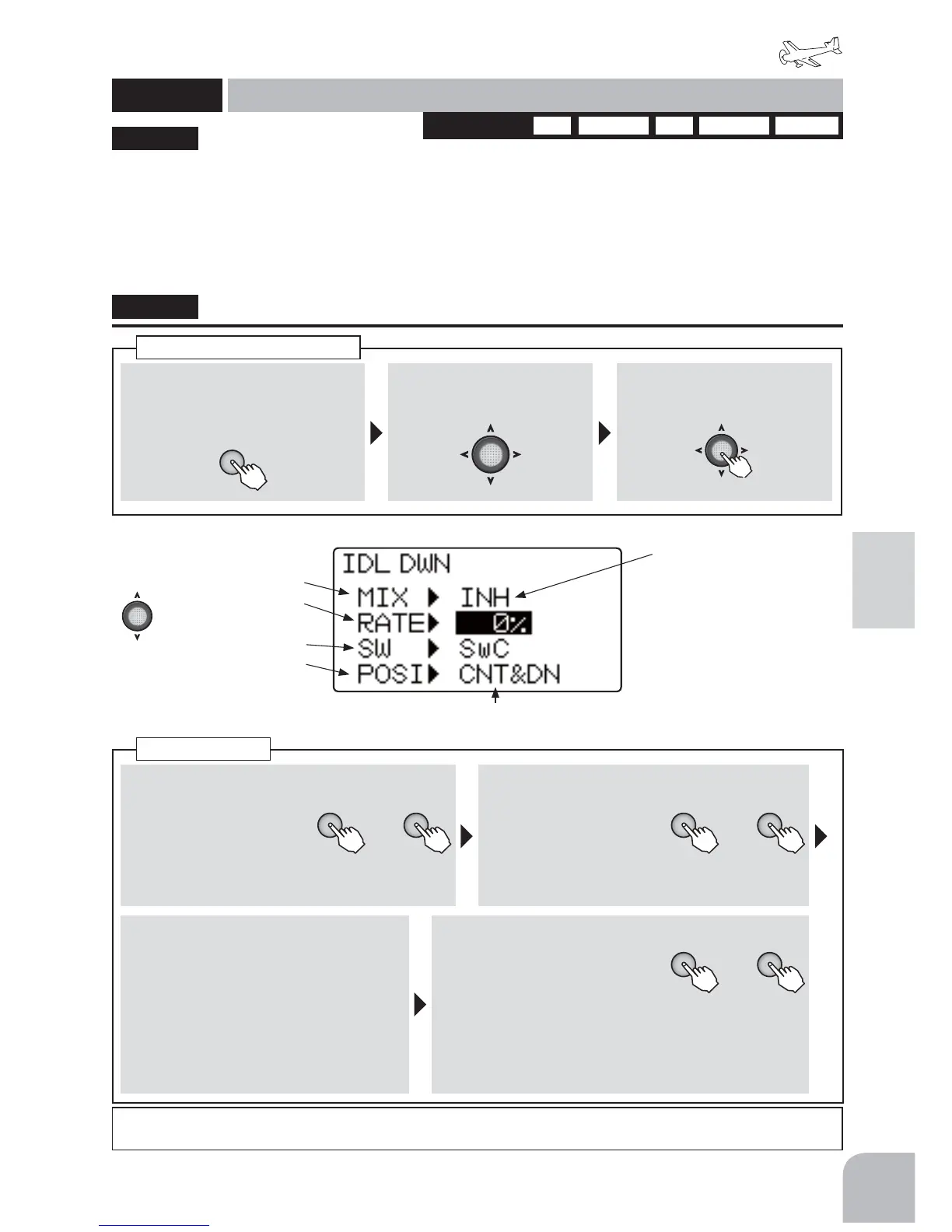
①Callthemenuscreenfromthe
homescreenbypressingthe+
keyfor1second.
+
② Select
fromthemenuwiththe
Jogkey.
③Openthesettingscreenby
pressingtheJogkey.
(1second)
Callingthesettingscreen
1AIL 2AIL1AIL1FLP 2AIL1FLP ELEVONWINGTYPE
■ Activatingthefunction
+ −
or
①Selectthe"MIX"item
andthenselecttheon
oroffbypressingthe+
keyor‒key.
● Whenyoudonotuseafunction,settothe
"INH"side.
■ Switchselection
+ −
or
②Selectthe"SW"item
andthenselectthe
switchbypressingthe
+keyor‒key.
Range:SwA-SwDDefault:SwC
■ Switchdirection
③ Selectthe"POSI"bypressingthe
+keyor‒keyattheONdirection
selectionitem.
Range:
● 2PSW:NULL,UP,DOWN
● 3PSW:NULL,UP,UP&DWN,
UP&CNT,CENTER,CNT&DN,DOWN
■ Idledownrate
+ −
or
④Selectthe"RATE"itemand
thenadjusttheidledown
ratebypressingthe+keyor
‒key.
Range:0-40%
Default:0%
● Whenyouwanttoreturnthesetvaluetotheinitial
value,pressthe+keyand‒keysimultaneously.
Idledown
This function is linked to the air brake switch
and gear switch and lowers the engine idle. It is
used when engine idle is set high to prevent the
HQJLQHIURPVWDOOLQJGXULQJÀLJKWDQG\RXZDQWWR
lower engine idle when landing.
ŏ7KHDPRXQWHQJLQHLGOHLVORZHUHGFDQEHVHW
ŏ$WLGOLQJGRZQRSHUDWLRQWKHVWRSOHYHUDGMXVWVWKH
LGOHGRZQDPRXQW
ŏ)XQFWLRQRSHUDWLRQFDQEHVHOHFWHGIURPDPRQJ
VZLWFKHV$
-
'7KHVZLWFKGLUHFWLRQFDQDOVREH
VHOHFWHG
● Theidledownamountisusually10%-20%.Holddowntheaircraftandsetthethrottleswitchtothemaximumslow
positionwhiletheengineisrunningandadjusttheidledropamountwhileturningtheswitchonandoff.
"IDLDWN"
IDLDWN
Idledown
(AIRPLANE)
Activatingthefunction
Idledownrate
Switchselection
Switchdirection
● WhennotusingthisFunction
selectINH.ThedisplayofOn/
Offisshownwhenactiveand
assignedtoaswitch.
● Selectthesettingitem
withtheJogkey.
● SetstheON/OFFdirectionoftheselectedswitch.
○ 2PSW:NULL,UP,DOWN
○ 3PSW:NULL,UP,UP&DWN,UP&CNT,CENTER,CNT&DN,DOWN



 To Next Page