61
Commonfunction
Function
Method
①Callthemenuscreenfromthe
homescreenbypressingthe+key
for1second.
+
② Select
fromthemenuwiththeJog
key.
③Openthesettingscreenby
pressingtheJogkey.
(1second)
Callingthesettingscreen
0〜
140%
0〜
140%
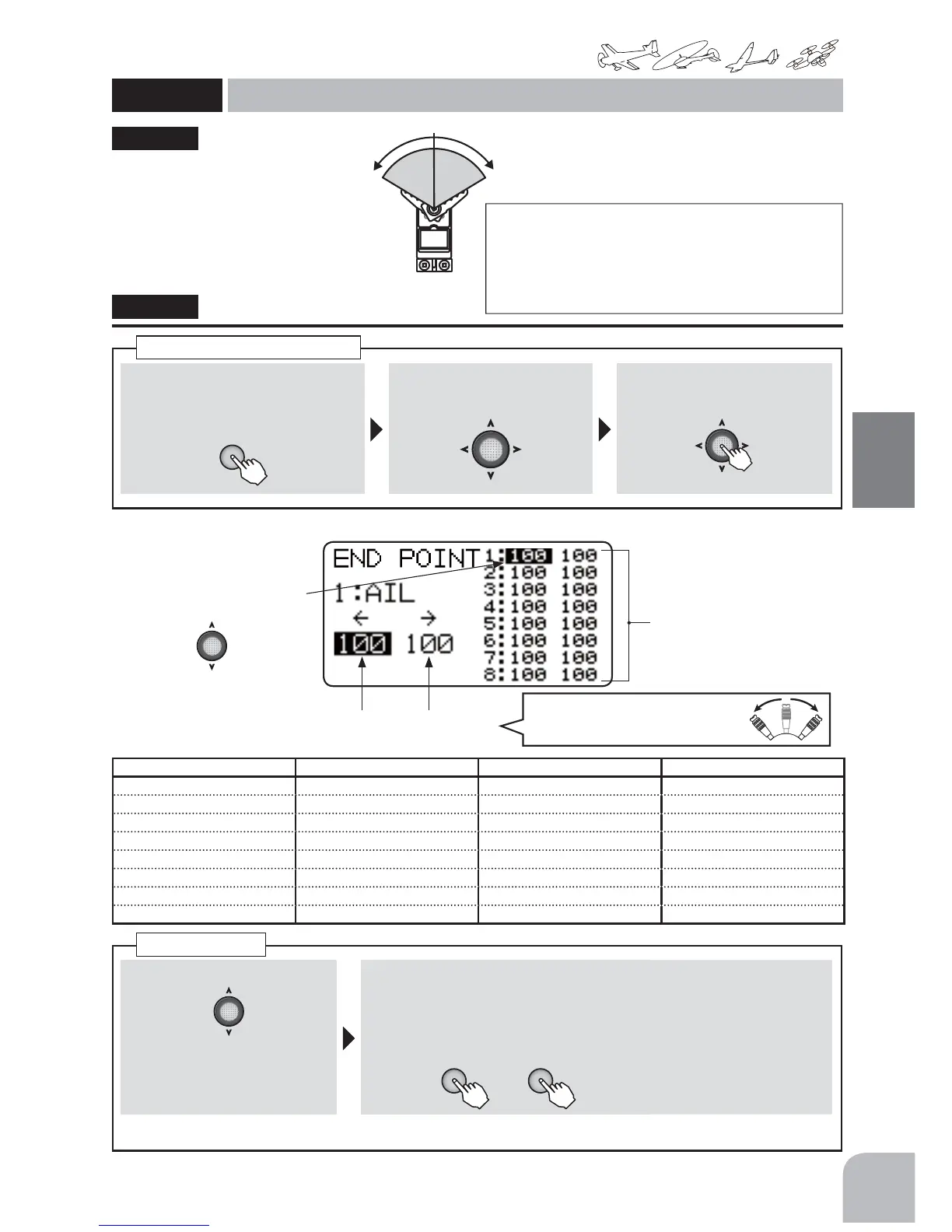
The End Point function adjusts the
left and right servo throws, generates
differential throws, and will correct
improper linkage settings.
ŏ7KHVHUYRWUDYHOFDQEHDGMXVWHG
LQGLYLGXDOO\DWWKHOHIWDQGULJKW
VLGHV
Servothrow
At100%settingtheservothrowofeachchannelisabout40°
forchannels1to4andabout55°forchannels5-8.
However,themaximumservotravelforchannels5-8isabout
110%.
*Whenchannels5to6weremixedby2AILetc,thethrow
becomesthesame(about40° )aschannels1to4.
"EPOINT"
● Selectthechannelwith
theJogkey.
● Thesettingrateofeachchan-
nel
(Left / Down)
ratedisplay
(Right / Up)
ratedisplay
EPOINT
Endpoint
(Common)
① AchannelischosenbyJogkey.
Selectionrange:CH1-8
②OperatethestickorVRoftheselected
channelfullytotheleft(down)orright(up)
andadjusttheratebypressingthe+keyor
‒key.
or
Range:
0-140%
Default:100%
● Whenyouwanttore-
turnthesetvalueto
theinitialvalue,press
the+keyand‒key
simultaneously.
AdjusttherateofeachdirectionofthestickandVRbyrepeatingstep① .
Endpoint
< ChannelDisplay >
+
−
AIRPLANE(2AIL1FLP) HELICOPTER GLIDER(2AIL2FLP) MULTICOPTER
1:AI1(Aileron1) 1:AIL(Aileron) 1:AI1(Aileron1) 1:AIL(Aileron)
2:ELE(Elevator) 2:ELE(Elevator) 2:ELE(Elevator) 2:ELE(Elevator)
3:THR(Throttle) 3:THR(Throttle) 3:FL3(Flap3) 3:THR(Throttle)
4:RUD(Rudder) 4:RUD(Rudder) 4:RUD(Rudder) 4:RUD(Rudder)
5:FLP(Flap) 5:GYR(GYRO) 5:FL5(Flap5) 5:AUX
6:AI6(Aileron6) 6:PIT(Pitch) 6:AI6(Aileron6) 6:MOD(Mode)
7:AUX 7:AUX 7:AUX 7:AUX
8:AUX 8:AUX 8:AUX 8:AUX
SelecttheLeft/Right(Down/Up)
withthestick(SW,VR).



 To Next Page