82
Commonfunction
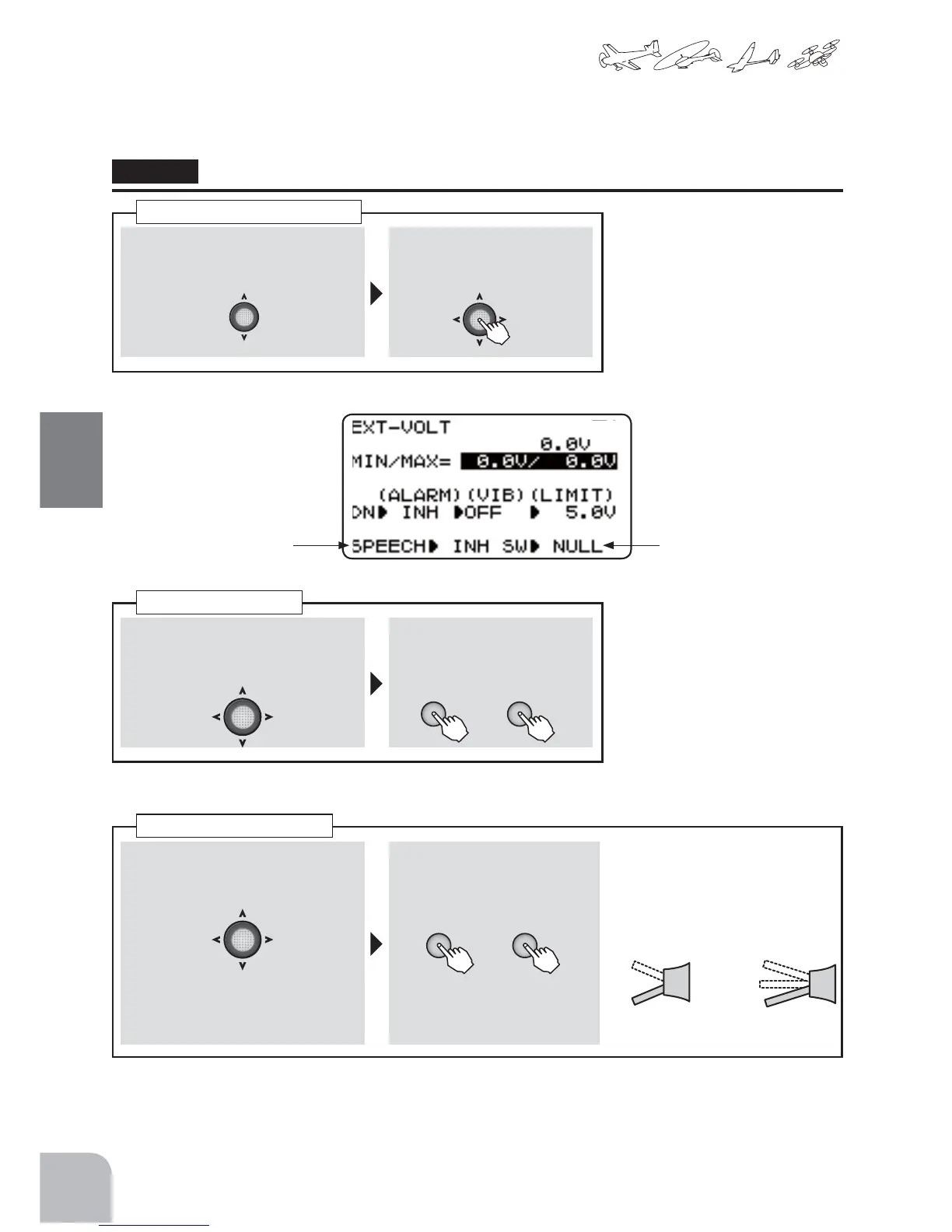
TheEXT-voltagecanbeheardverballyfromthetransmitterwithacommercialearphone(3.5mm
plug).Thespeechfunctioncanbeturnedonandoffwiththespecifiedswitch.
Method
① Select"EXT-VOLT"fromtheteleme-
tryscreenwiththeJogkey.
② Openthesettingscreenby
pressingtheJogkey.
① IntheEXT-VOLTscreenstate,select
(SPEECH)fromthemenuwiththe
Jogkey.
②Selectthe"ACT"bypressing
the+keyor‒key.
① IntheEXT-VOLTscreenstate,select
(SW)fromthemenuwiththeJog
key.
In"NULL",aspeechalwaysturnson.
② Selecttheswitchbypressing
the+keyor‒key.
Selectionrange:
NULL,SWA-SWD
Callingthesettingscreen
Speech
Switchset
● ListeningtotheEXT-voltagebyspeech.
SpeechON/OFFSwitch
selection
+ −
or
+ −
or
ON
2Position 3Position
OFF
ON
OFF
OFF
Speech
ACT/INH



 To Next Page