71
Commonfunction
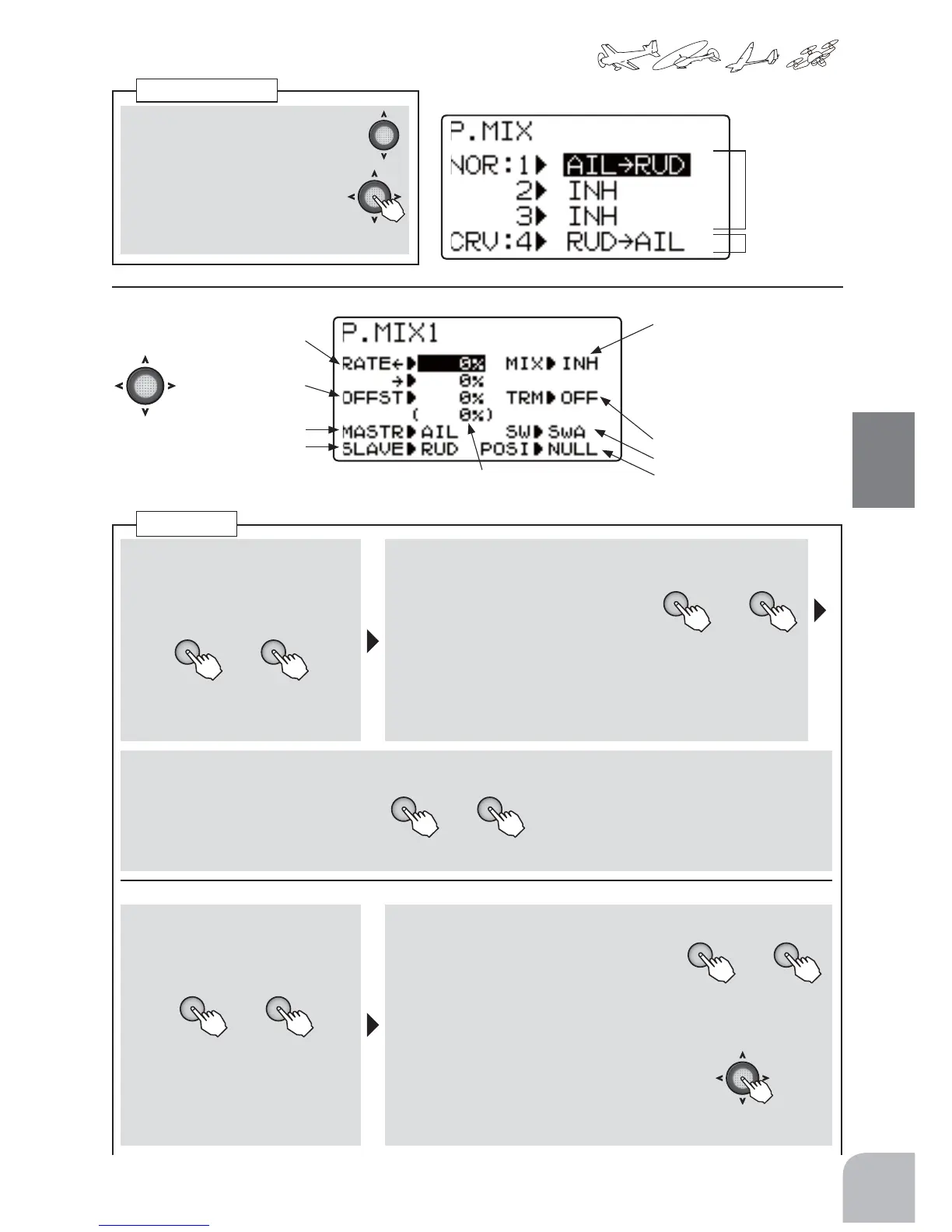
■ Callingthesettingscreen
① UsetheJogkeytoselecttheP.MIX
numberyouwanttouse.
② Callthesettingscreenbypress-
ingtheJogkey.
● P.MIX1-3(normaltype)
● P.MIX4(curvetype)
P.MIXSelection
(P.MIX1-3)
toP.MIX1-3
setupscreen
toP.MIX4
setupscreen
(P.MIX1-3setupscreen)
Mixingrateadjustment
Offset
MasterCHselection
SlaveCHselection
Functionactivation
● WhenINHisselected,the
functioncannotbeused.
WhenON orOFFisselected,
thefunctionisactivated.ON
andOFFchangesarelinked
totheswitch.
TrimON/OFF
Switchselection
Switchdirection
● Selecttheitemwiththe
Jogkey.
(MasterCHCurrentposition)
■ Functionactivation
① SelecttheMIXitemandselectON
orOFFbypressingthe+keyor‒
key.
+ −
or
● Whenyoudonotwanttouse
thefunctionselectINH.
■ Master/Slavechannelselection
② SelecttheMASTRchannelyouwant
tousebypressingthe+keyor‒key.
③ SelecttheSlavechannelyouwantto
usbypressingthe+keyor‒key.
● AVRaswellaschannels1to6,canbespecifiedasthe
masterchannel.Inaddition,whenOFSwasselectedasthe
masterchannel,slaveservooperationisoffset.
■ Mixingrateadjustment
+ −
or
④ SelecttheRATEitemandadjustthe
mixingratebypressingthe+keyor‒
keyforeachdirectionofthestick,etc.
selectedatthemasterchannel.
Range:-100to+100%
Default:0%
● Whenyouwanttoreturnthesetvalue
totheinitialvalue,pressthe+keyand‒
keysimultaneously.
(ChangingtheON/OFFSwitch)
■ ON/OFFSwitchselection
① Selectthe"SW"itemandthense-
lecttheswitchbypressingthe+
keyor‒key.
or
Selectionrange:SwA-SwD
THR
■ SwitchONdirectionsetting
② Selectthe"POSI"itemandselecttheswitch
ONdirectionbypressingthe+keyor‒
key.
● 2PSW:NULL(alwaysON),UP,DOWN
● 3PSW:NULL(alwaysON),UP,UP&DN,UP&CT,CENTR,CT&DN,
DOWN
● THRstick:HoldthestickattheON/OFFpoint
andsettheON/OFFpositionbypressingtheJog
keyfor1second.(IftheJogkeyispressedfor1
secondwhenthepositionwasset,itreturnsto
theNULLstate.)TheswitchONdirectioncanalso
beselectedbypressingthe+keyor‒key.
P.MIX1-3
+ −
or
+ −
or
(1second)
+ −



 To Next Page