133
Helicopter
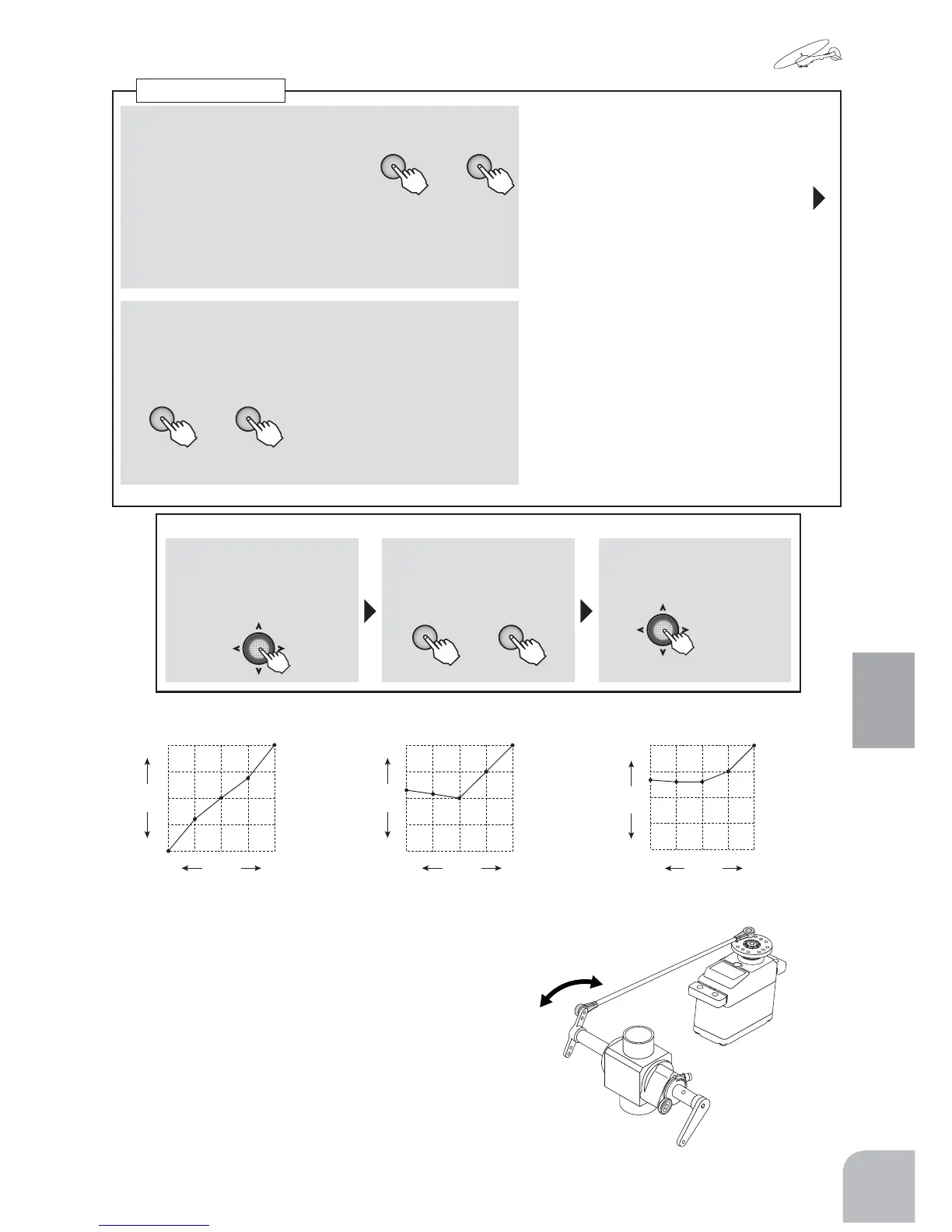
● Throttlecurvesettingexamples
(Normal) (Idle-up1) (Idle-up2)
■ Curvecopyingmethod
①
Selectthe"CND"item
andswitchtothecurve
copymodebypressing
theJogkey.
②Pressthe+keyor‒key
andselectthecopydes-
tinationcondition.
+ −
or
③Copytheconditionby
pressingtheJogkeyfor
1second.
(1second)
■ Activatingthethrottlecurves(ID1/2)
+ −
or
①
Selectthe"MIX"itemandsetto
"ON"or"OFF"bypressingthe+
keyor‒key.
● Forthenormalcondition,"---"isdisplayed.(AlwaysON)
● Whenyoudonotwanttouseanidleupcurve,setto
"INH".
Range:NOR,ID1,ID2
■ 5pointcurvesetting
②Selectthesettingitemofeachpoint(P-1toP-5)with
theJogkeyandsetthetravelofeachpointbypress-
ingthe+keyor‒key.
Range:0-100%
Default:
P-5:100%
P-4:75%
P-3:50%
P-2:25%
P-1:0%
●
Whenyouwanttoreturnthesetvalueto
theinitialvalue,pressthe+keyand‒key
simultaneously.
Throttlecurve
0
100
50
25
75
P1 P2 P3 P4 P5
%
STICK
RATE
(Theexampleofasetting)
P5=100.0%
P4= 65.0%
P3= 50.0%
P2= 30.0%
P1= 0.0%
0
100
50
25
75
P1 P2 P3 P4 P5
%
P5=100.0%
P4= 75.0%
P3= 50.0%
P2= 54.0%
P1= 56.0%
STICK
RATE
(Theexampleofasetting)
0
100
50
25
75
P1 P2 P3 P4 P5
%
P5=100.0%
P4= 75.0%
P3= 65.0%
P2= 65.0%
P1= 67.0%
STICK
RATE
(Theexampleofasetting)
NOTE:Settheactualvalueofthethrottlecurveaccordingtothefuselage
specifications.
+ −
or



 To Next Page