72
Commonfunction
(Changingthemixingreferencepoint)
(Includingtrimoperation)
■ Mixingreferencepointsetting
(1second)
① Selectthe"OFFST"itemandhold
themastersidestickorVRinthe
positionyouwanttosetandset
thenewreferencepointbypress-
ingtheJogkey.
Range:-100to+100%
(THRonly0-100%)
Default:0%
■ TrimON/OFFsetting
+ −
or
① Selectthe"TRM"itemand
selectONorOFFbypress-
ingthe+keyor‒key.
Range:OFF,ON
Default:OFF
● Whenyoudonotwanttoincludetrimin
mixingselectOFF.
At the end of setting, check that the mixing function is performed normally.
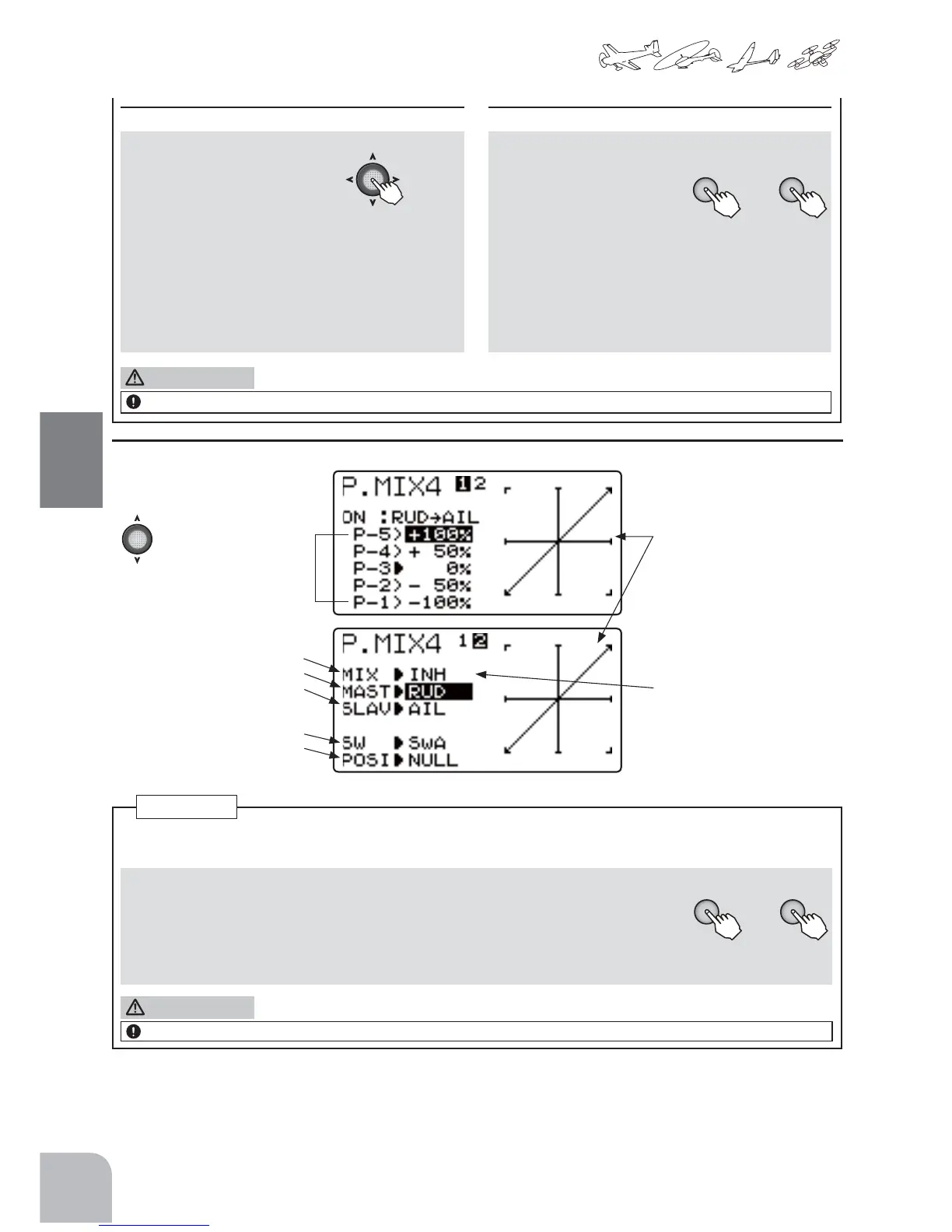
(P.MIX4setupscreen)
● Selecttheitemwiththe
Jogkey.
5Pointcurve
setting
● Thesetcurveisdisplayedona
graph.
Functionactivation
MasterCHselect
SlaveCHselect
Switchselection
SwitchONdirection
● WhenINHisselected,the
functioncannotbeused.
WhenON orOFFisselected,
thefunctionisactivated.ON
andOFFchangesarelinked
totheswitch.
RefertotheP.MIX1-3settingmethoddescribedpreviouslyforsettingsotherthanthe5pointcurvesettingde-
scribedbelow.
■ 5pointcurvesetting
+ −
or
① Selectthesettingitem(P-1toP-5)ofeachpointwiththeJogkeyandsettheamountof
movementofeachpointbypressingthe+keyor‒key.
Range:-100to+100%
Default:0%
At the end of setting, check that the mixing function is performed normally.
P.MIX4
CAUTION
CAUTION



 To Next Page