115
Airplane
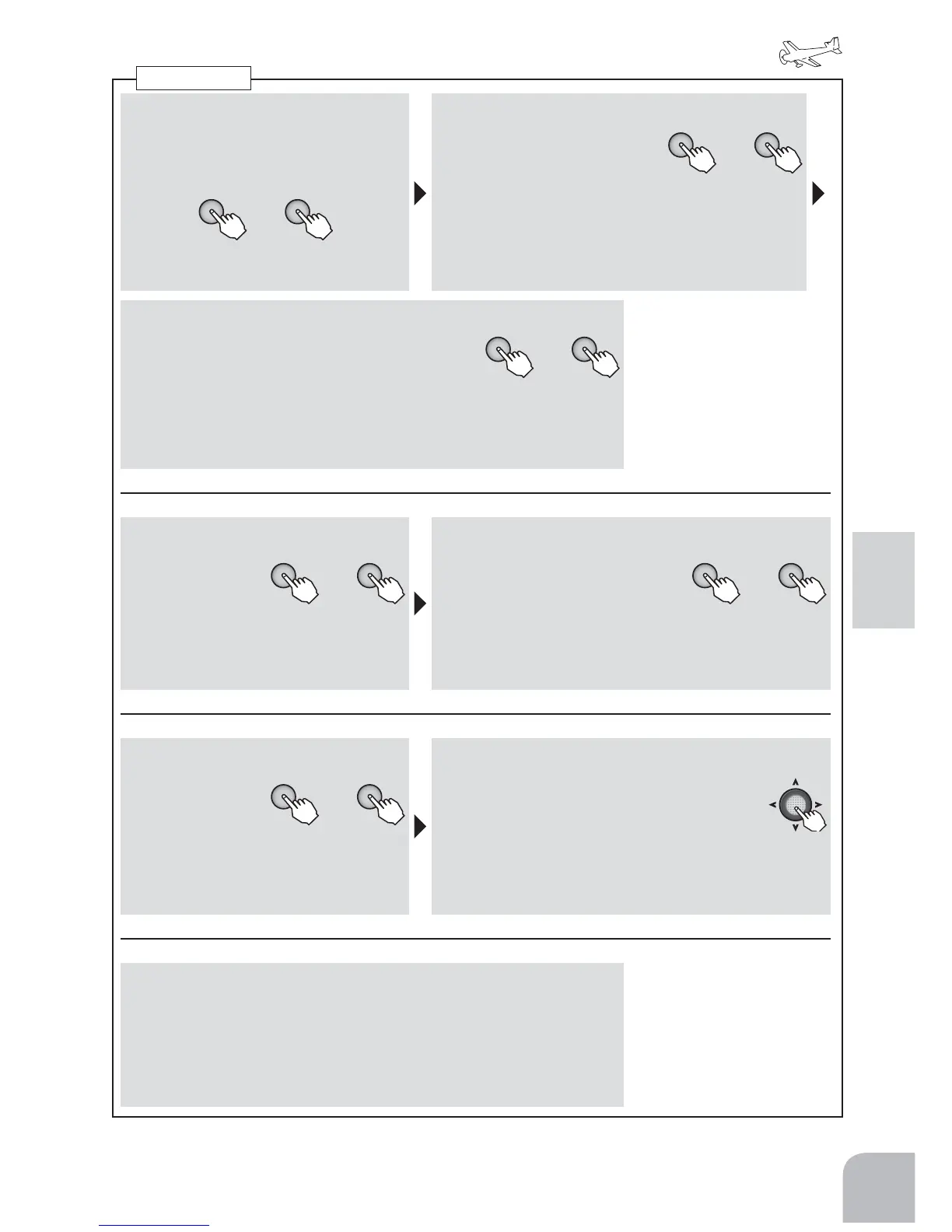
■ Activatingthefunction
①
Selectthe"MIX"itemandthenselect
the"ON"or"OFF"bypressingthe+
keyor‒key.
+ −
or
● Whenyoudonotuseafunction,set
tothe"INH"side.
■ Rateset
+ −
or
②
Selectthe"rate"itemand
adjusttheservotravelby
pressingthe+keyor‒key.
Range:-100to+100%
Default:+50%(ELEVonly-10%)
● Whenyouwanttoreturnthesetvaluetotheinitial
value,pressthe+keyand‒keysimultaneously.
However,polaritydoesnotreturn.
■ DelayRateset
+ −
or
③Selectthe"delay"itemandadjusttheelevator
operationdelaybypressingthe+keyor‒key.
● Theamountofdelayislargeat100%.
Range:0-100% Default:0%
● Whenyouwanttoreturnthesetvaluetotheinitialvalue,pressthe+key
and‒keysimultaneously.
(Inthecaseofchangeofaswitch)
■ Switchselection
+ −
or
①Selectthe"SW"
itemandthen
selecttheswitch
bypressingthe
+keyor‒key.
Range:SwA-SwD
Default:SwD
■ Switchdirection
+ −
or
②SelecttheONdirectionby
pressingthe+keyor‒keyat
theONdirectionselectionitem.
Range:
● 2PSW:NULL,UP,DOWN
● 3PSW:NULL,UP,UP&DN,UP&CT,CENTR,CT&DN,
DOWN
(Inthecaseofchangeofamode)
■ Mode
+ −
or
①
Selectthe
"MOD"item
andselectthe
operationmode
bypressingthe+keyorthe‒key.
Range:OFST,LINR
Default:OFST
■ Operationreferencepointsetting("LINR"mode
only)
② Selecttheoperationreferencepointsetting
itemnewlydisplayedatthebottomrow
of"MOD"andholdthethrottlestickatthe
airbrakestartpointandsetthereferencepointby
pressingtheJogkeyfor1second.
Range:0-100%
(When3CHcontrolischangedatthetimeof"LINR")
■ "LINR"mode3CHcontrol
① Selectthe"CH3"itemandselectcontrolbypressingthe+keyor‒
key.
Range:THR,SwA-SwD,VR
Default:THR
Airbrake



 To Next Page