Garmin GPSMAP 695/696 Owner’s Manual
190-00919-00 Rev. G
170
Additional Features
OverviewGPS NavigationFlight PlanningHazard AvoidanceAdditional FeaturesAppendicesIndex
The geo-referenced aircraft position is indicated by an aircraft symbol displayed on
the chart when the current position is within the boundaries of the chart. Inset boxes
are not considered within the chart boundaries. Therefore, when the aircraft symbol
reaches a chart boundary line, or inset box, the aircraft symbol is removed from the
display.
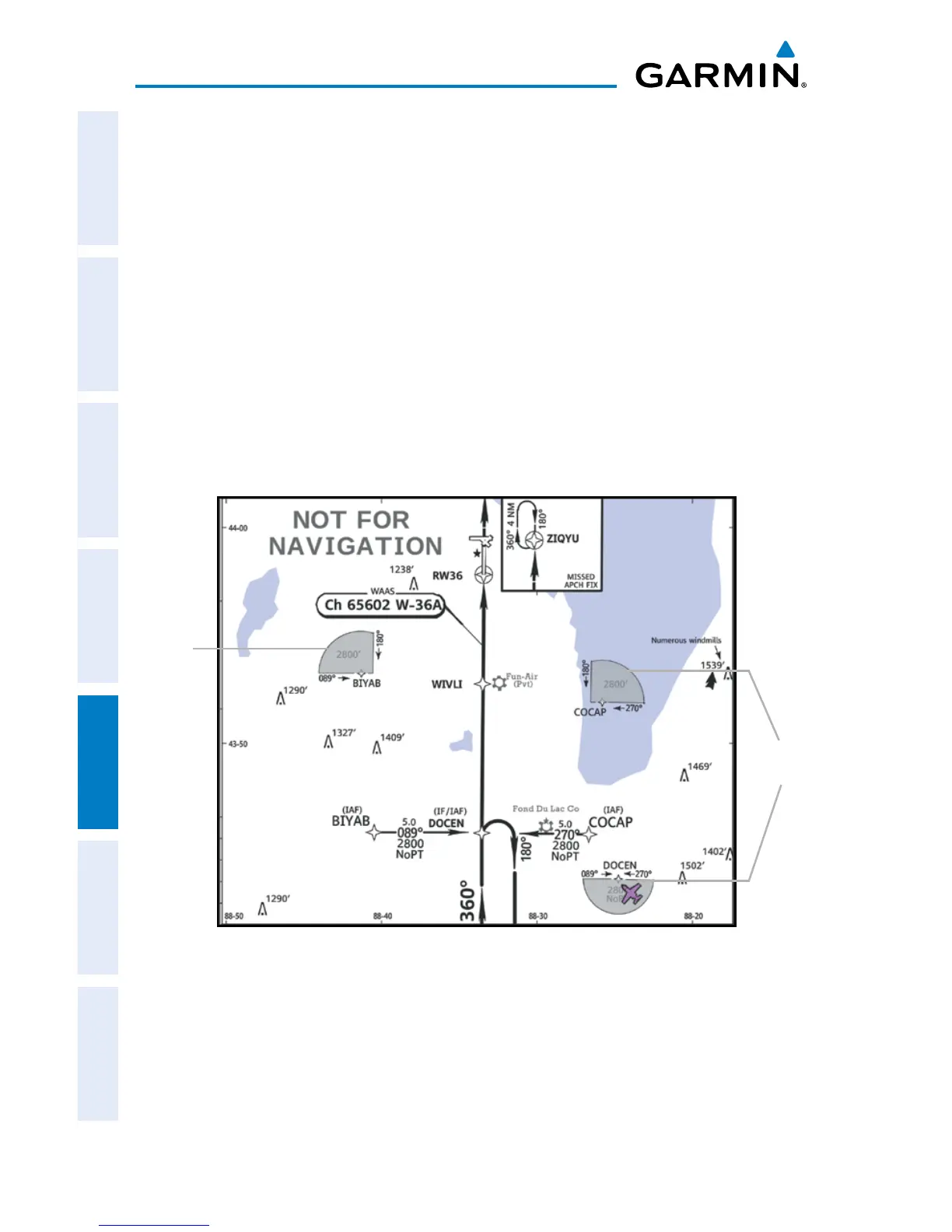
The figure below, shows examples of off-scale areas, indicated by the grey shading.
Note, the grey shading is for illustrative purposes only and will not appear on the
published chart or display. These off-scale areas appear on the chart to convey
supplemental information. However, the depicted geographical position of this
information, as it relates to the chart planview, is not the actual geographic position.
Therefore, when the aircraft symbol appears within one of these areas, the aircraft
position indicated is relative to the chart planview, not to the off-scale area.
Sample Chart Indicating Off-Scale Areas
Off-Scale
Area
Off-Scale
Areas














 To Next Page