Garmin GPSMAP 695/696 Owner’s Manual
190-00919-00 Rev. G
Appendix F
228
OverviewGPS NavigationFlight PlanningHazard AvoidanceAdditional FeaturesAppendicesIndex
The Save feature allows storage of up to 15 track logs.
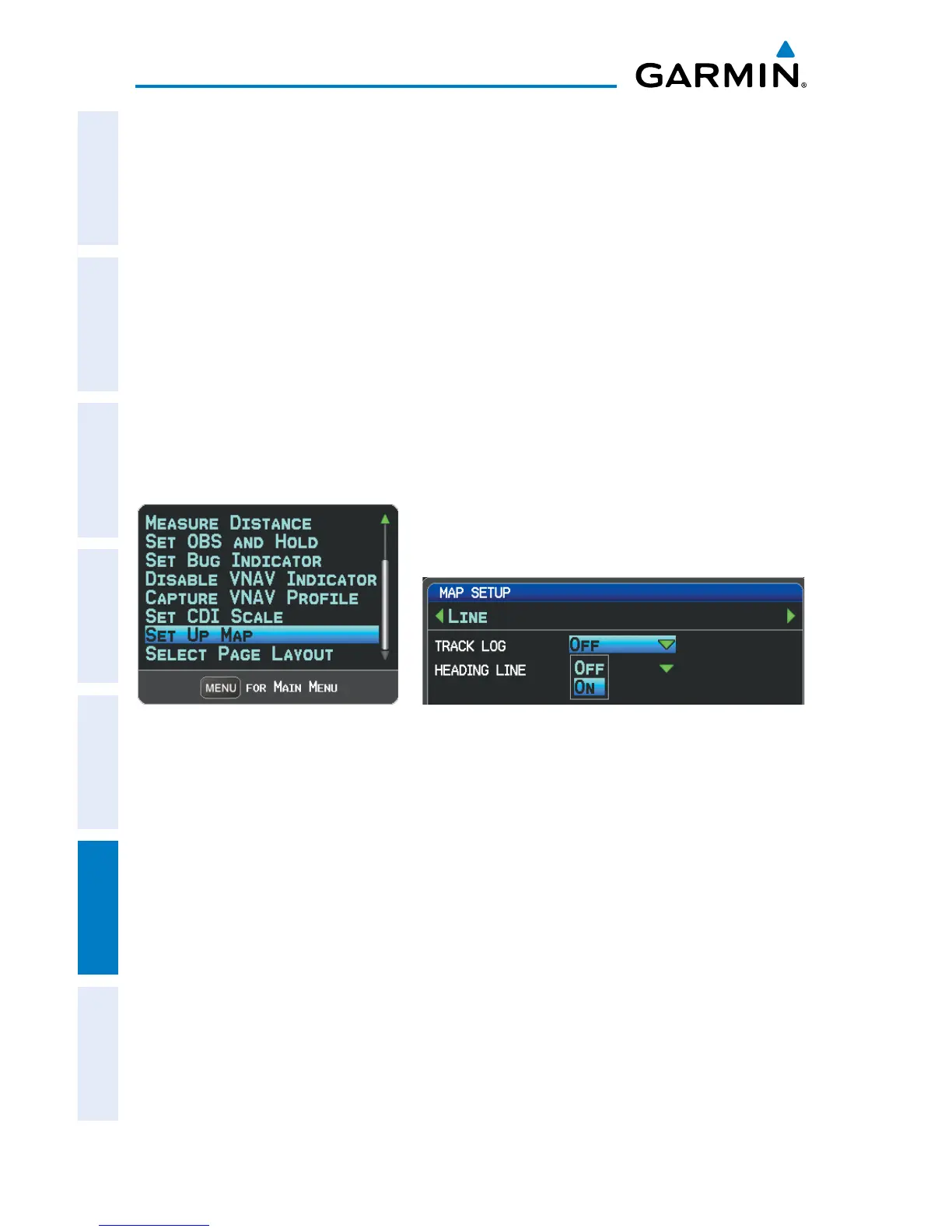
Displaying/removing the track log on the Map Page:
1)
From the Map Page, press the MENU Key. The Map Page Menu is
displayed.
2)
Turn or move the FMS Joystick to select ‘Set Up Map’ from the Map Page
Menu, and press the ENT Key.
3)
Turn the FMS Joystick to highlight the ‘Line’ options from the horizontal
list.
4)
Move the FMS Joystick to highlight the ‘Track Log’ field.
5)
Turn the FMS Joystick to select ‘On’ or ‘Off’, and press the ENT Key.
6)
Press the FMS Joystick, the CLR Key, or the EXIT Softkey to return to the
Map Page.
Map Page Menu Map Setup Page
Changing track log settings:
1)
Press the MENU Key twice.
2)
Turn or move the FMS Joystick to select ‘Track Log’ from the Main Menu,
and press the ENT Key.
3)
Move the FMS Joystick to highlight the desired field.
4)
Turn the FMS Joystick to select the desired setting.














 To Next Page