84 232003110G (03)
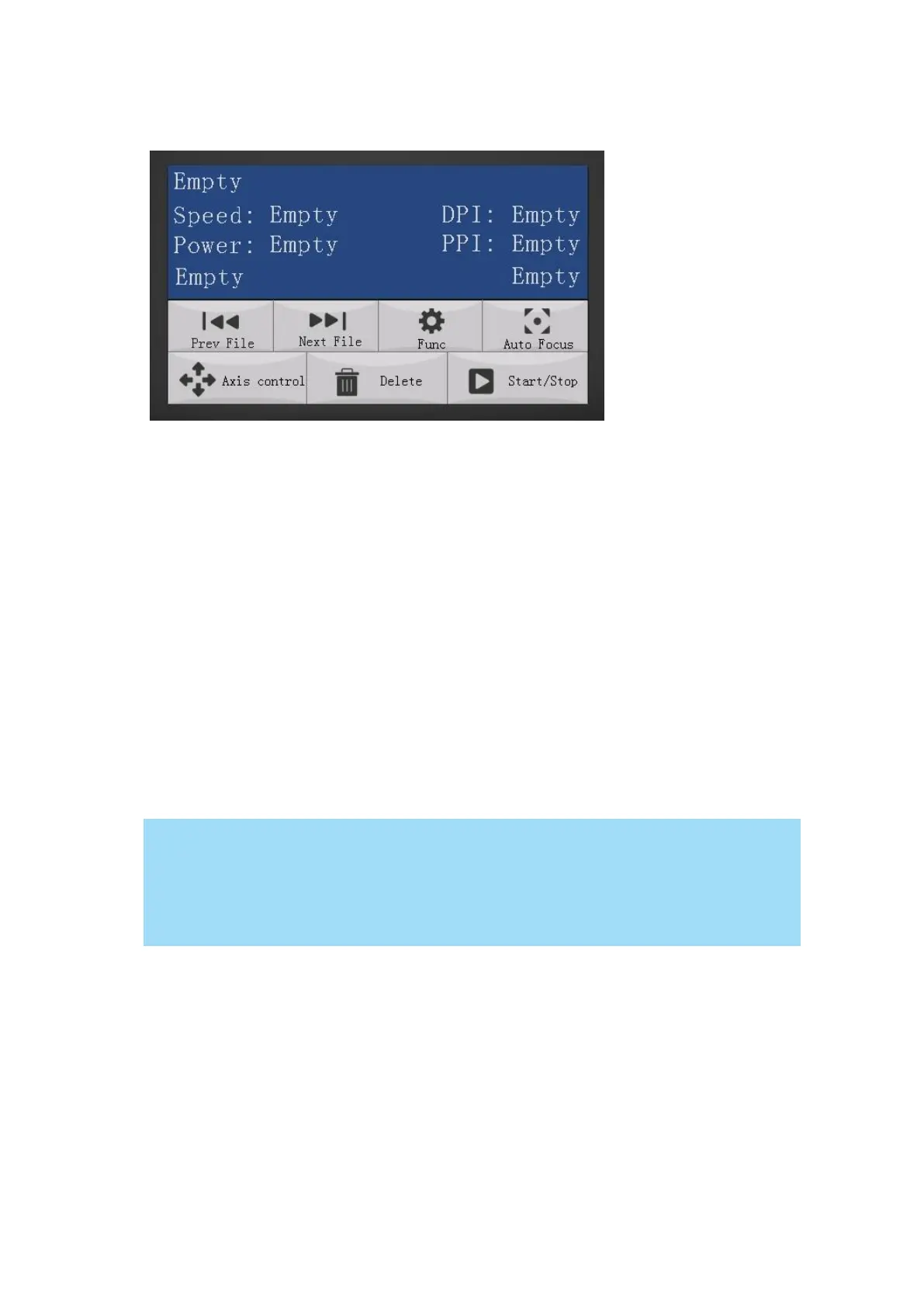
5.1.3 Home Page
Prev File – Able to go back to previous file when select this button.
Next File – Able to go next file when select this button.
Func (Function) – The Func. Button allows you to select various functions that contain four
categories – File Management, Machine Setting, Advanced Option and Information.
Auto Focus – After you have positioned your material and moved the lens carriage head to the
area you want to engrave, press this button and the system will automatically adjust the optimal
vertical focal distance for the laser.
Axis Control – To manually adjust the X, Y- axis position of the lens carriage and the height of
the work table (Z-axis)
Delete – Provides quick access to delete the current job.
Start / Stop – Allows you to start or stop engraving jobs, once those jobs have been
successfully loaded onto the system.
There is an 8-second warm up period after the door LED is triggered for systems
equipped with Synrad laser tubes. i.e. opening the top lid or the external pass through
doors of the machine. Operator must wait for 8 seconds before the laser tube can
begin to work.



 To Next Page