135 232003110G (03)
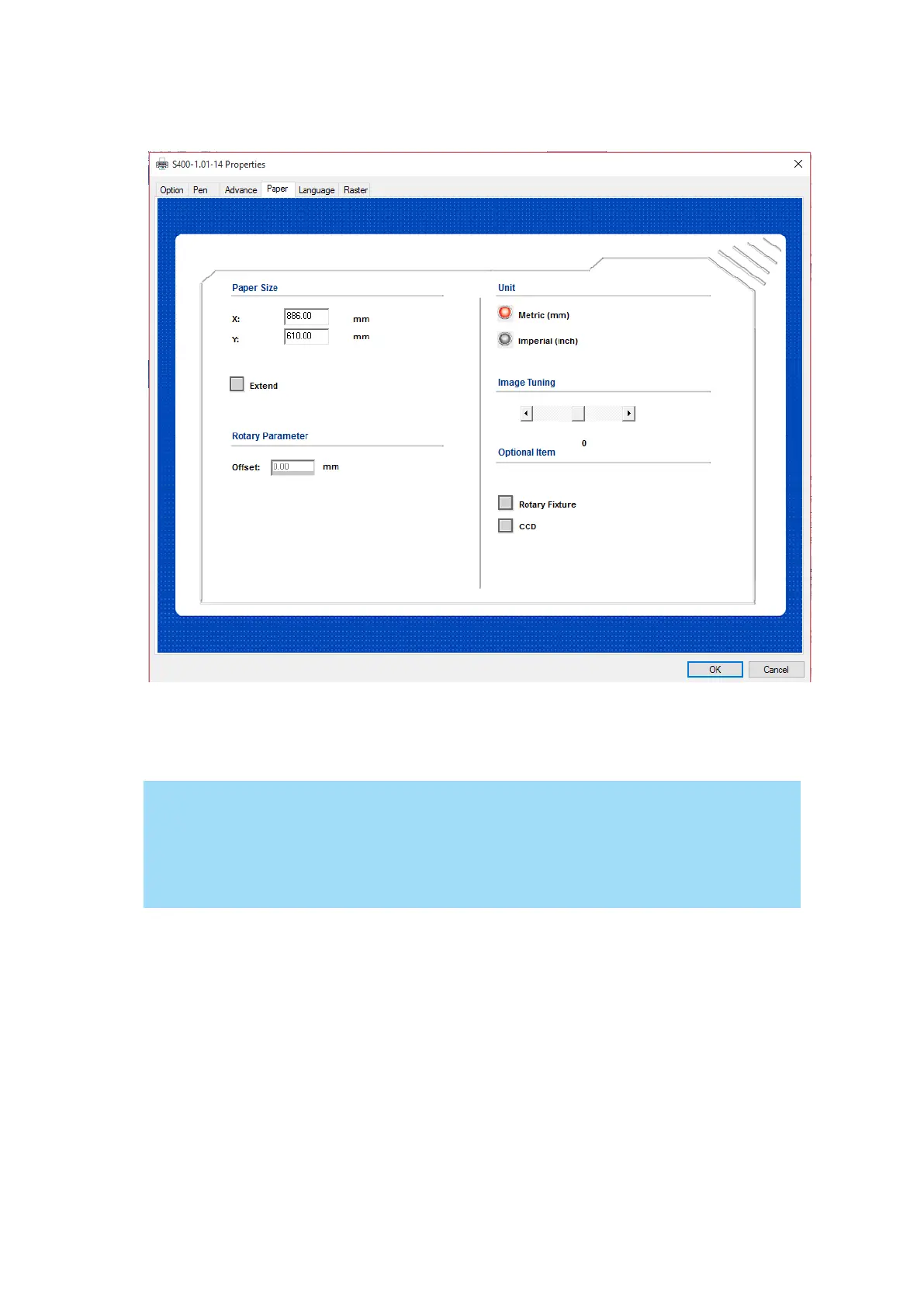
5.2.3.4 S400 Print Driver >> Paper Page
Paper Size (Paper Page)
The paper size represents your total work area. Ensure that the paper size is never set greater
than the working area. The X value represents the length and the Y value represents the width.
When using the optional rotary attachment system and with the Rotary Fixture option
checked, the X value represents the length of your working piece. The Y value will be
changed to Diameter, which represents the diameter of your working piece (at the
position you wish to engrave).
Unit (Paper Page) [DEFAULT SETTING: Metric (mm)]
Here you can set your preferred measurement standard in which you would like to use with the
S400 print driver. You can choose between metric or imperial standards.
Image Tuning (Paper Page) [DEFAULT SETTING: 0]
In the event that you are processing extremely fine and detailed designs requiring near-
microscopic edge-to-edge precision, you will need to adjust the image tuning setting. To adjust
this setting, we recommend that you engrave a small black square design as a sample and use a
magnifying glass to view the engraved results.
When you look at your engraved test square under a magnifying glass, you may notice the edges
of your square may be slightly offset, with every consecutive engraved even or odd line
protruding past the square’s ideal edge. This occurrence may occur on the left or right side of the



 To Next Page