40
796688 (4188-657)_i2 _06/03
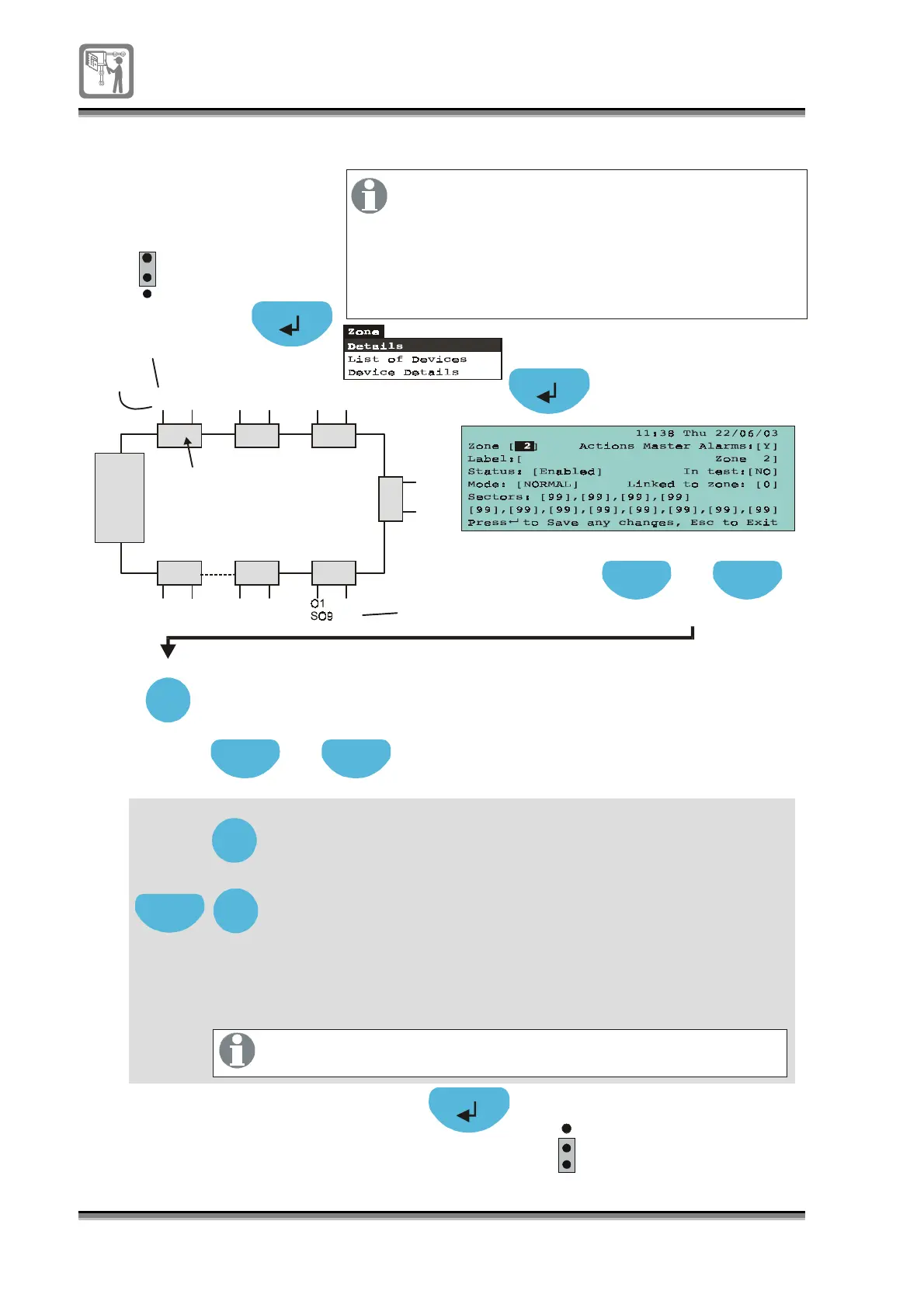
To assign a sectors to zone
Press to select a [Zone] field
Press Select to chan
e to a require zone number
Previous Next
Select
A4
Press to (12 fields available)hi
hli
ht the first linked field
Sector
Previous Next
1
2
3
P1
EEPROM
enable
1
2
3
P1
EEPROM
enable
Key in or press Select to enter the first number
(ran
e 1 to 24) that is required to be actioned in the event of
the zone
oin
into fire condition.
Hi
hli
ht by pressin
Next the second sector field and key in
the second
.
An entry 99 in any field will cause all the to tri
er
in the event of fire condition in the zone.
sector
sectors
linked
linked number that is required to be actioned
in the event of the zone
oin
into fire condition. Repeat the
procedure for other sectors required to be linked to the zone.
Set all rem ainin
unused fields for no action, enter 00 (zero)
Sector
There can be a maximum of up to 24 sectors per
system. A sector is an output of a
and each has two outputs.
The sectors are consecutively numbered from
end 1 to end 2 of the loop. A zone can action
up to 12 independent sectors in any
combinations in the system.
sounder controller
sounder controller
S1
O1
S2
O2
S3
O1
S4
O2
S5
O1
S6
O2
O1
S23
O2
S24
O1
S11
O2
S12
O2
S10
S
7
O
1
S
8
O
2
Sounder
controllers
Control
panel
End1
End2
Sector 1
Output
Sector 10
Select
Next
Select


 To Next Page