EasyManua.ls Logo

Gent System 800 - To Set; View Maintenance Reminder Message

Gent System 800
72 pages
Print Icon
To Next Page IconTo Next Page
To Previous Page IconTo Previous Page
Loading...
50
796688 (4188-657)_i2 _06/03
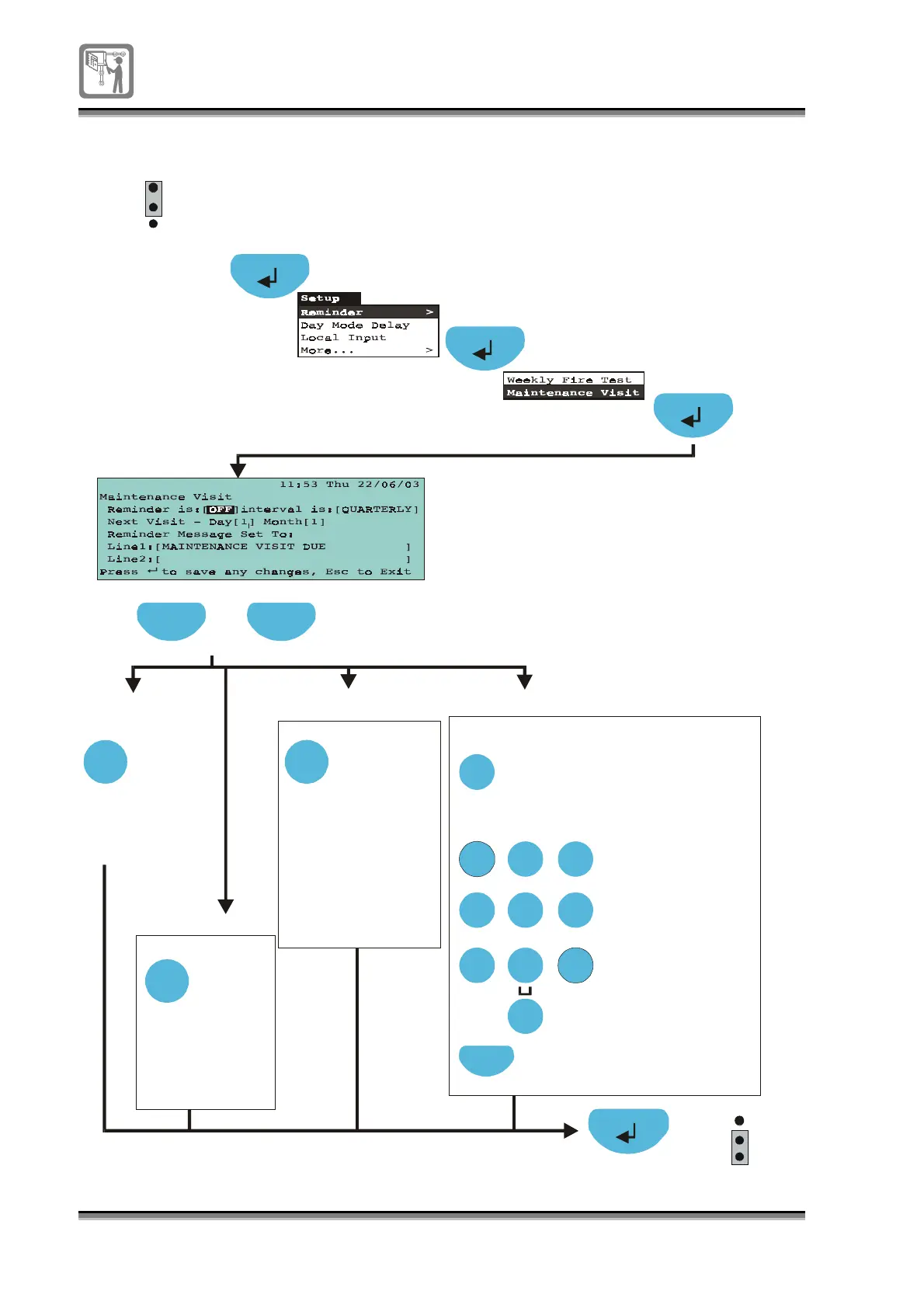
To set / view maintenance reminder message
A2
min
Select
Select
Press select
to to
gg
le
ON/OFF
(OFF -Default)
Press to select field [ ]
Previous NextPrevious Next
[Reminder is]
[Test Interval is]
Next
If necessar
y
, press
Next to move to the
next character position.
Usin
g
the numeric ke
y
pad
enter the label.
ABC
DEF
GHI
JKL
MNO
PQRS
TUV
WXYZ
1 2
3
4 5 6
7 8 9
0
Edit
Press Edit button to
allow label editin
g
.
To edit text in a field:
Each press of an
alphanumeric
ke
y
will scroll
character strin
g
,
e
g
each press of
ke
y
2 will scroll
characters:
A B C 2 a b c.
Each press of
ke
y
1 will scroll
character strin
g
1 ? , . ; & * /
Each press of ke
y
0 will scroll
character strin
g
0
(
)
: @ [ ]
[Messa
g
e]
1
2
3
P1
EEPROM
enable
[D a
y
]
Press to to
gg
le:
MONTHLY
QUARTERLY
BI-ANNUALLY
ANNUALLY
A4
A2
Select
Press select to
increment da
y
1 to 31
Press next
to hi
g
hli
g
ht [m onth]
and press select
to to
gg
le m onths
A2
1
2
3
P1
EEPROM
enable

Table of Contents