◐ Test Lamination
1. When temp. on laminating roller is reached to setting temp., test lamination is required to check setting status & laminating quality.
Press "RUN" to make roller engage and lamination is processed.
Feeding gap & Feeding error has to be checked for the 1st 3~4 sheets feeding.
For test lamination, the lower speed (3~5m/min) is recommended. Then, its test result is good, increase its speed.
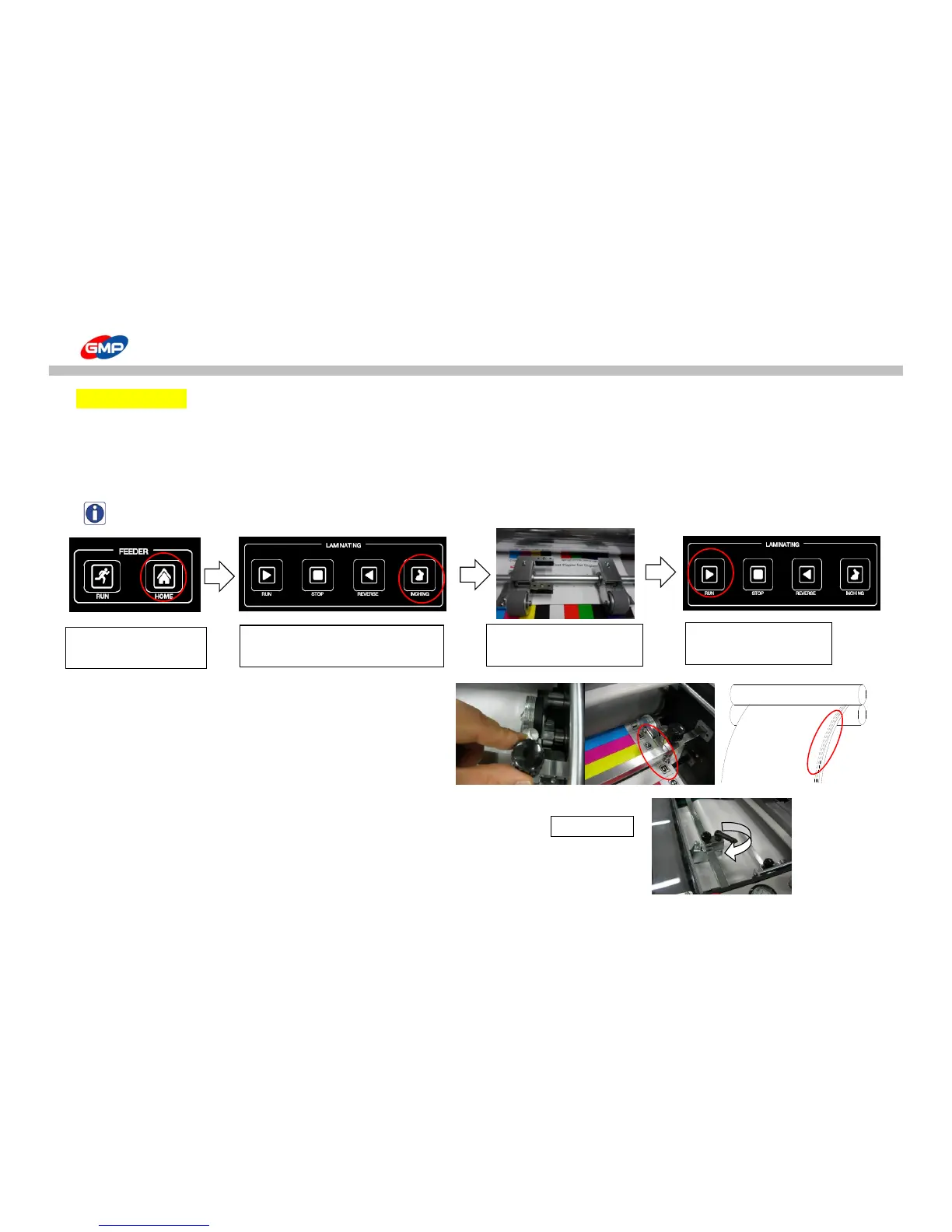
NOTE : How to load substrate after release from E-Stop status. (ex: EMERGENCY, Safety Cover is opened.)
2. If there is no problem for substrate feeding, set up the perforator.
Position the perforator at 1~3mm from film edge.
If the perforator would be more inside of the above position,
this could be a cause of quality trouble & cutting error.
Pressure on film to make holes clearly.
3. Press "BURSTING" on "MAIN" screen to activate Burst "ON" status.
Rotating Bursting roller is moved up/down to cut the laminated results.
If a cutting quality is not good, install the skewing wheel as the picture <2_2>.
① Feeder at Origin Point.
② Move sheets at Feeding Wheel to
Laminating Roller in Job Mode.
③ Attach the substrate end to
the film on roller.



 To Next Page