User Manual
62
• Clicking each option box with the touch pen or pressing button S can toggle between the
options. Moving the joystick up or down can alter values of the option. Moving the joystick
left or right can toggle between each digit of the option values if the values contain several
digits. If there are several values to choose from for an option (e.g. IsoColor: Black, Green,
White), clicking the values respectively with the touch pen can also change the option
values.
• To save the change, choose button OK or press the joystick directly; to cancel the change,
choose button Cancel or press button C directly. Then the dialog box will be closed and
the original image status will be resumed.
• Button OK and button Cancel can be selected by the touch pen directly or by pressing
button S first and then pressing the joystick.
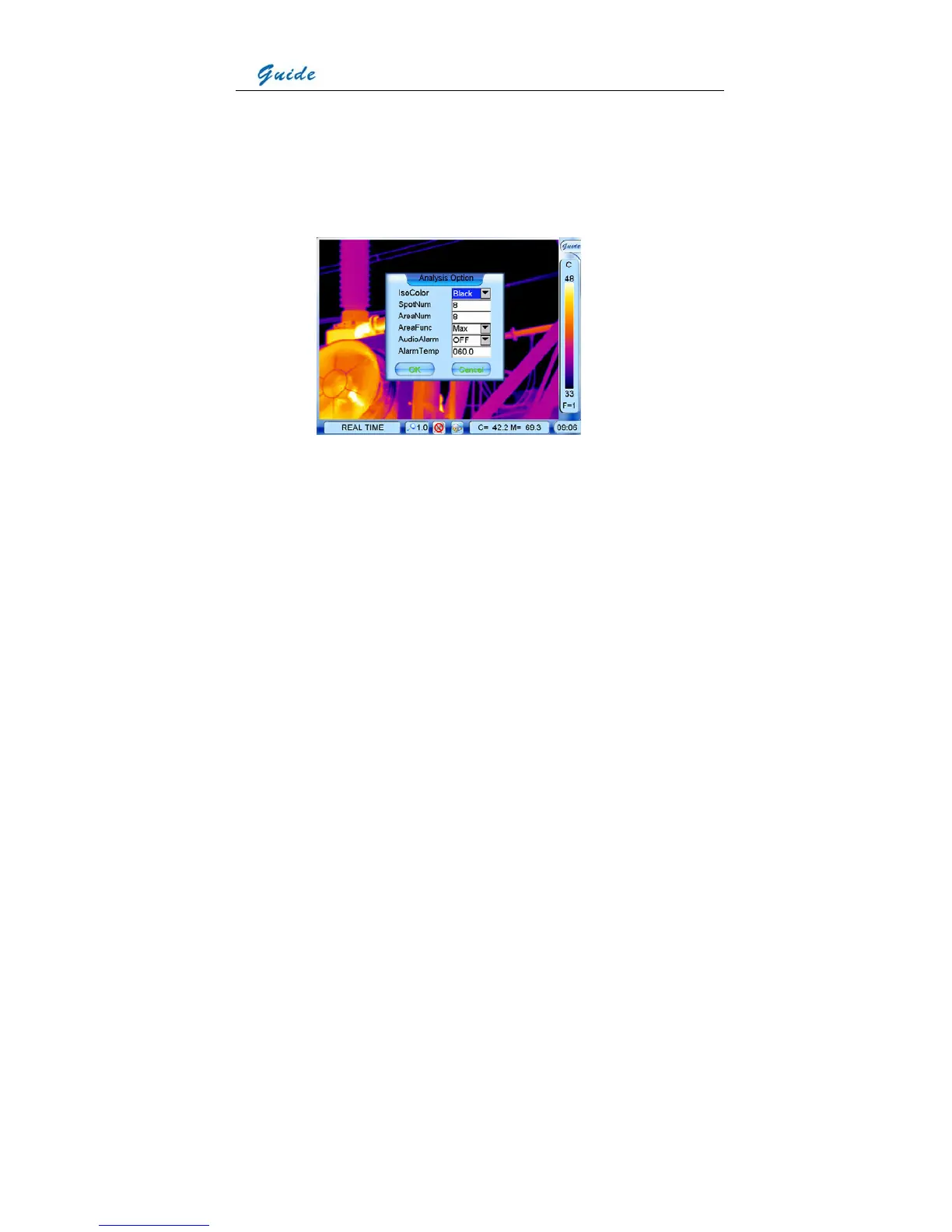
• IsoColor: To choose a certain color for isotherm, black, white or green
• SpotNum: To set the number of spots for spot analysis, up to 8 spots are available
• AreaNum: To set the number of areas for area analysis, up to 8 areas can be set
• AreaFunc: To set the temperature type of areas in area analysis, maximum, minimum or
average
• AudioAlarm: To activate or inactivate the audio alarm for live thermal images



 To Next Page