HQ Pro-Stitcher User Manual07/23/123.26 Installation Instructions
7. Carefully li the quilting machine and place it
on the carriage so the wheels engage the white
carriage tracks, making sure not to set the wheels
on top of the stitch regulator cable (this is easier to
do with two people – one at each end of the quilting
machine). e stitch regulator cable should be
laying across the carriage in such a manner that
it ends up between the front and rear wheels of
the quilting machine when it is placed on the
carriage.
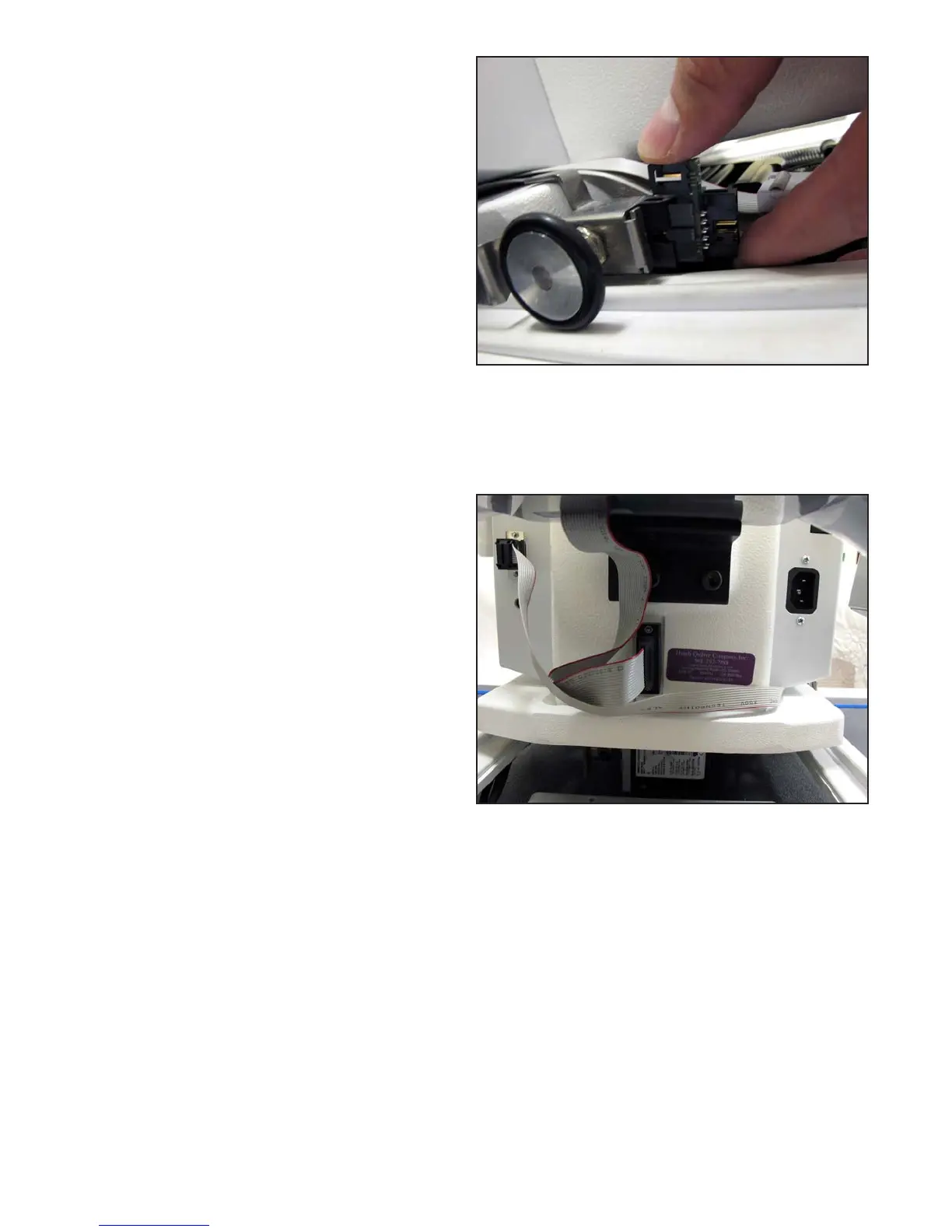
8. For HQ Sixteen only: Plug the Stitch Regulator
Adapter Board (Page 16, Q) into the Y-axis stitch
regulator encoder (Figure 3.49).
9. Plug the middle connector on the gray stitch
regulator cable into the Y-axis stitch regulator
encoder (the stitch regulator encoder mounted to
the rear machine wheel).
10. To prevent the stitch regulator cable from
dragging across the motor assemblies during
operation, route the nal section of the stitch
regulator cable around the back of the quilting
machine and plug the 9-pin D-sub connector
into the C-Pod (Figure 3.50).
Figure 3.49
Figure 3.50












 To Next Page