www.HandiQuilter.com/ProStitcher 07/23/12 Overview 4.3
Screen Overview
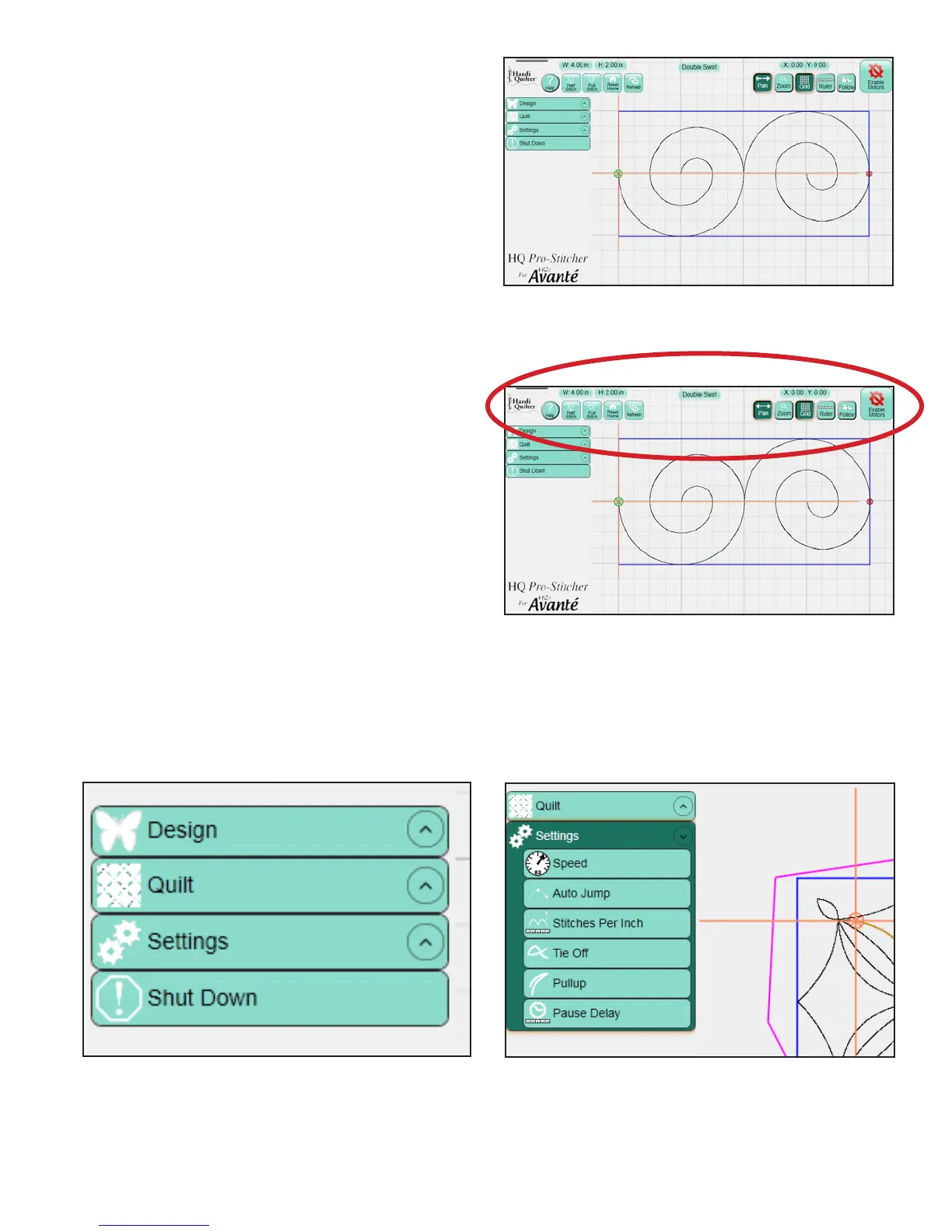
e HQ Pro-Stitcher screen is arranged to provide
quick access to all functions without navigating
through multiple levels of option screens. is
simple screen layout prevents users from getting lost
in a maze of quilting options (Figure 4.6).
Top Toolbar Buttons
e most commonly used HQ Pro-Stitcher
functions are across the top of the screen for easy
access at any time during the designing process.
Also visible at the top of the screen are the name of
the current design le, the size of the design, and
the position of the crosshairs (Figure 4.7).
Menu Selections
e le-hand side of the screen shows the available
menus: Design, Quilt, Settings and Shut Down
(Figure 4.8). e sub-menus within these options
are described in detail later in this manual. Press
any of these sub-menu headings to reveal the
functions available for that option. For example, the
Design menu includes functions related to loading
and manipulating quilt designs. e Quilt menu
includes functions related to quilting the design. e
Settings menu enables the user to change stitch and
system settings (Figure 4.9).
Figure 4.6
Figure 4.7
Figure 4.8
Figure 4.9












 To Next Page