www.HandiQuilter.com/ProStitcher 07/23/12 Design Menu 5.3
File Types
e HQ Pro-Stitcher will read four le types
directly: *.hqf, *.qli, *.txt, and *.tap. Pro-Stitcher
cannot read encrypted les or *.txt les that were
created for computerized quilting systems with
proprietary formats.
Load
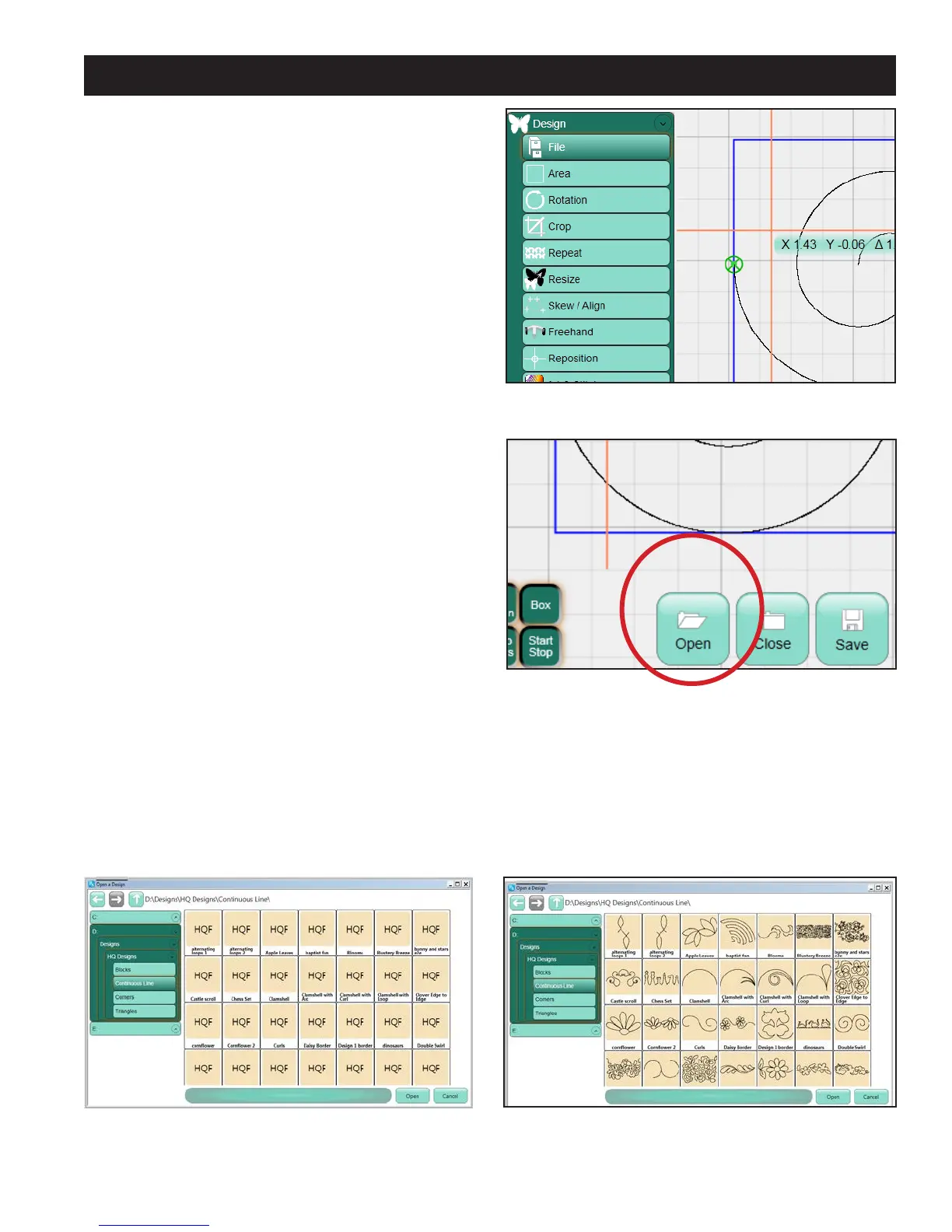
To load a design of one of these four le types, press
the Design menu tab on the le (Figure 5.4). en
press the File sub-menu if it is not already selected
and press the Open button at the bottom of the
screen (Figure 5.5).
Browse to the desired design stored either on the C:
drive or on a removable disk. e dierent design
le types have color-coded backgrounds as follows:
*.hqf: Beige
*.qli: Light blue
*.txt: Lavender
*.tap: Pink
Loading the thumbnails may take a few moments,
depending on how many designs are stored in the
selected directory and how intricate those designs
are. While the thumbnails are being loaded, a
colored block with the name of the le type will
be visible in place of the actual design thumbnail
(Figure 5.6).
Double-tap the name of the desired le or single-tap
and then press Open in the le browser to open the
design. Press Cancel to exit the le browser without
selecting a new design to load (Figure 5.7).
Figure 5.4
Figure 5.5
Figure 5.6
Figure 5.7
Loading a Design












 To Next Page