www.HandiQuilter.com/ProStitcher 07/23/12 Design Menu 5.11
Mirror and Flip
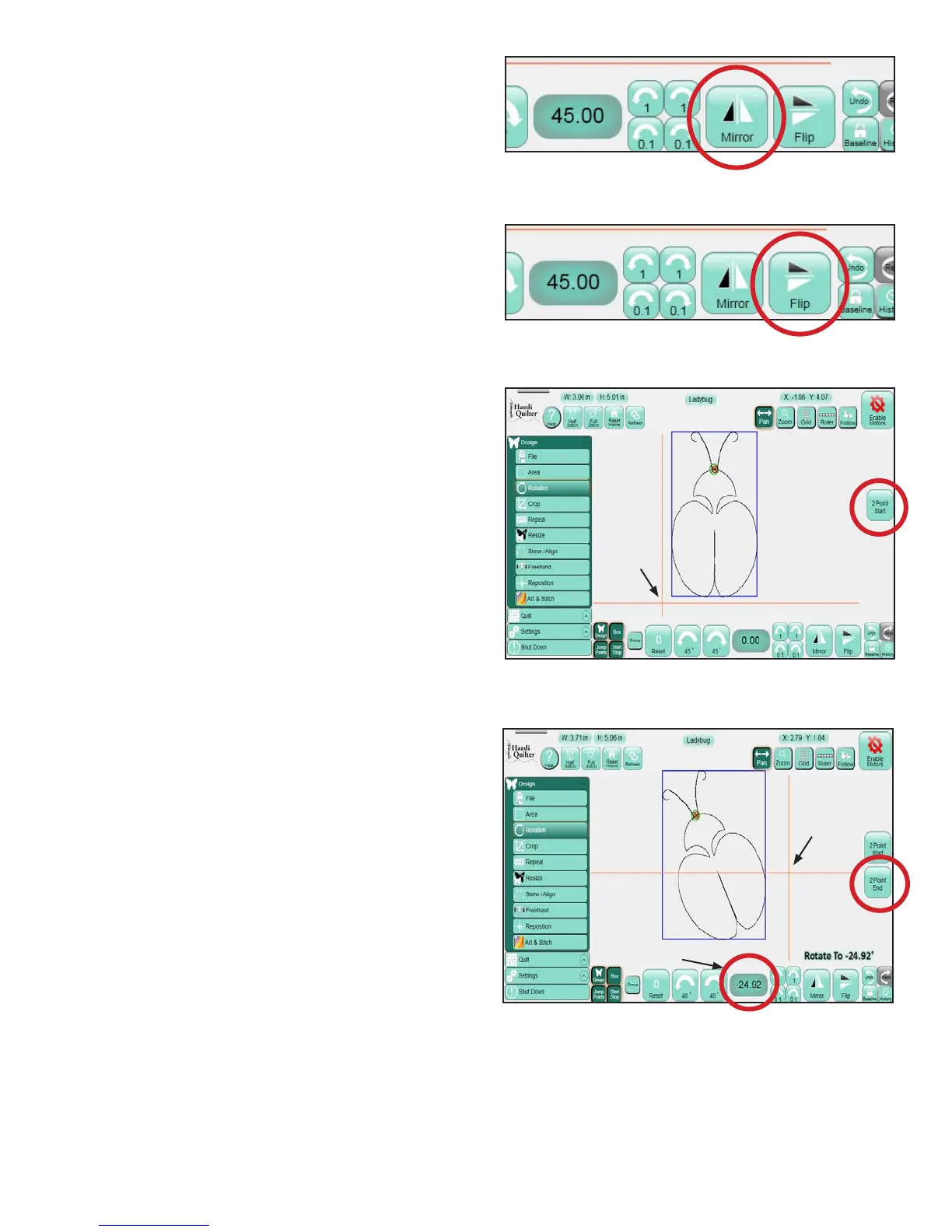
Press the Mirror button (Figure 5.34) to mirror the
design vertically. Press the Flip button (Figure 5.35)
to ip the design horizontally. It is best to press the
Baseline button following a Flip or Mirror function.
Otherwise, other functions (such as Rotate) that are
based on the original design orientation, will appear
to be happening backwards (e.g. a Rotate clockwise
aer a Mirror without pressing Baseline will rotate
counterclockwise).
2-Point Rotation
2-Point Rotation uses the quilting machine to
identify a line that represents the rotation angle.
To understand how it works, look at the light blue
bounding box around the design. e bottom of that
bounding box is a at line, or a 0° angle. Imagine
drawing a line and then rotating that bounding box
so the bottom line of the bounding box matches the
line you just drew. 2-Point Rotation enables the
quilter to draw this line and the HQ Pro-Stitcher
will rotate the design to match the angle of that line.
To do this, move the quilting machine to a point
on the quilt le of the line to follow and press the 2
Point Start button (Figure 5.36). Move the machine
to a point further to the right along that same line
and press the 2 Point End button that appears aer
pressing 2 Point Start (Figure 5.37). e rotation
angle will appear in the number box and the design
will rotate to match. Either the Start or the End
point may be redened by moving the quilting
machine to a new location and pressing either the
2-Point Start or the 2-Point End button, depending
on which end of the line needs to be repositioned.
e HQ Pro-Stitcher assumes that a Start Point
on the le followed by an End Point on the right,
without moving up or down at all (i.e. a straight line
with Start on the le and End on the right) is a 0°
rotation, or no rotation. A Start Point on the right
and an End Point on the le (i.e., the same line, but
the Start and End points reversed) is a 180° rotation,
or in other words, the design will be upside down.
Figure 5.36
Figure 5.37
Figure 5.34
Figure 5.35
2 Point
Start
2 Point
End
Angle of Rotation












 To Next Page