www.HandiQuilter.com/ProStitcher 07/23/12 Design Menu 5.19
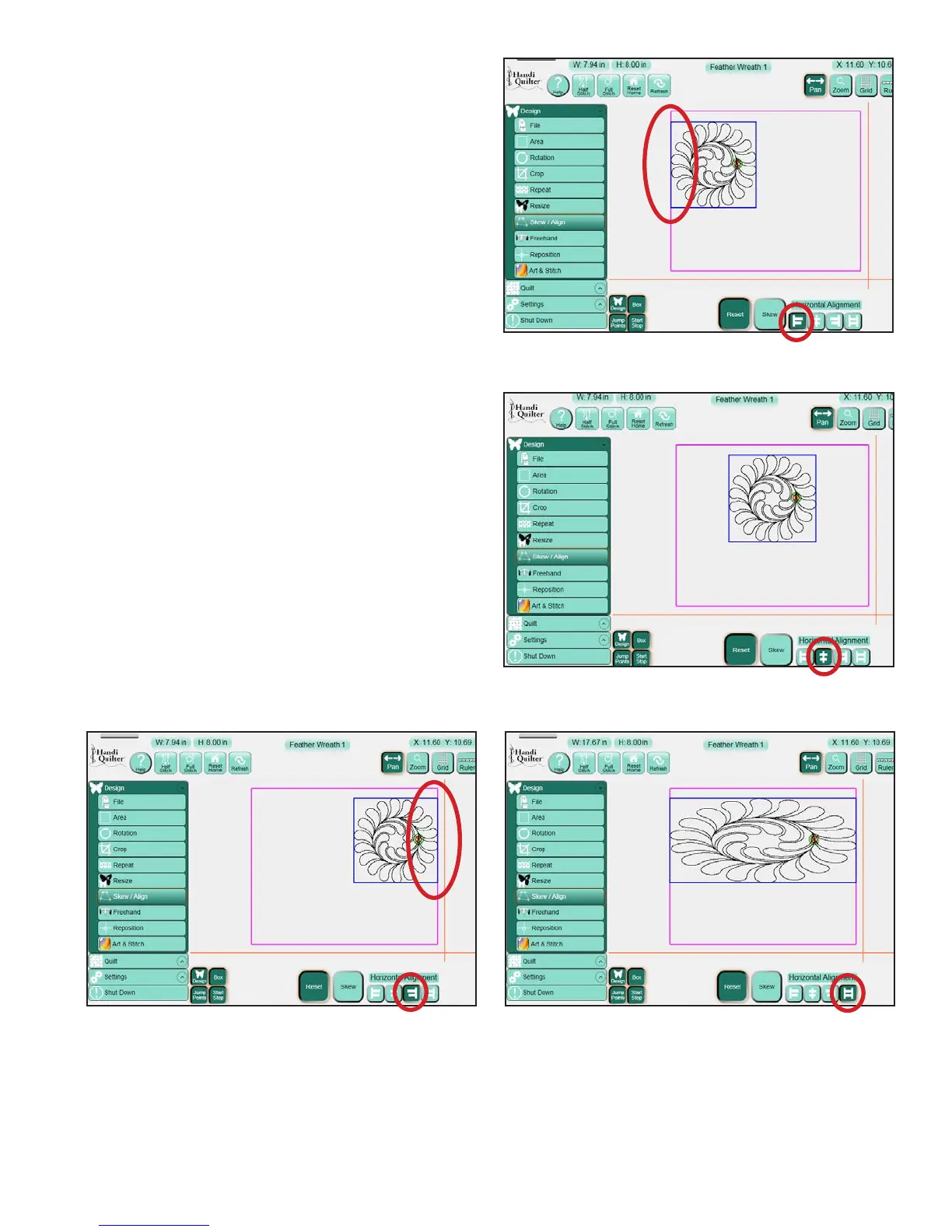
Horizontal Alignment
Align Le: (Figure 5.63) e le side of the design’s
bounding box (the light blue box) aligns with the
le-most point of the Area (represented by the
purple lines).
Align Horizontal Center: (Figure 5.64) e
horizontal center of the design’s bounding box
aligns with the horizontal center of the Area.
Align Right: (Figure 5.65) e right side of the
design’s bounding box aligns with the right-most
point of the Area.
Horizontal Stretch: (Figure 5.66) e current
design will be stretched (or shrunk) so the le side
of the bounding box aligns with the le-most point
of the Area and the right side of the bounding box
aligns with the right-most point of the Area.
Figure 5.63
Figure 5.64
Figure 5.65 Figure 5.66












 To Next Page