www.HandiQuilter.com/ProStitcher 07/23/12 Design Menu 5.13
Crop
e Crop function is used in conjunction with
Area. Aer a design has been loaded and modied
as needed, mark an Area that represents the region
to be cropped.
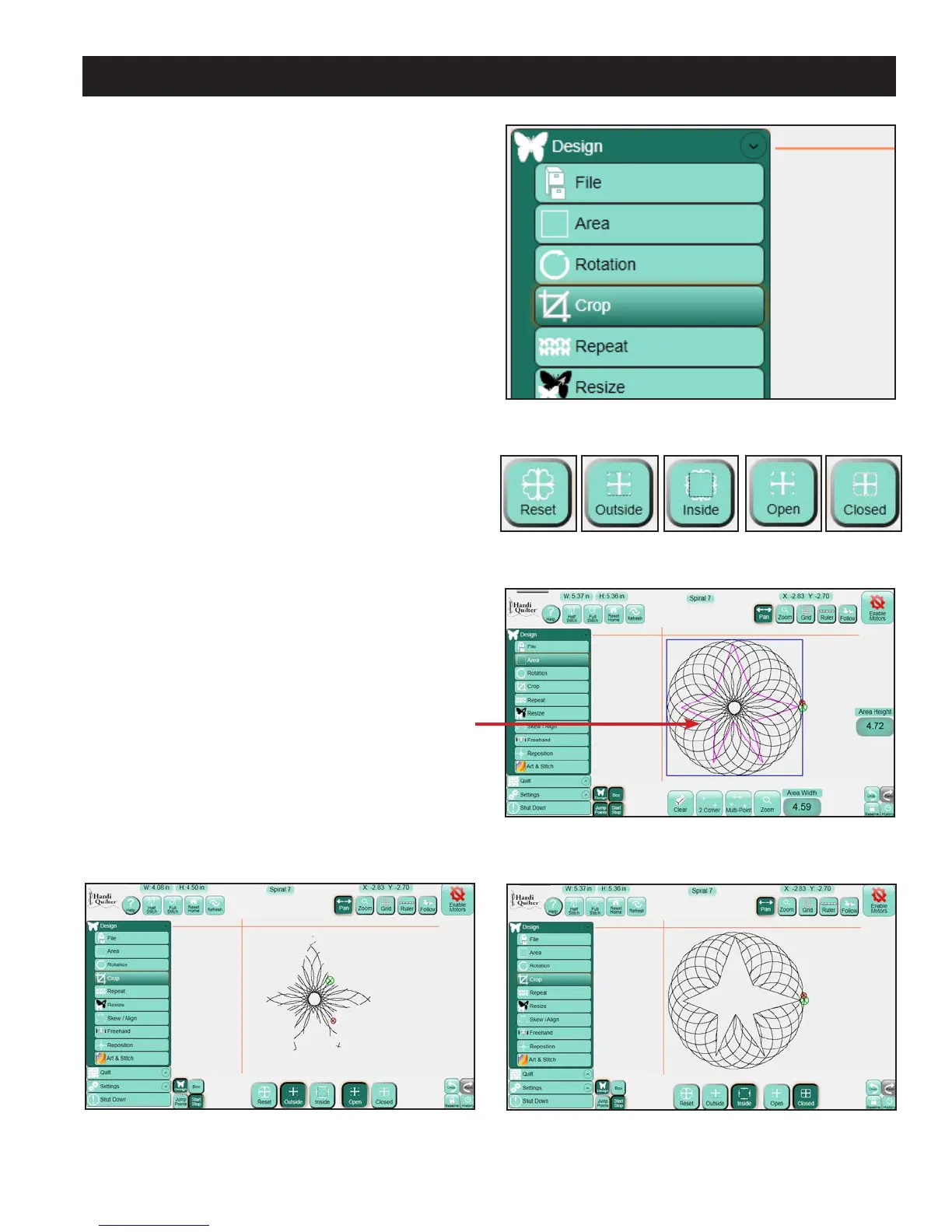
Select the Design menu and press the Crop sub-
menu button (Figure 5.42). If the Crop panel
buttons (Figure 5.43) at the bottom of the screen
are grayed out, an Area has not yet been dened.
Dene the Area to be cropped using the area tool
(Figure 5.44).
Outside
Select the Outside option to crop away everything
outside the dened Area and keep everything
within that Area (Figure 5.45). (Note that the gure
shows the result with jump points and the bounding
box turned o.)
Inside
Select the Inside option to crop away everything
inside the dened Area and keep everything outside
that Area (Figure 5.46).
Figure 5.42
Figure 5.44
Figure 5.43
Figure 5.45
Figure 5.46
Star-shaped crop
area created using
Multi-Point












 To Next Page