Art & Stitch 6.1
6. Art & Stitch
Art & Stitch is comprehensive quilting-design
soware for creating and modifying quilting
designs. It is included with the HQ Pro-Stitcher. e
HQ Pro-Stitcher can pass designs quickly and easily
into Art & Stitch to enable the quilter to use any of
the Art & Stitch tools to modify the design however
necessary. Art & Stitch automatically loads when the
HQ Pro-Stitcher starts and runs in the background,
so passing les from HQ Pro-Stitcher to Art & Stitch
happens very quickly.
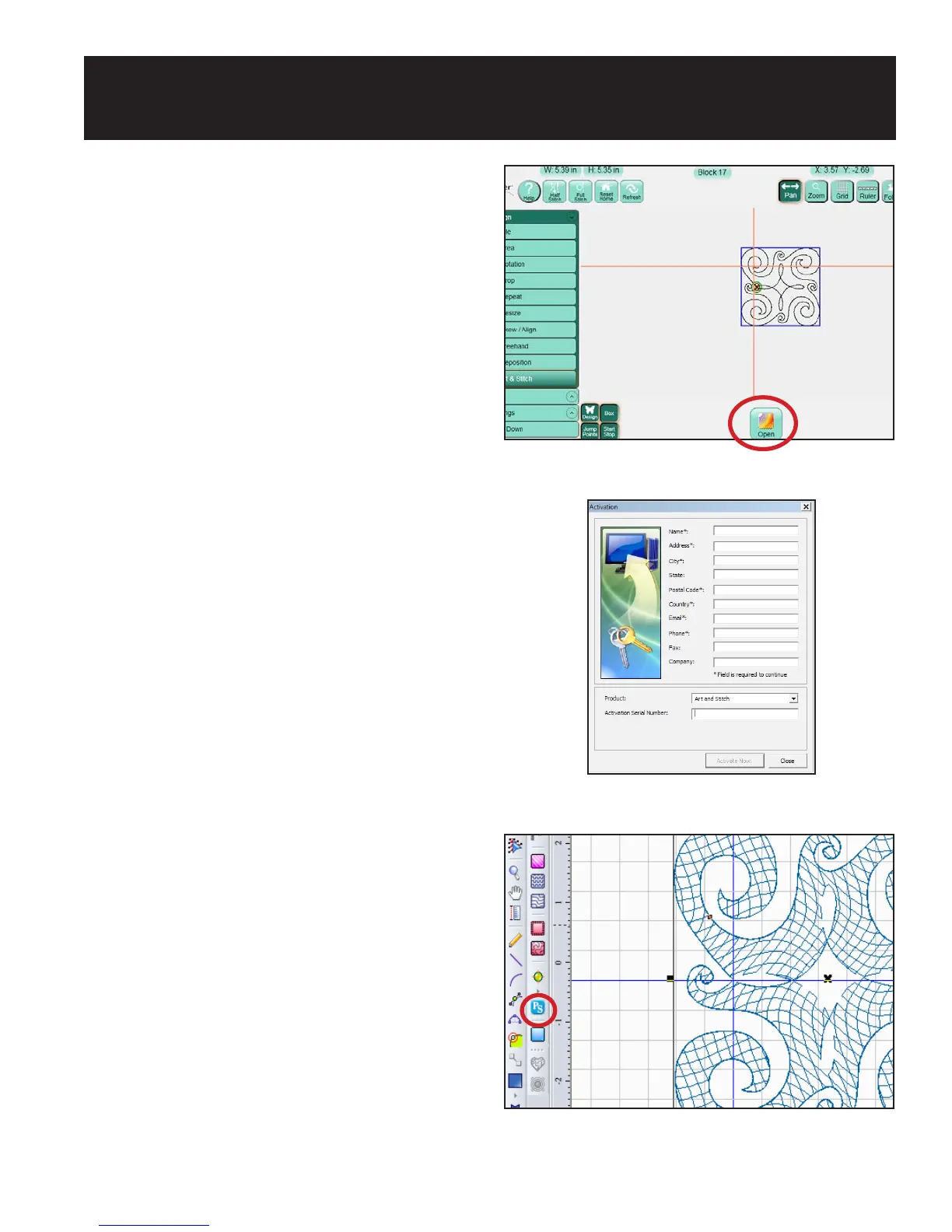
To pass the design to Art & Stitch, select the Design
menu and then press the Art & Stitch sub-menu
button. Press the Open button at the bottom of the
screen to open the Art & Stitch soware (Figure 6.1).
If Art & Stitch is open and has been licensed, the
design will open in Art & Stitch. If Art & Stitch has
not yet been licensed, a licensing screen will appear
for entering license information. Pressing the Close
button will bypass registration but the quilter will not
be able to save any changes to the design until the Art
& Stitch license is activated (Figure 6.2). Follow the
instructions in the Art & Stitch instruction manual
for oine activation.
When the design is passed into Art & Stitch, the
position information is maintained; as long as the
design is not moved in Art & Stitch, it will be in the
same location when it is passed back to HQ Pro-
Stitcher. Pass the modied design back to HQ Pro-
Stitcher by pressing the HQ Pro-Stitcher button on
the Art & Stitch toolbar on the le-hand side of the
Art & Stitch screen (Figure 6.3).
CAUTION: If a design is opened in Art & Stitch
without using the HQ Pro-Stitcher soware and the
HQ Pro-Stitcher button is pressed to pass the design
into the HQ Pro-Stitcher soware, the design will
be saved in its current state with the same name
it had when it was opened. is could lead to
unintentionally writing over a design. To avoid this,
always save the design with a new working name
when it is directly loaded in Art & Stitch.
Figure 6.1
Figure 6.2
Figure 6.3












 To Next Page