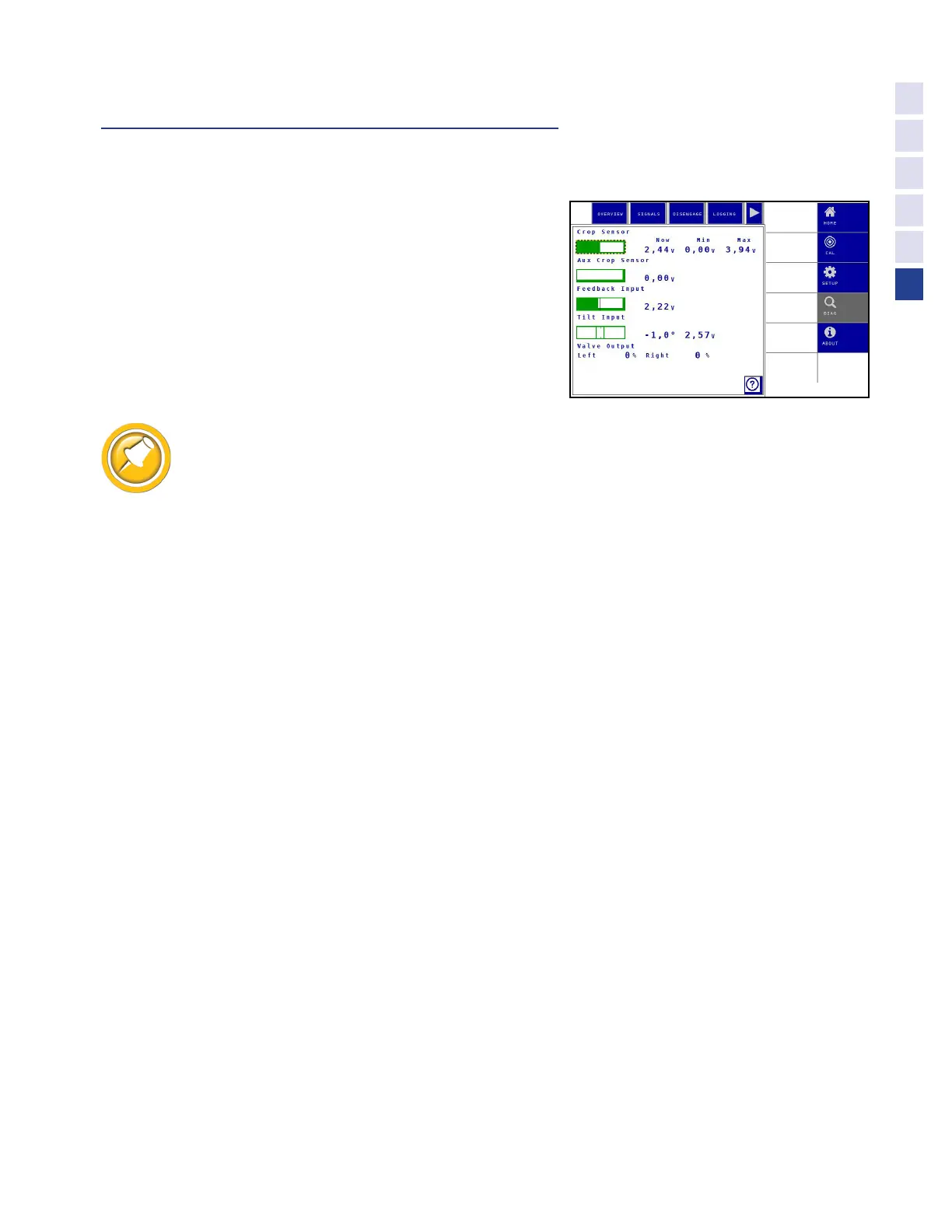
Diagnostic Pages on VT
Accessing Diagnostics
1. Access Truesight 2 VT screen on display.
•
If you are unsure how to do this see Operation/
Finding VT Applications section of this manual
2. Choose the Diag tab at right then Overview,
Disengage, or Signals at top of screen menu.
Diagnostics - "Overview"
Tapping a display item gives more information (Min & Max values)
Crop Sensor
•
Main crop sensor voltage
•
2.5V centered 1-4V range
•
Voltage decreases when stalks push left side of wand
•
Voltage increases when stalks push right side of wand
Aux Crop Sensor
•
Optional second crop sensor voltage
•
2.5V centered 1-4V range
•
Voltage decreases when stalks push left side of wand
•
Voltage increases when stalks push right side of wand
Feedback Input
•
Steering angle sensor
•
2.5V centered 1-4V range (2.7 centered OEM sensor)
•
Voltage decreases when turned one way
•
Voltage increases when turned opposite way
Tilt Input
•
Internal Slope sensor
•
Displays in degrees of center
•
“Bubble” arround center shows approximate level
Valve Output
•
Displays Left/Right valve output percentage
Motor Output
•
Displays Left/Right motor output percentage
39
Advanced Info



 To Next Page