52
|
HEAT-TIMER CORP.
059305–00 REV. E
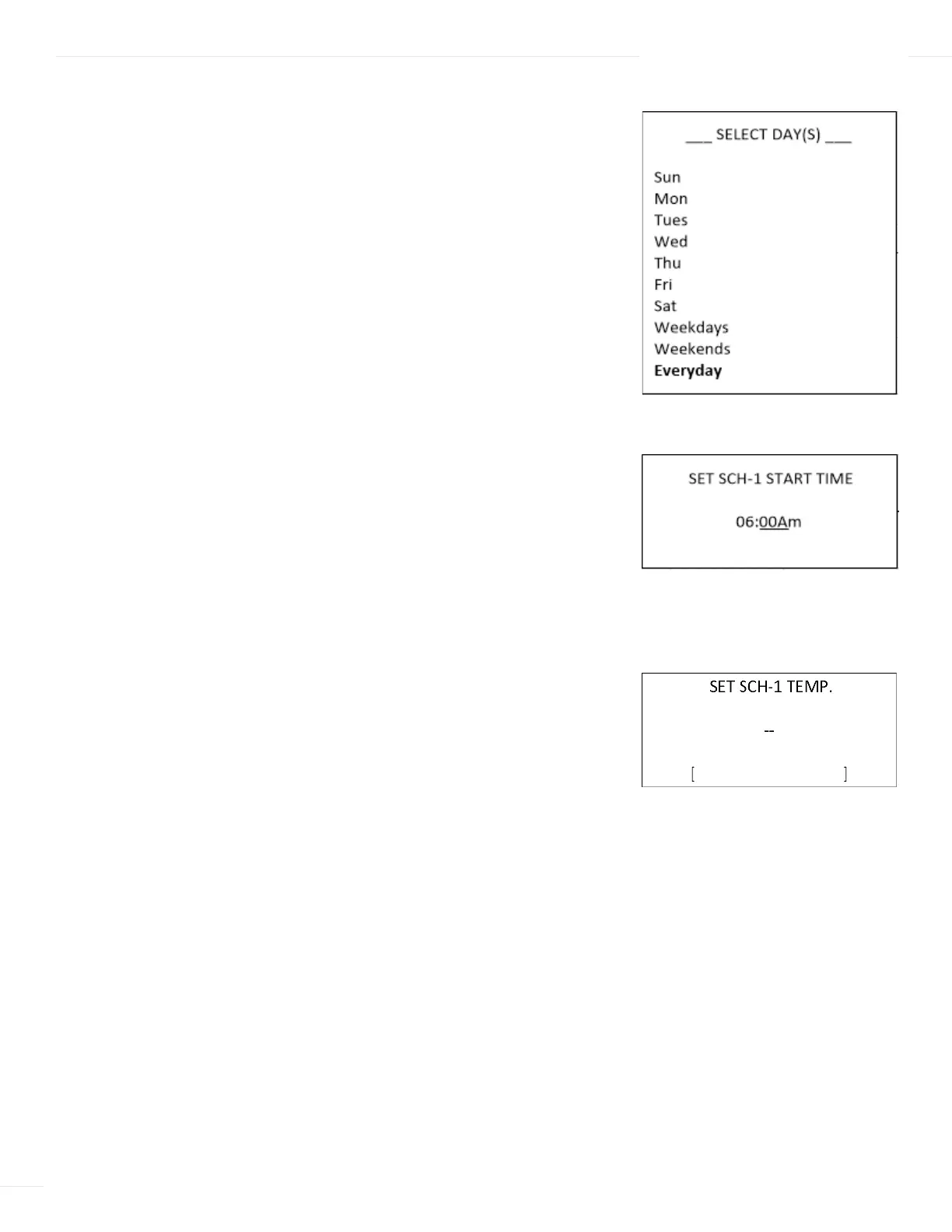
SELECT DAYS
Selections: Weekdays, Weekends, Everyday, or specific days
Available in Control Mode: ETV or ETV + HTLV
Menu Path: /Schedules > Temp. Schedules > Select Day
Description:
Select the days or group of days (weekends, weekdays, or everyday) to
apply the schedule.
SET SCHEDULE START TIME
Selections: Numerical values for Time
Available in Control Mode: ETV or ETV + HTLV
Menu Path: /Schedules > Temp. Schedules > Select Days >
Set SCH-1 Start Time
Description:
Specifies the schedule start time. Four Schedule Start Times can be set
for each day. Each start time has its own temperature setting (See “Set Schedule
Temperature” on page 52).
SET SCHEDULE TEMPERATURE
Selections: 40°F/4.5°C to 200°F/93°C Default: 0°F/-18°C
Available in Control Mode: ETV or ETV + HTLV
Menu Path: /Schedules > Temp. Schedules > Select Days >
Set SCH-1 Start Time > Set SCH-1 Override
Description:
The the Temp. setting overrides the Setpoint and sets the system
temperature to the entered value. The new Schedule Setpoint temperature is displayed
on the screen with an asterisk (for example, 130F*). All Temp. settings for each day of
the week must be set to guarantee that the default setting is replaced.
- MINIMUM RUNTIME -
2 min
[ ]
BACK ▲▼ SAVE
- STAGE SETTINGS -
Reaction Time 2min
Minimum Runtime 2min
BACK ▲▼ SAVE
-- REATION TIME --
2 min
[ ]
BACK ▲▼ SAVE
- MINIMUM RUNTIME -
2 min
[ ]
BACK ▲▼ SAVE
- STAGE SETTINGS -
Reaction Time 2min
Minimum Runtime 2min
BACK ▲▼ SAVE
-- REATION TIME --
2 min
[ ]
BACK ▲▼ SAVE
- MINIMUM RUNTIME -
2 min
[ ]
BACK ▲▼ SAVE
- STAGE SETTINGS -
Reaction Time 2min
Minimum Runtime 2min
BACK ▲▼ SAVE
-- REATION TIME --
2 min
[ ]
BACK ▲▼ SAVE
06 DISPLAY AND PROGRAMMING



 To Next Page