The specific operation steps are as follows:
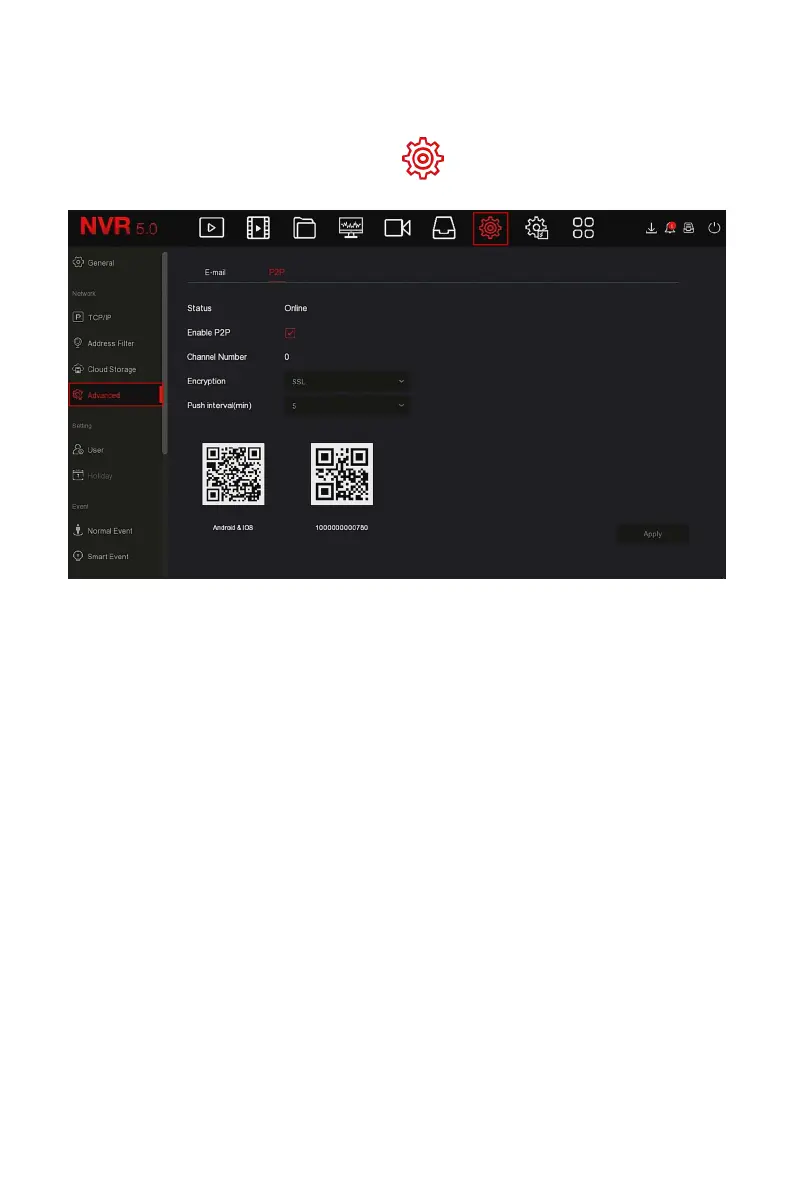
Step 1: On the main menu page, click " → Advanced→ P2P" to enter the
P2P interface, as shown in Figure 5-53.
Figure 5-53
Step2: Make sure that the NVR accesses the external network, choose
"Enable P2P→ Encryption ".
Steps 3: Click "Apply" to save the configuration.
Steps 4: Click "Refresh" and the status shows "Online ". This indicates that
P2P is enabled and can be used normally.
Status: Display device P2P online status.
Enable P2P: Turn on / off device P2P function, The default is "Online".
Channel Number: Shows the current user viewing the number of NVR
channel videos on the App client.
Encryption: Select the encryption type. After the device is enabled, all
signaling communication between the device and the server is
encrypted.
Push interval(min): Set the time interval for the device to snap the
alarm picture to the mobile client, and you can also select "Turn off the
push" to stop the device from pushing the picture to the mobile
terminal.
Android &IOS: P2P client download link.



 To Next Page