Coming soon!
5.3.6.5 Advanced
Coming soon!
5.3.7 System
5.3.7.1 General
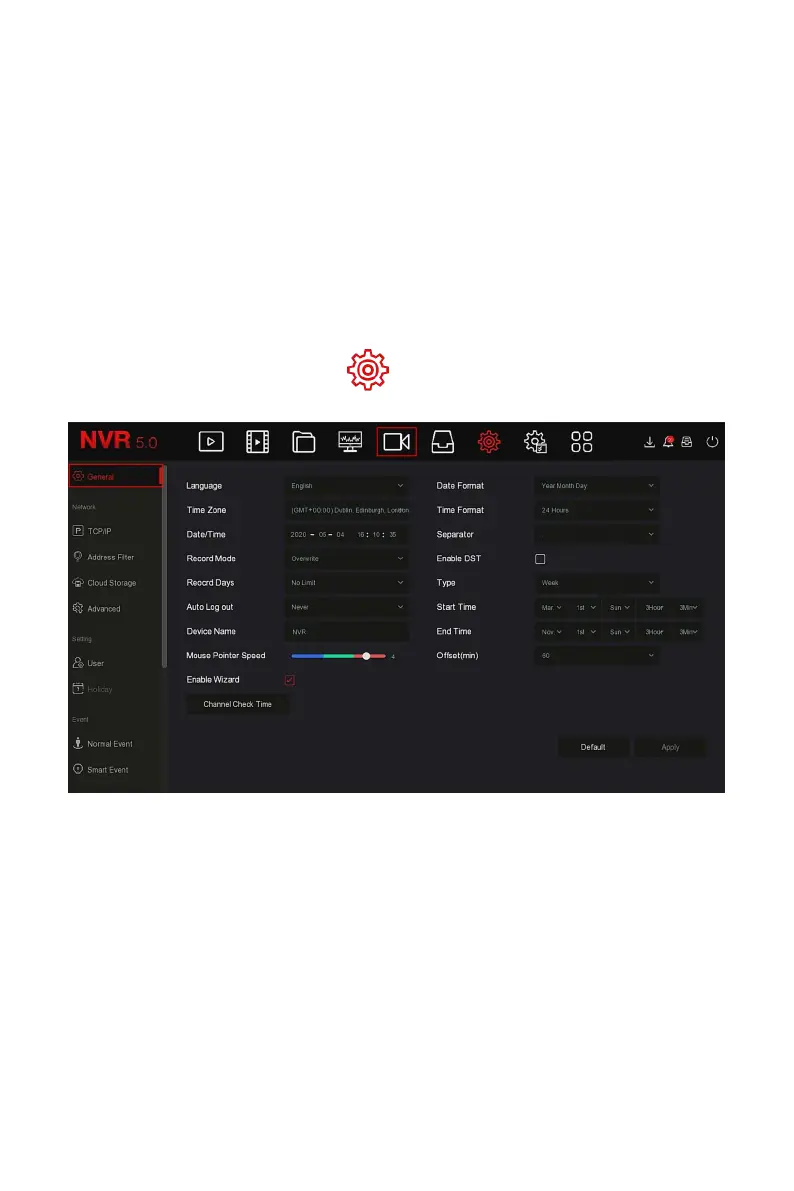
In General interface, you can view and set the NVR language, recording mode,
recording days, video standards, standby time and date settings.
The specific operation steps are as follows:
Step 1: In the main menu, click " →General" to enter General setup
interface, as shown in Figure 5-41 below.
Figure 5-41
Steps 2: Set the language, time zone, recording mode, recording days and
other information of the device as needed.
Language: Set the default language of the system, currently supports
Simplified Chinese, Traditional Chinese, English, Polish, Czech, Russian,
Thai, Hebrew, Bulgarian, Arabic, German, French, Portuguese, Turkish,
Spanish, Italian, Hungarian, Roman, Korean, Dutch, Greek, Vietnamese
and Japanese, the default is English.
Time Zone: Select the time zone of the device from the drop-down box.
For example: Beijing is GMT+8:00.



 To Next Page