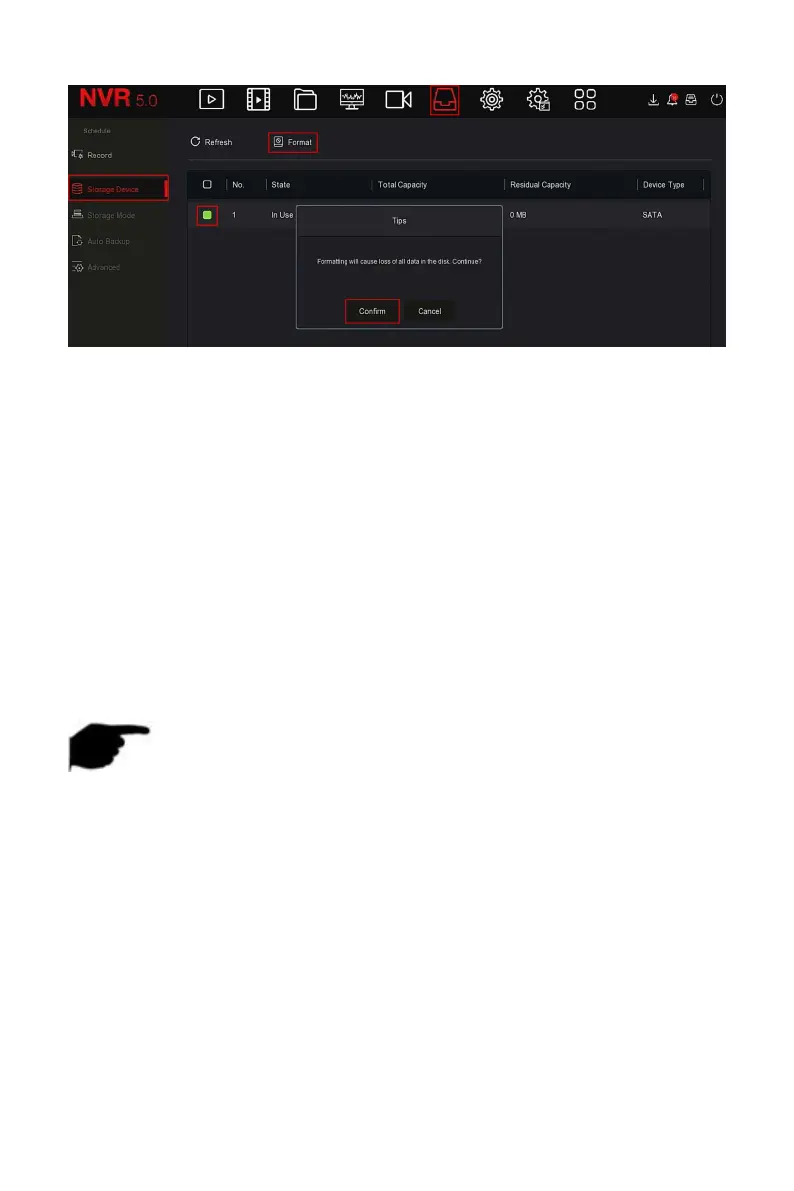
Figure 5-40
○
2
Steps 3: Wait for the formatting progress bar to finish, click "Confirm", the
NVR will restart and complete the format. The status of the hard disk is "In
Use" at this time.
No.: The number of HDD that connect the system.
State: Detect the current working status of HDD, you could use only that
displays "In use"; after formatting is completed, you need to restart NVR,
the status displays "In use".
Total Capacity: The total available HDD capacity, the single HDD capacity
can not exceed the maximum capacity: 8TB.
Residual Capacity: Display the residual capacity of the current HDD;
Refresh: Click update disk list information.
NOTE
"No Disk" indicates that the device is not connected or the hard disk is
not detected.
The hard disk must be formatted first when the hard disk is connected
to the NVR for the first time or when "Not formatted" is displayed.
The device does not need to format the hard disk when the hard disk
status shows "In Use".
After formatting the hard disk, restart the NVR to takes effect.
5.3.6.3 Storage Mode
Coming soon!
5.3.6.4 Auto Backup



 To Next Page