Target: To view the snapshot results, check the options ("Face
Detection", "Person Detection", "Smart Detection", "Vehicle
Recognition") to view real-time snapshots.
5.3.2 Playback
5.3.2.1 Playback channel video
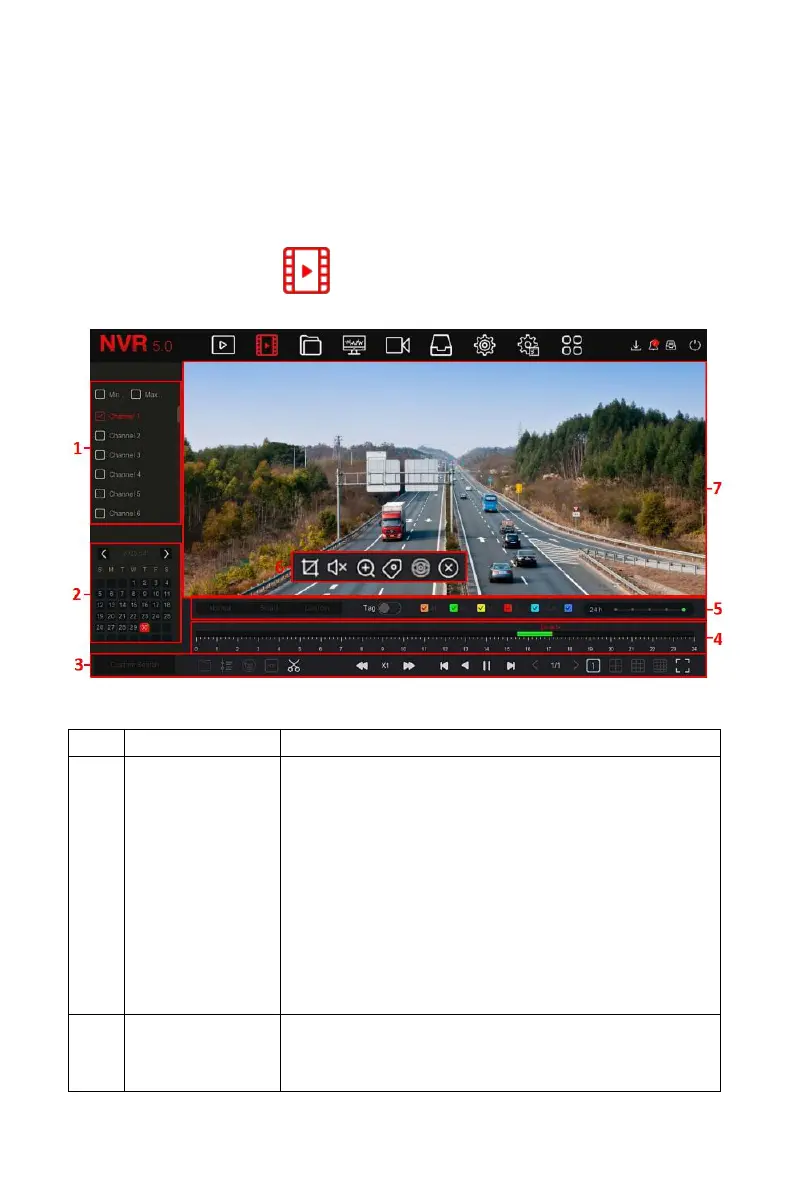
In the main menu, click " " to enter the video playback interface, as
shown in Figure 5-7.
Figure 5-7
The interface description is shown in the following table:
Min / Max Ch: Intelligently select the number of
playback channels. The minimum number of
channels selects one channel at a time by
default; the maximum number of channels
selects the maximum channels supported by the
device at a time, such as 4 channels.
Channel: select the channel number to be
queried (multiple channels can be selected at
the same time, depending on the device
performance)
Dates with colored dots on the calendar indicate
that there is video recording, and dates without
color dots indicate that there is no recording on



 To Next Page