Steps 5: Click "Apply" to save the setting.
NOTE
There are four options for sensitivity, low, medium, high, and highest.
The lower the sensitivity, the harder it is to detect a side face or a face
that is not clear enough. The user can adjust it according to the actual
environment.
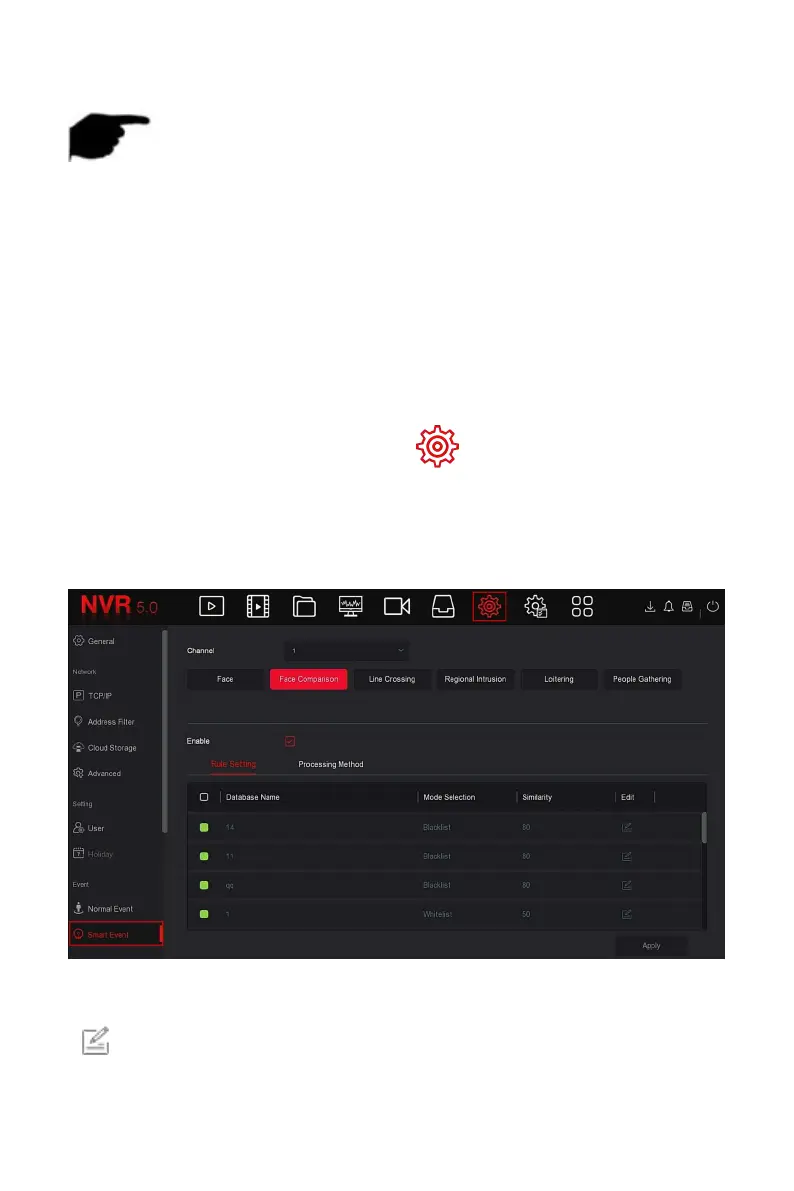
Face comparison is used to compare the detected faces.When a
face that has been stored in the face database appears in a channel, the
corresponding alarm will be triggered.
The specific operation steps are as follows:
Step 1: In the main menu, choose " →Smart Event " to enter Smart
Event setting interface.
Steps 2: Choose the channel you need to set the face comparison, click
"face comparison " to enter face comparison setting mode, as shown in
Figure 5-67
○
1
below.
Figure 5-67
○
1
Steps 3: Click "Enable→Rule Setting ", select the face database, click
" "to enter the similarity setting interface, as shown in Figure 5-67
○
2
below.



 To Next Page