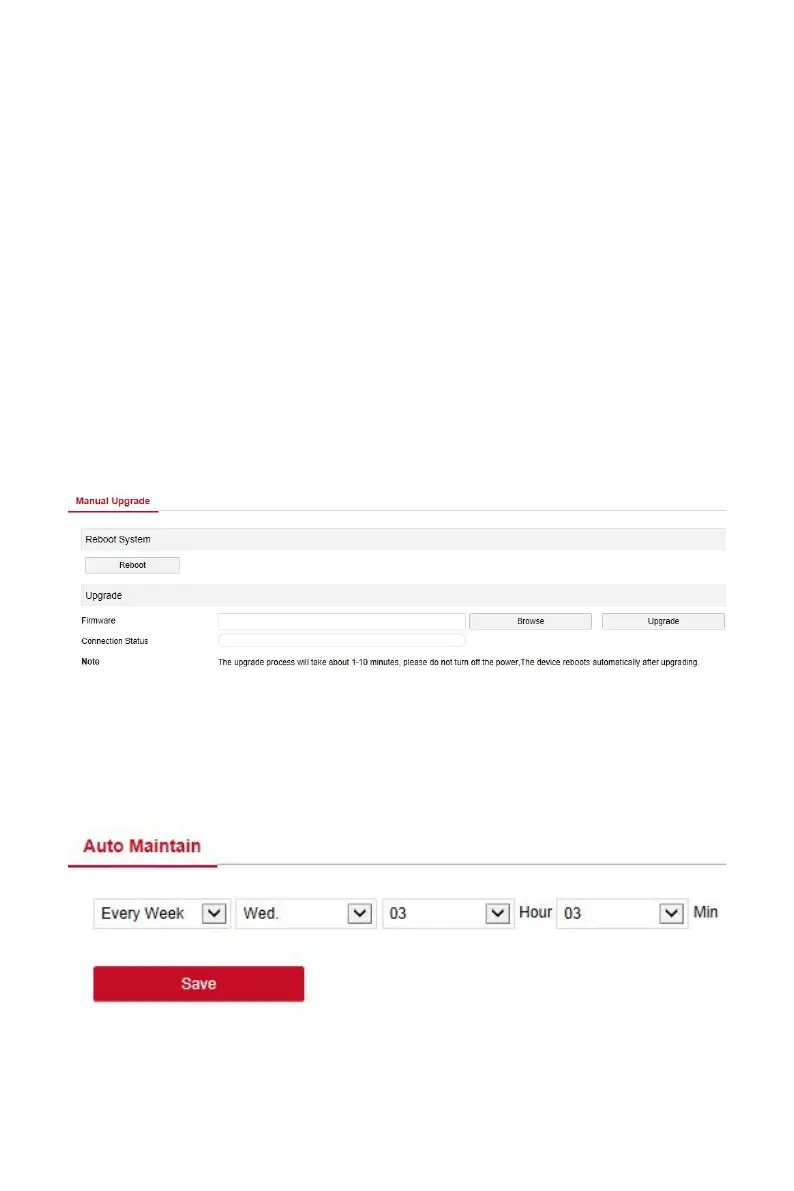
6.5.5.3 Manual Upgrade
In the manual upgrade interface, you can reboot and upgrade your device.
The device system restart and upgrade steps are as follows:
Step 1: In the main interface, click "Configuration →Maintain →Manual
Upgrade" to enter the manual upgrade interface, as shown in Figure 6-44
below.
Steps 2:
System Reboot: Click "Reboot→ OK", WEB enters the device
restart interface, wait for the device to restart, enter the login
interface and log in again.
Upgrade: Click "Browse" to open the folder where the device
upgrade file is located, select the upgrade file, click "Upgrade", the
device starts to upgrade, and the WEB enters the device upgrade
interface. After the device is upgraded and restarted, log in to the
login page.
Figure 6-44
6.5.5.4 Auto Maintain
In the main interface, click "Configuration →Maintain →Auto Maintain" to
enter the auto maintain interface, as shown in Figure 6-45 below. Here you
can set the device reboot time, the auto maintenance settings and NVR
settings consistent.
Figure 6-45
6.5.5.5 Restore Default



 To Next Page