EasyManua.ls Logo

Hitachi VM-E530A - Page 43

Hitachi VM-E530A
56 pages
Print Icon
To Next Page IconTo Next Page
To Previous Page IconTo Previous Page
Loading...
Programming
the
Remote
Control
for
the
VCR
It
is
necessary
to
program
the
edit
remote
control
code
to
match
the
VCR
before
starting
editing.
1.
Turn
the
VCR
on.
2.
Aim
the
remote
control
at
the
infrared
receiver
on
the
VCR
and
press
the
VCR
SET
button
on
the
remote
control
and
hold
it,
then
press
the
button
corresponding
to
the
VCR's
maker
code.
For
example,
if
you
have
a
RCA
VCR,
press
the
VCR
SET
button
and
hold,
it,
then
press
the
DIS¬
PLAY
button.
To
check
whether
the
remote
control
code
matches
that
of
your
VCR
or
not,
point
the
remote
control
at
the
infrared
receiver
on
the
VCR
and
press
the
VCR
SET
button
and
hold
it.
If
the
remote
control
code
has
been
set,
the
VCR
channel
is
counted
up
automatically.
Note:
Your
VCR
should
have
an
infrared
remote
control.
Note:
if
the
channel
on
the
VCR
does
not
change
with
the
above
operation,
you
need
to
switch
the
remote
control
code
of
your
VCR.
Refer
to
the
VCR's
instruction
manual.
If
the
channel
still
does
not
change
after
you
have
changed
the
VCR's
remote
control
code,
the
edit
remote
control
cannot
operate
your
VCR.
VCR
Brands
Press
VCR
SET
cndftiis
Button
Hitachi
REVERSE
Sony
PROGRAM
Panasonic
FORWARD
Toshiba
IN
Mitsubishi
COPY
START
Sanyo
OUT
Sharp
44
NEC
JVC
Akai
A/V
DUB
Gold
Star
m
PHILIPS
II
RCA
DISPLAY
Zenith
COUNTER
RESET
Magna
vox
TITLE
ON/OFF
Note:
The
remote
control
code
is
held
in
memory
until
it
is
changed
or
the
batteries
are
replaced.
Note:
Point
the
remote
control
straight
at
the
VCR's
Infrared
receiver
for
operation.
Note:
Use
the
remote
control
indoors.
When
the
infrared
receivers
of
the
VCR
and
cam¬
corder
are
exposed
to
direct
sunlight
or
strong
artificial
light,
the
remote
control
may
not
operate
correctly,
Note:
The
remote
control
cannot
be
oper¬
ated
if
there
is
an
obstacle
between
the
remote
control
and
infrared
receiver,
Especially,
be
careful
of
this
during
dubbing.
Note:
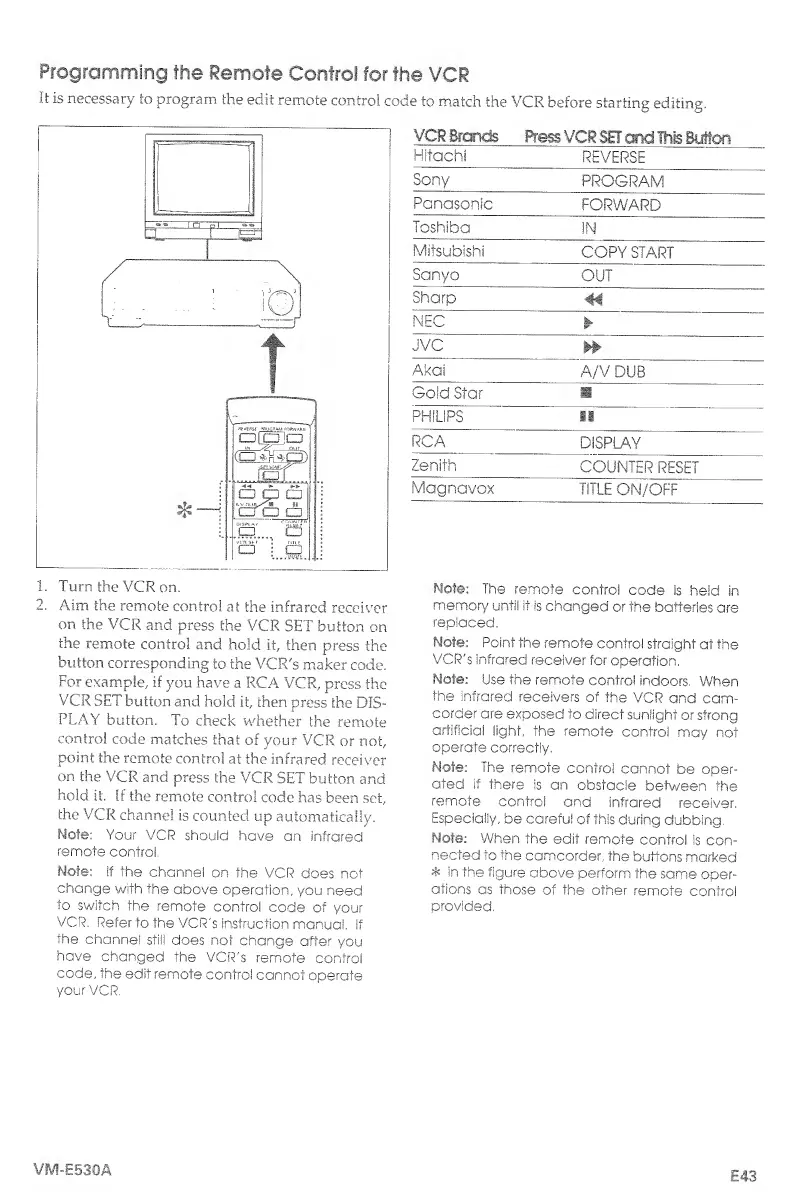
When
the
edit
remote
control
is
con¬
nected
to
the
camcorder,
the
buttons
marked
*
in
the
figure
above
perform
the
same
oper¬
ations
as
those
of
the
other
remote
control
provided.
VM-E530A
E43

Table of Contents

Related product manuals