EasyManua.ls Logo

Hitachi VM-E530A - Page 44

Hitachi VM-E530A
56 pages
Print Icon
To Next Page IconTo Next Page
To Previous Page IconTo Previous Page
Loading...
Operation
You
can
select
up
to
four
different
scenes
or
segments
to
be
copied
at
one
time.
Note:
If
sunlight
or
strong
artificial
light
strikes
the
camcorder's
infrared
receiver,
the
editing
operation
may
not
be
possible,
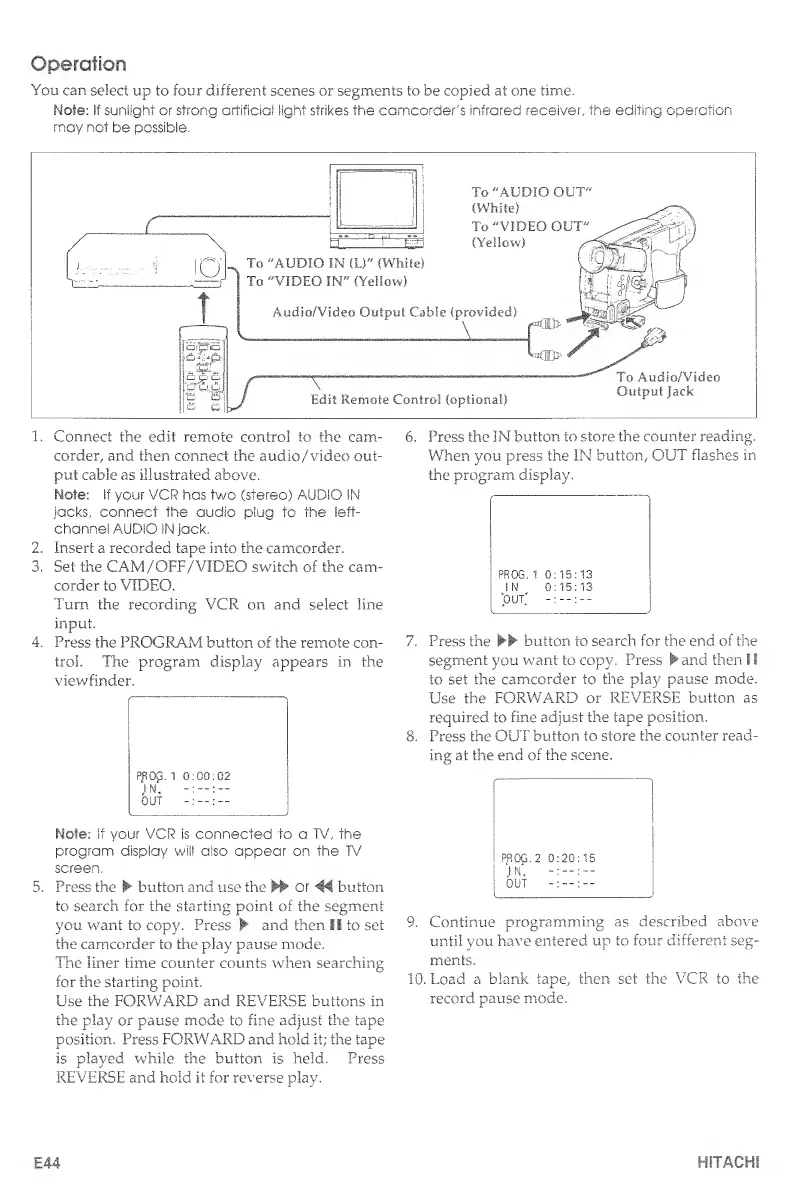
1.
Connect
the
edit
remote
control
to
the
cam-
6.
Press
the
IN
button
to
store
the
counter
reading,
corder,
and
then
connect
the
auclio/video
out-
When
you
press
the
IN
button,
OUT
flashes
in
put
cable
as
illustrated
above.
the
program,
display.
Note:
if
your
VCR
has
two
(stereo)
AUDIO
IN
jacks,
connect
the
audio
plug
to
the
left-
channel
AUDIO
IN
jack.
2.
Insert
a
recorded
tape
into
the
camcorder.
3.
Set
the
CAM:/OFF/VIDEO
switch
of
the
cam¬
corder
to
VIDEO.
Turn
the
recording
VCR
on
and
select
line
input.
4.
Press
the
PROGRAM
button
of
the
remote
con-
7.
Press
the
►►
button
to
search
for
the
end
of
the
trol.
The
program
display
appears
in
the
segment
you
want
to
copy.
Press
and
then
!
I
viewfinder.
to
set
the
camcorder
to
the
play
pause
mode.
Use
the
FORWARD
or
REVERSE
button
as
required
to
fine
adjust
the
tape
position.
8.
P
ress
the
OUT
button
to
store
the
counter
read¬
ing
at
the
end
of
the
scene.
Note:
if
your
VCR
is
connected
to
a
TV,
the
program
display
will
also
appear
on
the
TV
screen.
Press
the
button
and
use
the
or
46
button
to
search
for
the
starting
point
of
the
segment
you
want
to
copy.
Press
and
then
II
to
set
the
camcorder
to
the
play
pause
mode.
The
liner
time
counter
counts
when
searching
for
the
starting
point.
Use
the
FORWARD
and
REVERSE
buttons
in
the
play
or
pause
mode
to
fine
adjust
the
tape
position.
Press
FORWARD
and
hold
it;
the
tape
is
played
while
the
button
is
held.
Press
REVERSE
and
hold
it
for
reverse
play.
PROG.
2
0:20:15
IN,
OUT
9.
Continue
programming
as
described
above
until
you
have
entered
up
to
four
different
seg¬
ments.
10.
Load
a
blank
tape,
then
set
the
VCR
to
the
record
pause
mode.
E44
HITACHI

Table of Contents

Related product manuals