MC10 HS Operation - Measuring Unbalance
5 - 1
5 Operation
The possibility to perform the following operational
steps depends on the access privileges set for the re-
spective access group.
5.1 Measuring Unbalance
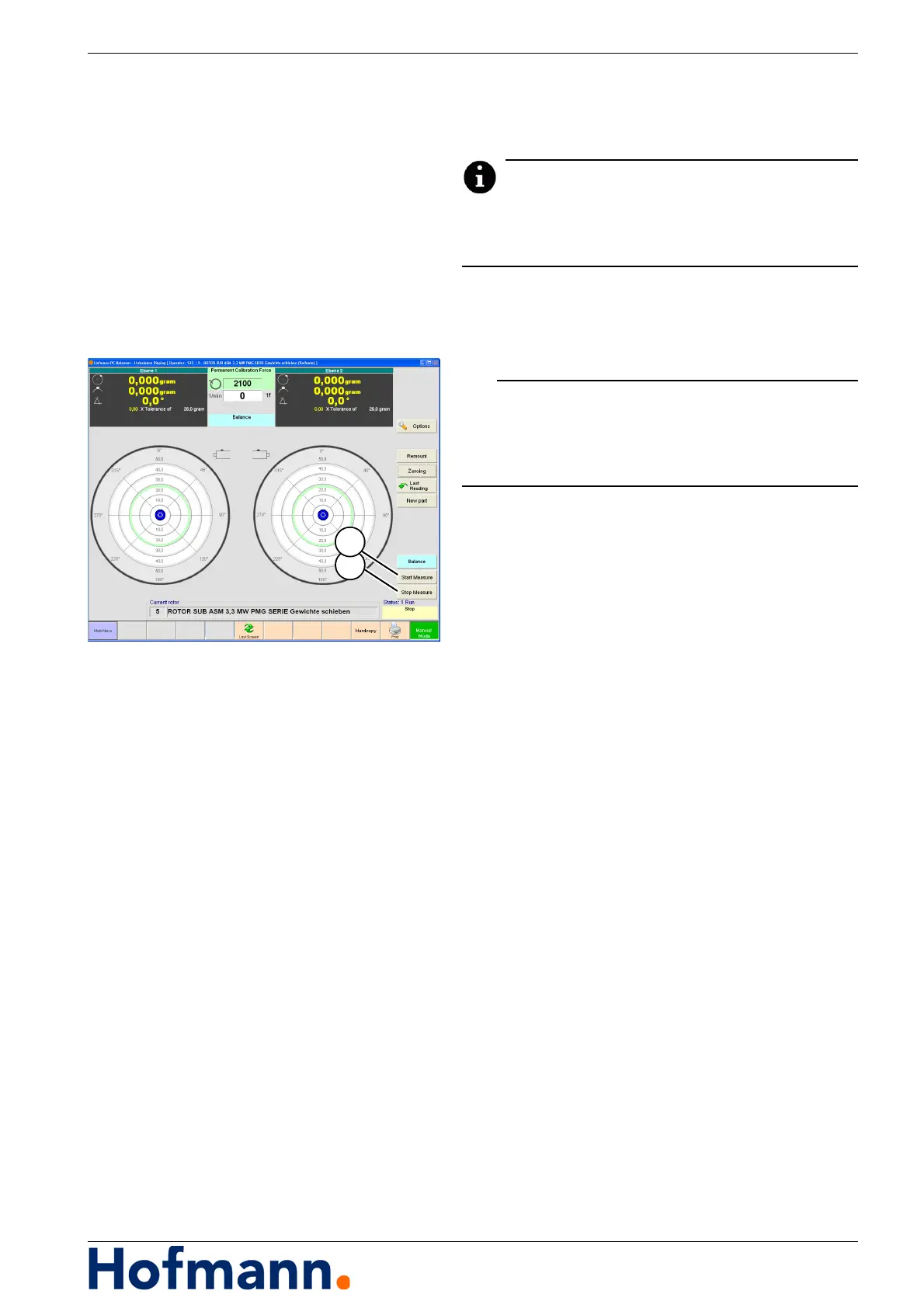
Unbalance Display
Do not leave the unbalance display during the auto-
matic operation. Do not select any other screens or
settings.
For a full description refer to the machine's Op-
erator's Manual.
5.1.1 "MANUAL" Operating Mode
The machine is ready for operation and set up
on the rotor to be measured.
Press the "Start Measure" (1) key.
When measuring run is completed:
Press the "Stop Measure" (2) key.
The measurement result is displayed.
5.1.2 "AUTOMATIC" Operating Mode
The machine is ready for operation and set up
on the rotor to be measured.
Press the "Start Measure" (1) key.
Once the rotor has reached measuring speed,
the unbalance measurement takes place, the
rotor is evaluated according to the specified tol-
erance, and the compensation values are de-
termined, if necessary.
The drive is stopped automatically by the un-
balance measuring system.
The drive can be stopped at any time by press-
ing the foot switch or the "Stop Measure" key
on the touch screen.


 To Next Page