Insight FD Mini C-Arm Imaging System User Guide
Using the Insight Application
MAN-09971 Revision 001 48
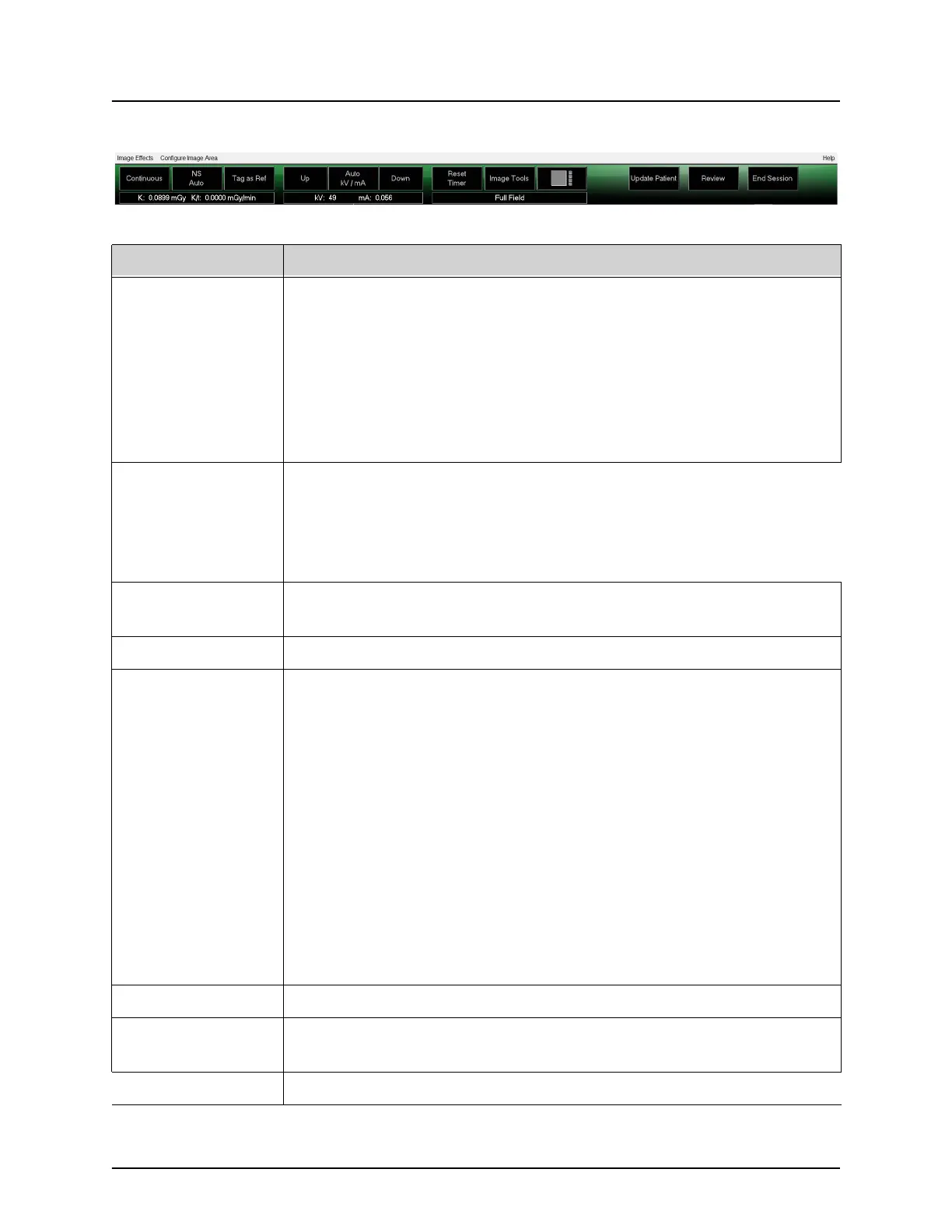
Figure 28 Image Acquisition Screen Buttons
Table 32 Image Acquisition Screen, Button Functions
Button Function
Acquisition Mode
Selection
Cycles through:
Continuous – Displays continuous images when X-rays are
actuated.
Snapshot – Captures and displays one image when X-rays are
actuated.
Cine Record – Gathers all images acquired into a cine loop.
Continuous and/or Snapshot mode may be disabled (Physician
Preferences on Page 30).
NS (Noise
Suppression)
Cycles through the levels selected during configuration. See Table
19.
Select Ultra to acquire images for very still anatomy. Image
processing for Ultra level imaging averages frames at High noise
suppression.
Tag as Ref Marks the image as a reference image for the current session or
unmarks a marked image.
Up Increases the kV and/or mA incrementally by one.
X-ray Power
Adjustment
Selection
Cycles through:
Auto kV / mA - Automatically adjusts kV / mA.
Manual kV / mA (simultaneous kV/mA enabled) - Allow the user
to manually increase or decrease kV / mA.
Manual kV (simultaneous kV/mA disabled) - Allow the user to
manually increase or decrease the kV.
Manual mA (simultaneous kV/mA disabled) - Allow the user to
manually increase or decrease the mA.
Auto IQ kV / mA - Automatically adjusts kV / mA. Select IQ mode
to acquire an enhanced image with improved clarity. Using IQ
mode increases the x-ray dose to the patient. Use Auto IQ when
enhanced clarity is required in accordance with ALARA.
See Physician Preferences on Page 30 for setting simultaneous kV/
mA.
Down Decreases the kV and/or mA incrementally by one.
Reset Timer Resets the X-ray warning timer to zero and turns off the audible
alarm.
Image Tools Shows or hides the tool set in the Filmstrip/Tools area.




 To Next Page