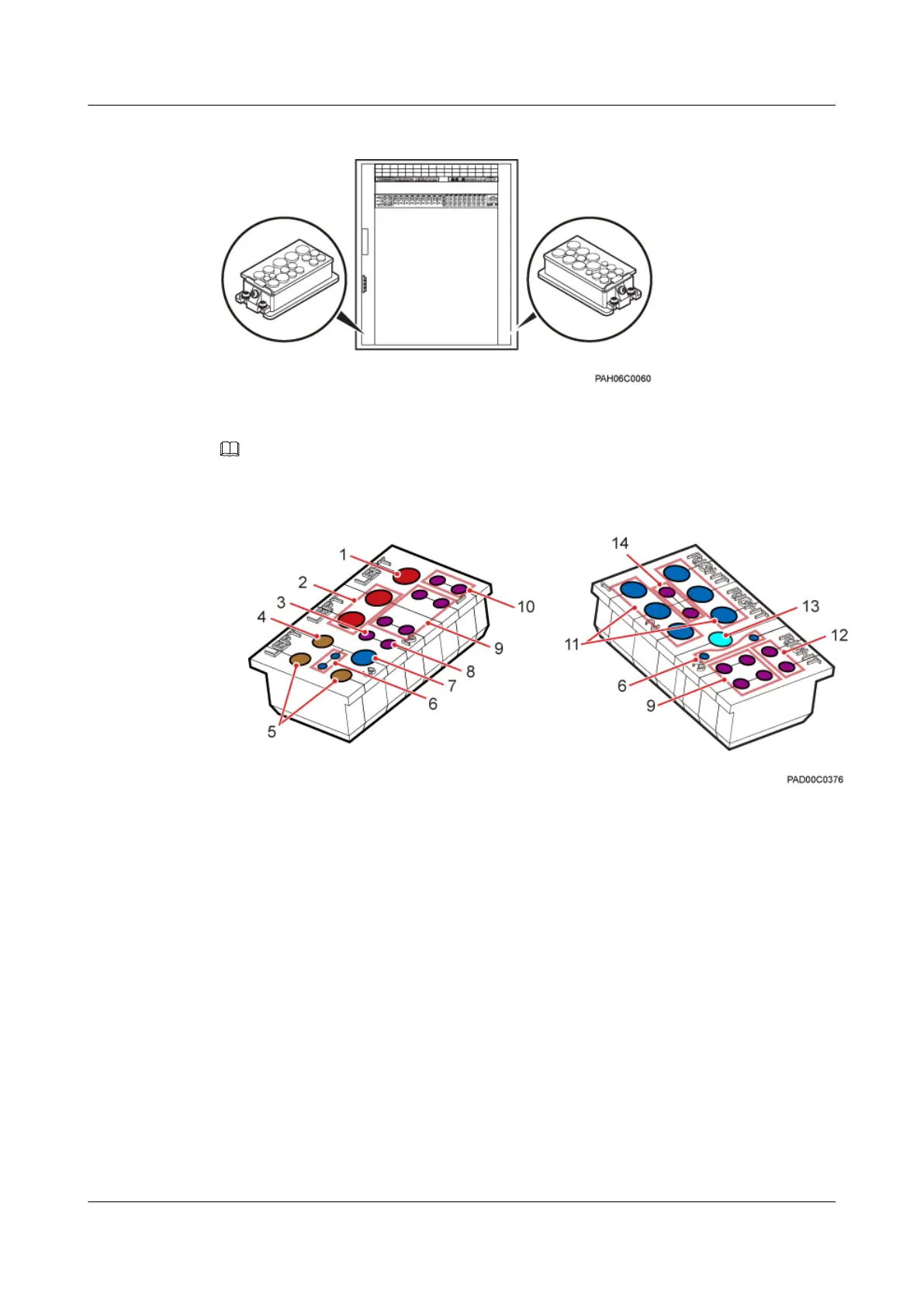
Figure 12-3 Cable outlet module of the TMC11H cabinet
NOTE
Figure 12-4 shows the exterior of the cable outlet modules of the TMC11H.
Figure 12-4 Cable outlet modules of the TMC11H
(1) Cable hole for an AC input power cable
(8) Cable hole for an SDH cable
(2) Cable holes for GPS jumpers (1/2") (9) Cable holes for CPRI optical cables
(3) Cable hole for a PGND cable (10) Cable holes for AC output power cables, or DC
output power cables
(4) Cable hole for an E1/T1 cable, or a GPS jumper
(RG8)
(11) Cable holes for RRU power cables
(5) Cable holes for E1/T1 cables (12) Cable holes for power cables for storage
batteries
(6) Cable holes for DC output power cables (of the
TMC and IBBS's FAN/TEC)
(13) Cable hole for a Boolean alarm signal cable, or
an E1/T1 cable
(7) Cable hole for an fiber optic cable (14) Cable holes for RS485 signal cables
BTS3900A(Ver.B)
Installation Guide 12 Installing the Cables
Issue 01 (2011-10-25) Huawei Proprietary and Confidential
Copyright © Huawei Technologies Co., Ltd.
85












 To Next Page