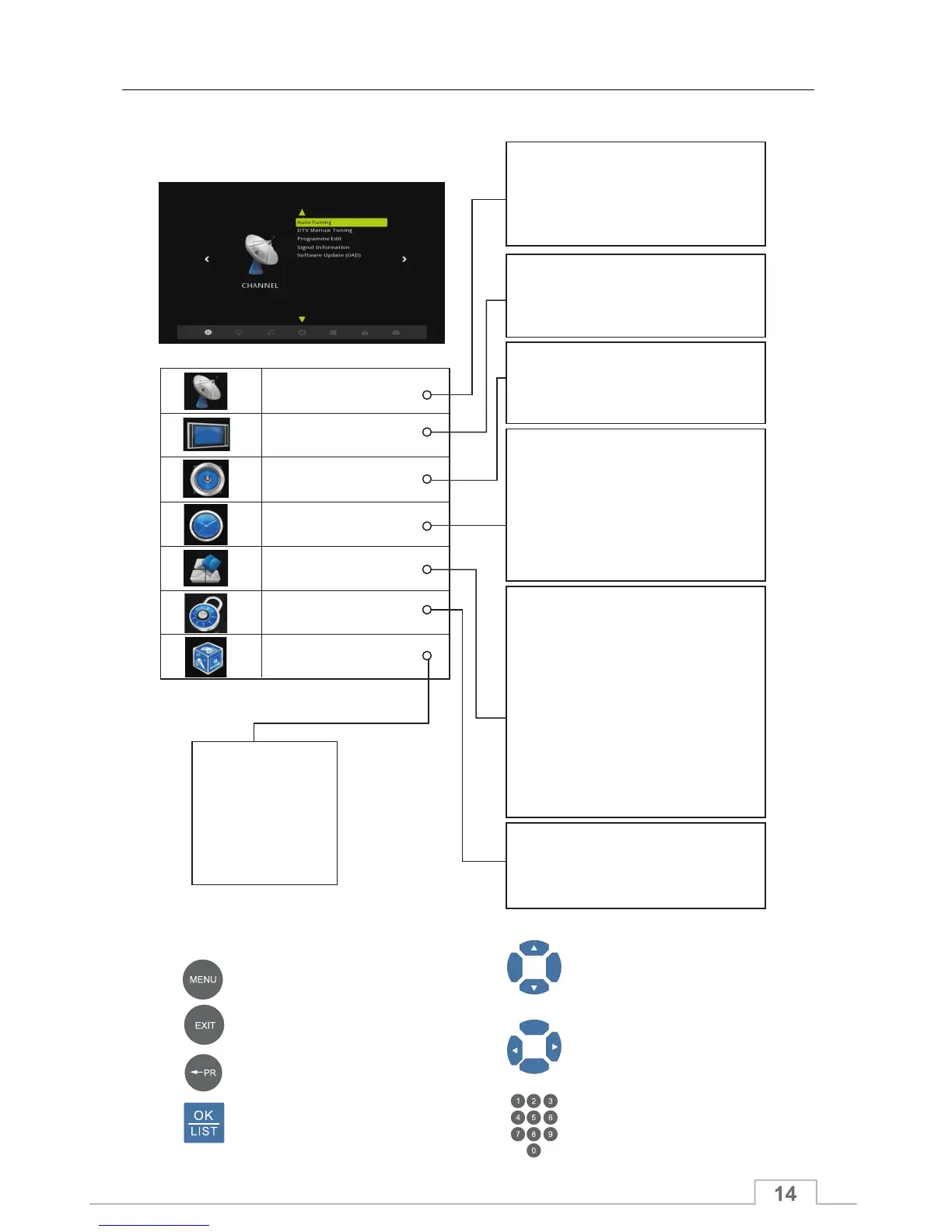
Menu Overview
How to Navigate
CHANNEL
PICTURE
SOUND
TIME
OPTION
LOCK
APPLICATIONS
-
-
- Subtitle Language
- Hearing Impaired
- PVR File System
- Restore Factory Default
- Network Configuration
- Eco power save
- Antenna power
- Country
OSD Language
Audio Language
- Software Update (USB)
- System Information
- Lock System
- Set Password
- Block Programme
- Parental Guidance
- Movie
- Music
- Photo
- File
- Setup
- Device
- Return to DTV
- Auto Tuning
- DTV Manual Turning
- Programme Edit
- Signal Information
- Software Update(OAD)
- TV System
- Scart Mode
- Aspect Ratio
- Resolution
- Balance
- SPDIF Mode
- SPDIF Delay
- AD Switch
- Clock
- Off Time
- On Time
- Sleep Timer
- Auto Sleep
- Time Zone
- Menu TimeOut
- Menu Transparency
Displays the Menu OSD
Exit all On-Screen
Selects (Enters) a menu or
confirms a selection
Moves among menus or options
Changes or adjusts the option
Enters the number (0~9)
Goes back to the previous screen
Menu Information
Media Player
When you press MENU key, you can enter Main Menu.



 To Next Page