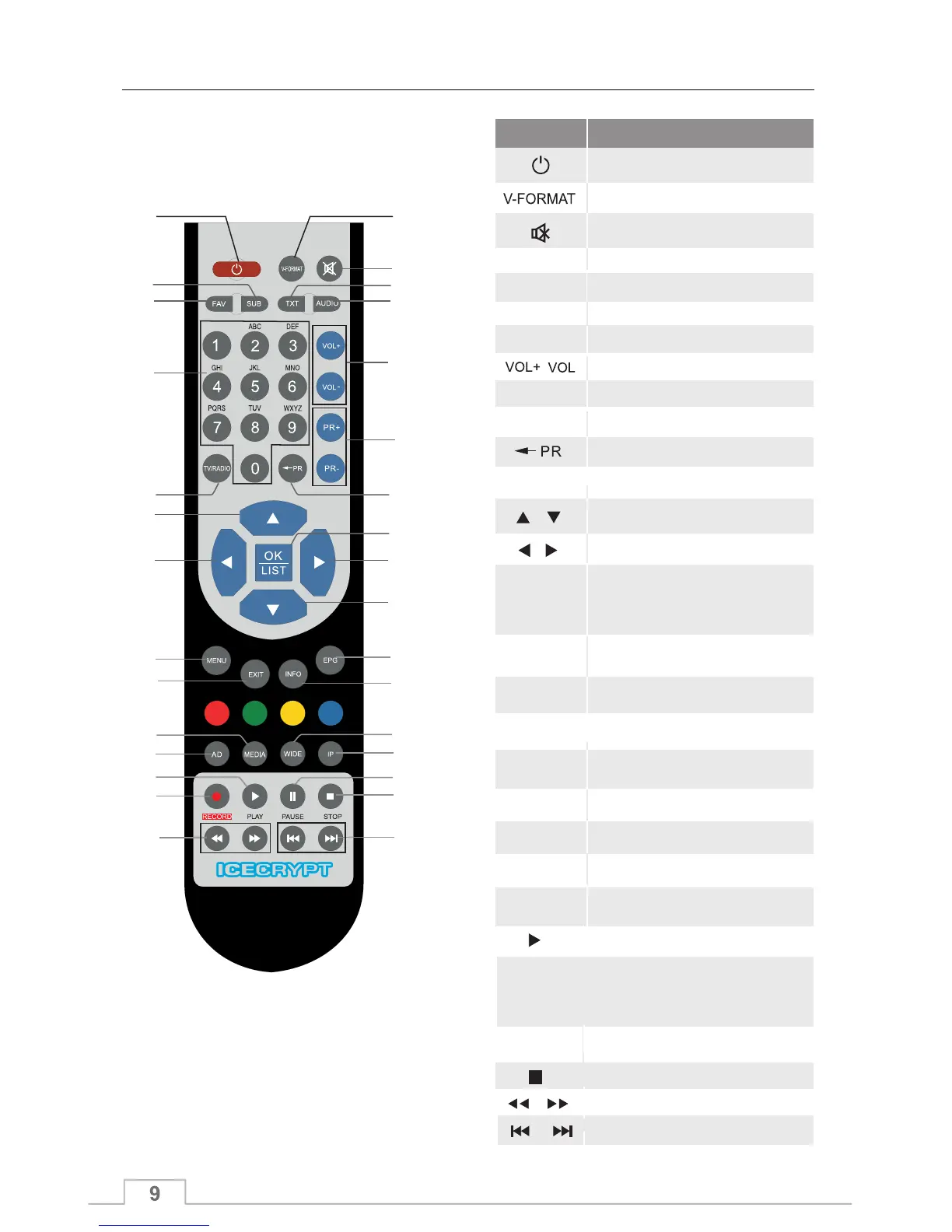
1
2
3
9
12
16
4
10
19
17
8
11
15
13
13
14
14
18
5
7
6
2220
23
26
24
27
28 29
21
25
Function
Key
Standby/ON
Selects TV or Radio mode
0~9
MENU
EXIT
OK/LIST
Direct channel entry
Displays the on-screen menu
Return to the previous menu or
exit from main menu
TV/RADIO
Displays the favourite group list
FAV
Selects the highlighted item in the
menu screen or when entering
a value in any input mode.
Displays the channel list.
Move cursor up or down in menu
Move cursor right or left in menu
Displays the EPG
(Electronic Programme Guide)
EPG
Subtitles
TXT
Teletext
PR+,PR-
Back to previous channel
SUB
Change the aspect ratio
Volume up / down
IP
Change the HD format
Change channels up/down
Optional OTT functions on
selected models
MEDIA Start the Media Player
WIDE
1
2
3
4
5
6
7
8
9
10
11
12
13
14
15
16
17
18
19
20
21
22
23
Mute
Display the Audio window.
AUDIO
Displays the current channel
information
INFO
AD
Audio Description ON/OFF
Remote control
Play
RECORD
Stop
Optional record functions on
selected models
24
25
26
27
28
29
PAUSE
When USB is not connected, press to
TV picture, press again to release.freeze
When USB is connected, press to
live TV (time-shift function)pause
Previous and next
Press to fast forward or fast backward
Quick Start Guide



 To Next Page