78
13
OPTIONAL INSTALLATIONS
13-4
Optional IF filters
Several IF filters are available for the IC-746. You can
install 2 filters for the 9 MHz IF and 1 filter for the 455
kHz IF. Choose appropriate filter(s) for your operating
needs.
9 MHz optional filters:
FL-101
CW NARROW FILTER
250 Hz/–6 dB
FL-232
RTTY
/
CW NARROW FILTER
350 Hz/–6 dB
FL-100
CW NARROW FILTER
500 Hz/–6 dB
FL-223
SSB NARROW FILTER
1.9 kHz/–6 dB
FL-103
SSB WIDE FILTER
2.8 kHz/–6 dB
455 kHz optional filters:
FL-53A
CW NARROW FILTER
250 Hz/–6 dB
FL-52A
CW
/
RTTY NARROW FILTER
500 Hz/–6 dB
FL-222
SSB NARROW FILTER
1.8 kHz/–6 dB
FL-96
SSB WIDE FILTER
2.8 kHz/–6 dB
FL-257
SSB WIDE FILTER
3.3 kHz/–6 dB
D INSTALLATION
➀
Remove the bottom cover (p. 76).
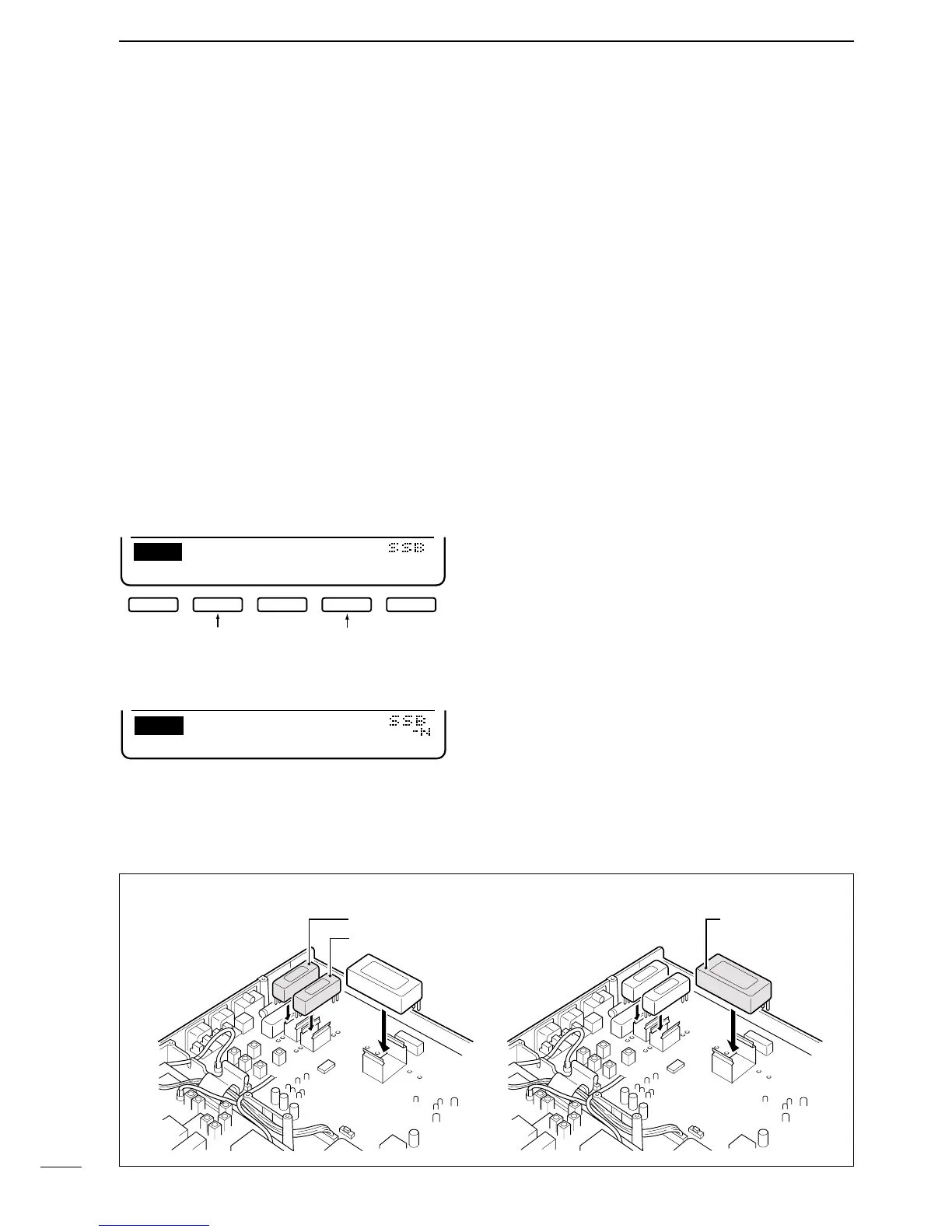
➁ Turn the transceiver upside down. Install the desired
filter as shown in the diagram below.
• The filters can be installed in either direction.
➂ Replace the bottom cover.
D USING THE FILTERS
➀
Select an installed filter in set mode (pgs. 60, 61).
➁ Push [FILTER] for 2 sec. to enter filter program
mode.
➂ Push a mode key to select the desired operating
mode.
➃ Push [FILTER] to set the selected filter condition
(normal or narrow).
➄ Push [F-2] one or more times to select the desired 9
MHz filter.
➅ Push [F-4] one or more times to select the desired
455 kHz filter.
➆ Repeat steps ➂ to ➅ to set filters for other operat-
ing modes if desired.
INSTALLING 9 MHz FILTERS INSTALLING 455 kHz FILTERS


 To Next Page