24 Chapter 2 Installation and Cabling
Ehave Series Full Digital IGBT CO
2
/MAG/MMA Multifunctional Inverter Welder User Manual
Safety Warning
Keep fingers, hair, and clothes away from the rotating parts such as the cooling fan and the wire inching
roll of the wire feeder.
2.7.4 Adjusting the Gas Flow
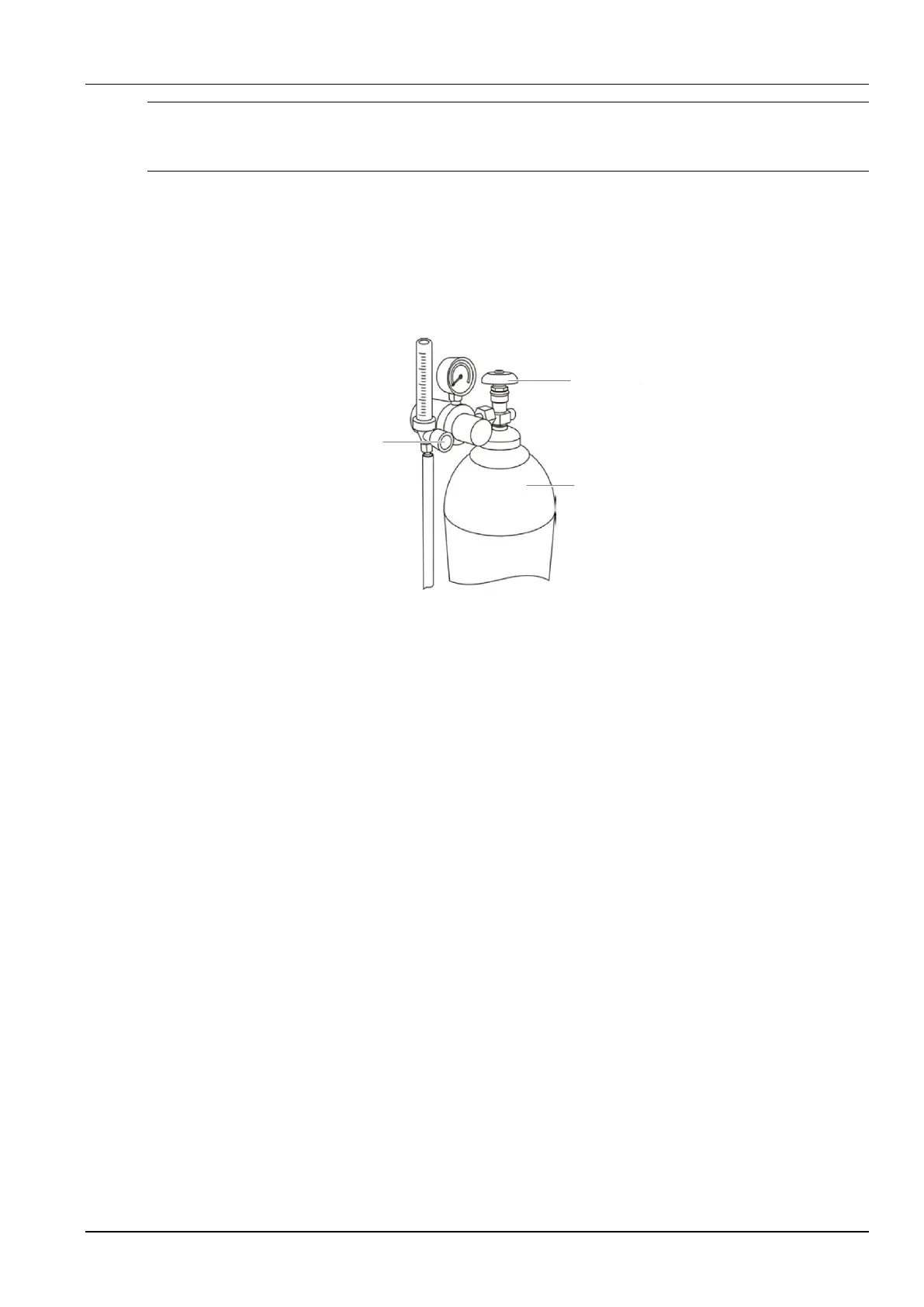
1. Turn on the switch of the gas cylinder. (See Figure 2-11.)
2. Turn on the flow adjusting knob.
Flow adjusting
knob
Gas cylinder
Gas cylinder
switch
Figure 2-11 Position of the flow adjusting knob
3. Press the gas detection button on the control panel and rotate the knob to set the gas flow to
an appropriate level.
2.7.5 Wire Inching
Stretch the welding torch and hold down the wire inching button (see Figure 2-12). The related
LED indicator turns on. When the welding wire is extended beyond the tip by about 10 mm,
release the button to stop wire inching. The LED indicator turns off. When you hold down the
button, you can use the current adjusting knob on the remote control box of the wire feeder to
change the wire inching speed. You can also use the wire inching button on the remote control
box of the wire feeder to inch wire and use the current adjusting knob to change the wire inching
speed.



 To Next Page