32 Image Vault
®
PRO Command
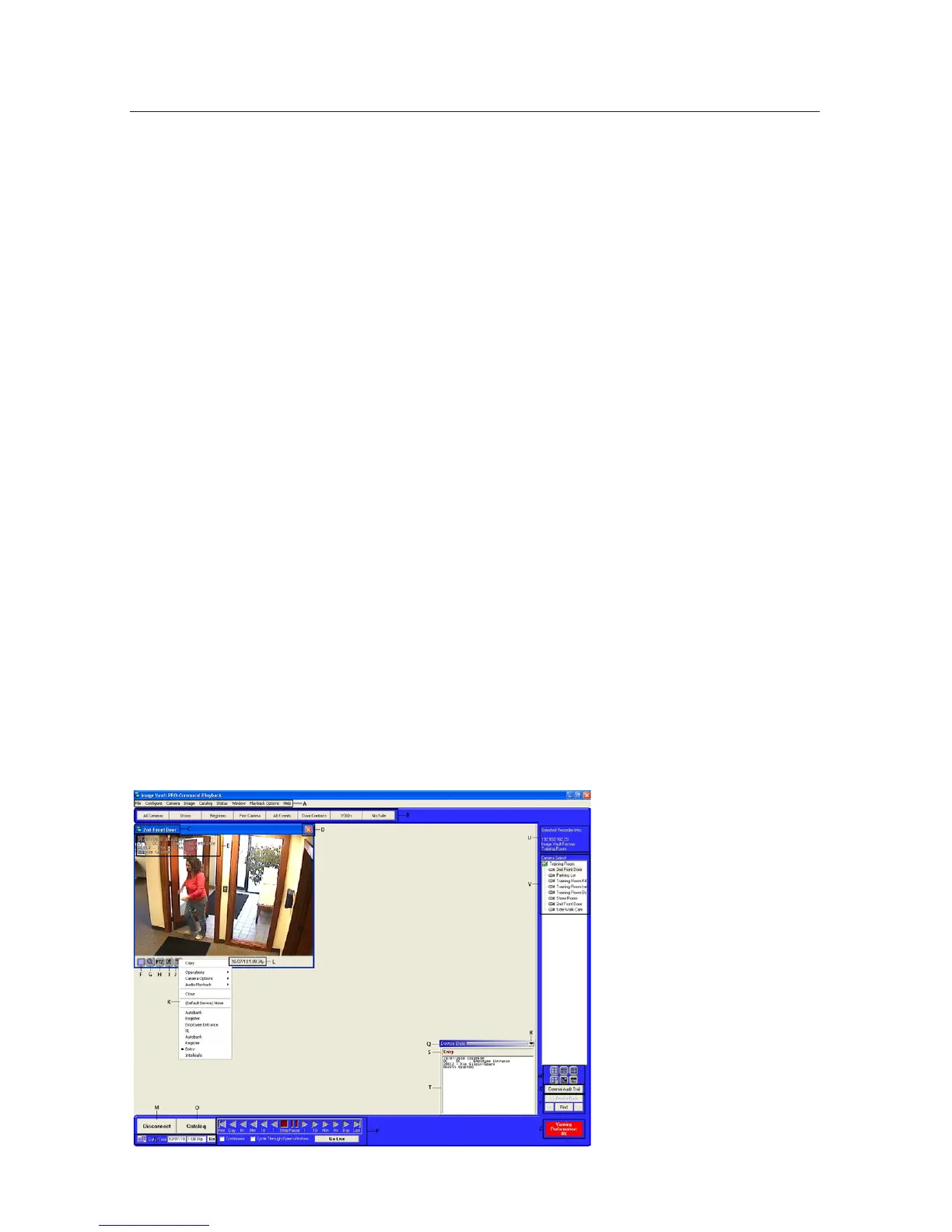
2.3 Playback Mode
Playback Mode is used to review recorded video, audio, and data. Use Playback
ModetoconguretheDVR’srecordingprocessandallotheradvancedfeatures.
Playback Mode on the DVR is almost identical to the remote playback software
(PRO-Command Playback). For complete information refer to the online help
in your software.
Playback Mode Description
Note: Various screen elements can change. These descriptions cover the basics.
Item A: Menu Bar.File,Congure,Camera,Image,Catalog,Status,Window,
Playback Options and Help menus.
Item B: QuickView Action Buttons.User-denedoptionalshort-cutbuttonsto
pullupspeciccamerasordata.
Item C: Camera Name. Camera name is displayed above the camera image in
the camera window (if window borders are enabled).
Item D: Close Icon. Click to close the camera window. If window borders are
turned off, scroll over the upper right corner and the close icon will appear auto-
matically.
Item E: POS Data. POS data may be overlaid on camera windows. Text attributes
are adjustable. Click and drag from one image to another to synchronize.
Item F: Full Screen Icon. Click to make the camera window “Full Screen” (occu-
pies full matte area). When zoomed to full screen, you may want to enable “Use
Smooth Zooming” for better screen display. Click the icon again to restore to the
previous size.
Item G: Zoom Icon. To use digital zoom, click the Zoom icon. The pointer changes to a
magnifying glass. Click and drag to select the zoom area and the image will instantly zoom.
This will show a Picture-in-Picture window so you may see the area you are zoomed into on
the full picture. You may jog, play or set full-screen zoomed images as if they were normal
images. While the Zoom feature is active you will not be able to drag-and-drop to sync



 To Next Page