63 Image Vault
®
PRO Command
7.7 Alarm Output Setup
The“AlarmOutput”featureallowsyoutodenewhateventsgenerateanalarm
and how each alarm is sent. You may set up alarms for camera loss, system
events (rebooting or pressing the “Copy Video to Media” button), Data Rule
triggers or external (dry contact) input triggers. Alarms may be sent in the form
of email, SMS text message, dry contact closure output, or dial-up to a service
bureau.Tocongurethesefeaturesselect“AlarmOutputSetup”fromtheStatus
menu.
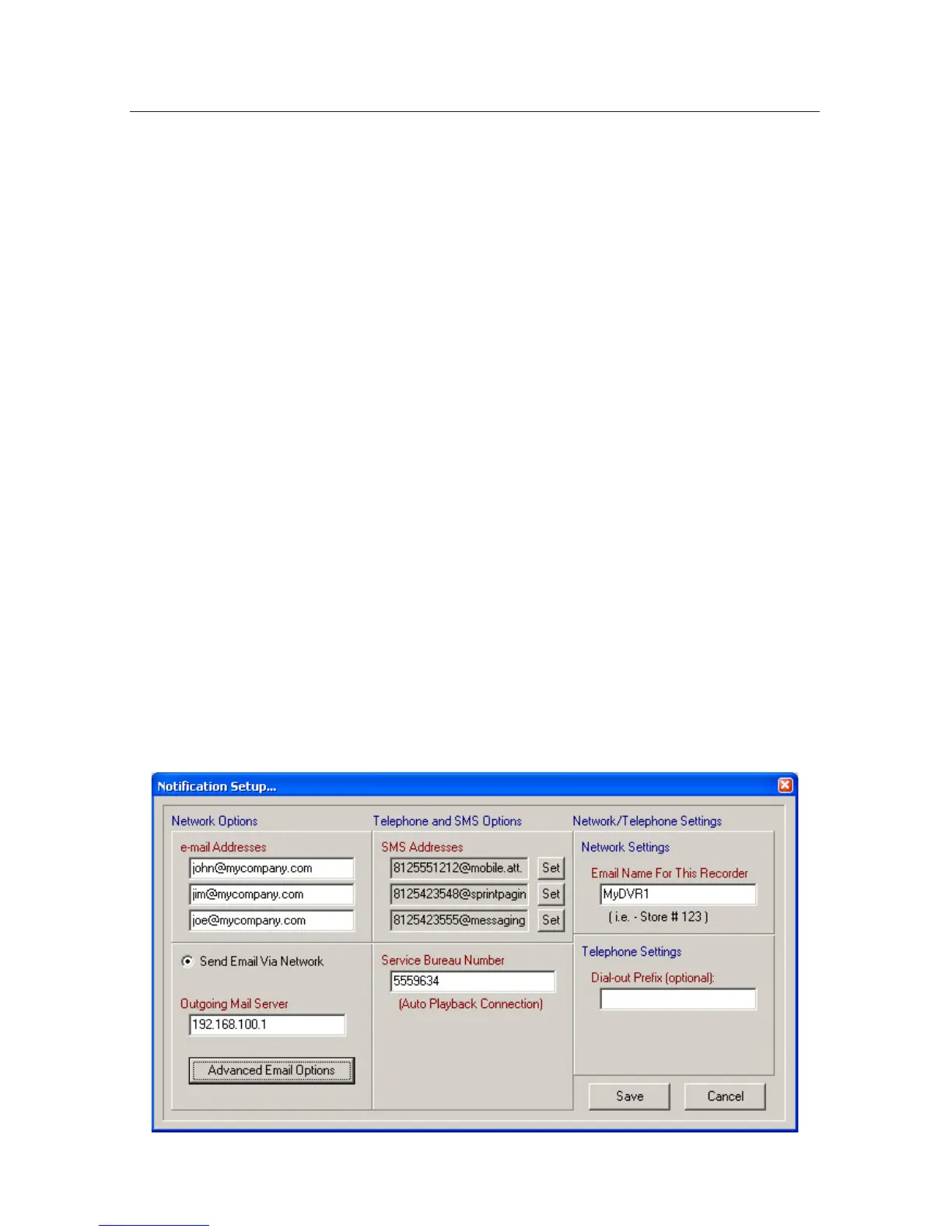
NoticationSetup
CongureNoticationSettingsbeforeyouconguretheindividualalarms.On
themainAlarmOutputSetupdialog,clickthe“EditNotications”buttontoac-
cesstheNoticationsSetupdialog.
Network (Email/SMS): To send email or an SMS text message the DVR must
be on a network with a mail server. Enter the “IP Address” of the outgoing mail
server. Click on “Advanced Email Options” if you need to set or change the Pass-
word, From, or Time-out settings. The text you enter in the “Email Name For This
Recorder” will appear in the subject line of the resulting email.
Email:Enteruptothreeemaildestinationsinthe“emailAddresses”eldsto
receive alarms from the DVR. Enter an “Email Name For This Recorder” under
Network Settings.
SMS Text Messages: To enter a cell phone number to receive an SMS text mes-
sage click a “Set” button under SMS Addresses. Enter the phone number and
select the cellular network.



 To Next Page