Platinum™ VX
Installation and Operation Manual System Configuration
© 2016 Imagine Communications Corp. Proprietary and Confidential. Version 1.2 | Page 144
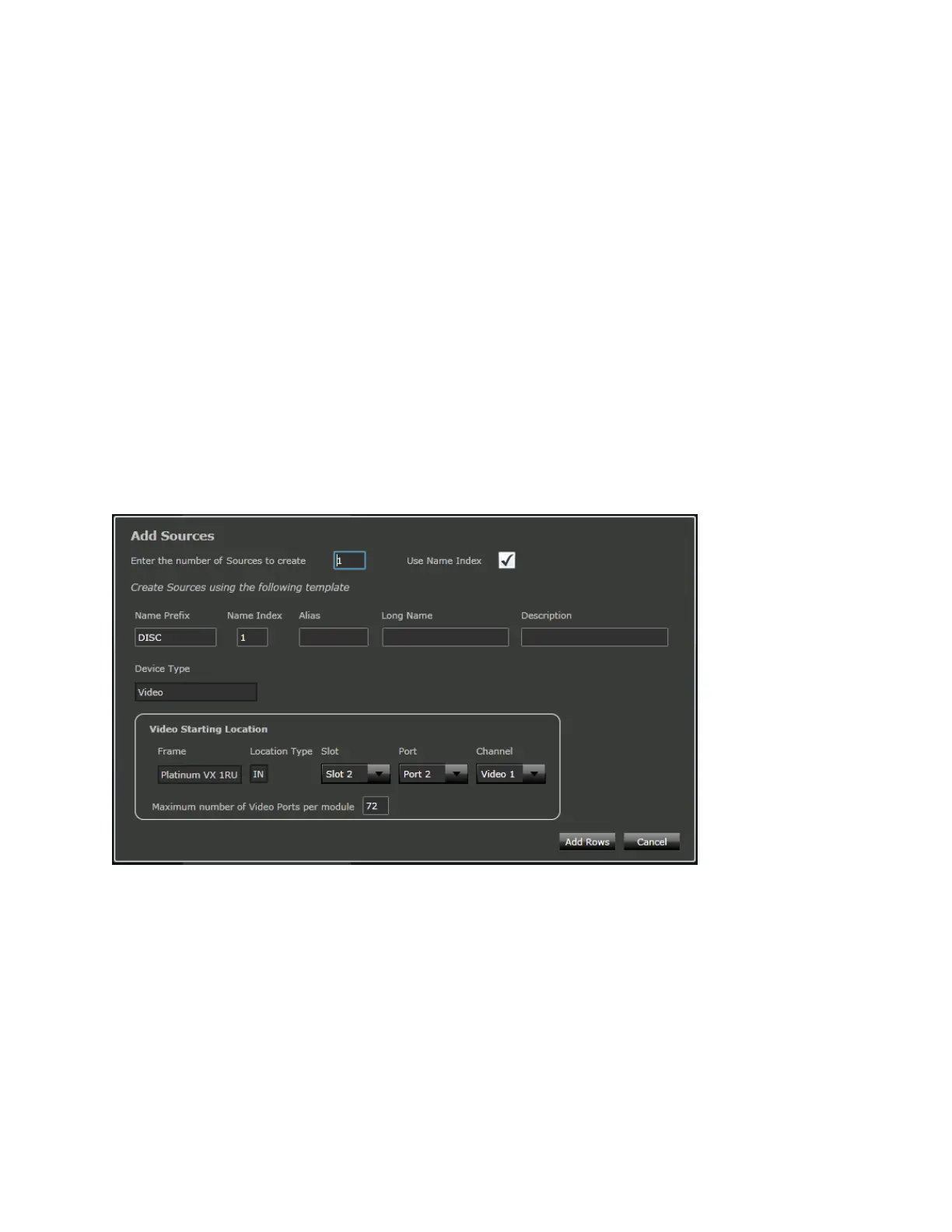
Name Index: Index of the Source/Destination.
Alias: Alias for the Source/Destination.
Long Name: Long Name for the Source/Destination. Opt to provide a longer more descriptive name
than the character limited Name.
Description: Description of the Source/Destination.
Device Type: Video, SD/HD Video, or QL Video. See Device Types (on page 148).
Video Starting Location
Frame: The Frame that the Source/Destination is in
Location Type: Whether Input (IN) or Output (OUT)
Slot: The Slot in the Frame that the Source is in.
Port: The Port for the Slot. Ports 1 to 24 available for selection
Channels: Set to Video 1
Maximum number of Video Ports per module: This affects how the sources/destinations are spread
across the modules
Figure 82: Database Editor - Add Function
Insert
The Insert allows you to choose where to Add sources/destinations.
For example, if you previously defined Sr1-Sr5, and you want to add a new source right after Sr1 (rather
than after Sr5), use the Insert option to do so. If you use Add in this case, Sr6 will be placed after Sr5.


 To Next Page