MICRO S automatic Cutter motor
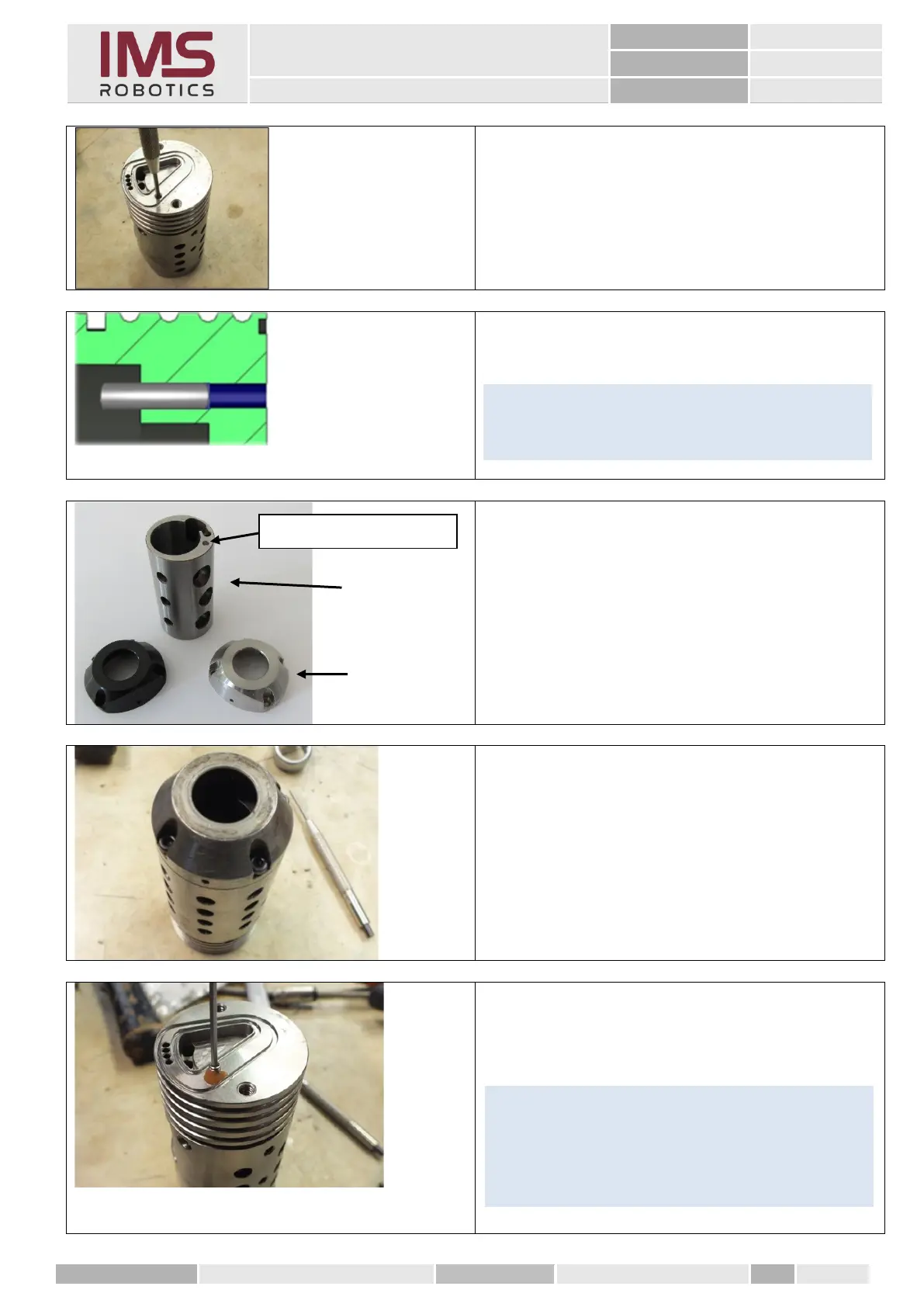
1. Thoroughly degrease the threaded holes
in the air motor housing.
2. Insert the cylindrical pin with Loctite 574
"orange" into the hole provided and
knock it into the housing with a punch so
far..
until it protrudes approx. 2 mm in the
interior.
These parts are required when installing the
cylindrical pin in the air motor housing.
1. Cylinder (021 01 027)
2. Cover (030 01 004)
In order to achieve a better camera image, the
cover is now only installed in black under the
same item number.
3. Insert air motor cylinder into air motor
housing.
4. Screw on the air motor cover
(by fastening the cover, the guide pin is
pressed into correct position; the guide
pin should then protrude ≈ 2 mm in the
air motor housing).
5. Screw in grub screw M3x4
with LOCTITE 574 "orange".
Pin must not protrude.
Tip
Install the cylinder and cover so as to create
counterpressure when screwing in the grub screw
so that the cylindrical pin does not slip. Then check
the 2mm pin protrusion.
Tip
If it is difficult to move, ream either the pin or the
bore (Ø 2.5 H7)



 To Next Page